

You’re staring at your credit card statement. Another month of AI subscriptions. ChatGPT Plus. Notion AI. Maybe a couple others you barely remember signing up for.
Total: $147 this month.
You scroll through the list and ask yourself the same question you ask every month: “Am I actually getting $147 worth of value from these?”
You don’t know. You never tracked it. You just kept paying because canceling felt like admitting you made a mistake.
Here’s the problem with AI tool subscriptions: The value is invisible until you measure it. You know what you’re paying. You don’t know what you’re getting.
A tool that costs $20 per month sounds cheap. But if you only use it twice, that’s $10 per use. If each use saves you 15 minutes, you’re paying $10 to save a quarter of an hour. That’s $40 per hour of time saved. If you value your time at less than $40 per hour, the tool is losing you money.
Most creators never do this math. They subscribe based on features, not value. They renew based on guilt, not results.
The tool might be objectively good. That doesn’t mean it’s worth it for you. Worth is personal. It’s the gap between what you pay and what you actually get back in time, quality, or revenue.
Knowing whether an AI tool worth paying for comes down to one thing: measurable value over real cost. Five questions tell you whether a tool crosses that threshold. Answer yes to at least four, and the subscription is justified. Answer yes to two or fewer, and it’s time to cancel – without guilt.
Table of Contents
The true cost of an AI tool worth paying for

Before deciding if an AI tool worth paying for is sitting in your stack, understand this: the price you see isn’t the price you pay.
The visible cost
You see $20 per month on your credit card. That’s what the tool costs, right?
Wrong. That’s just the subscription fee.
The hidden costs
Learning time: How many hours did you spend learning the tool? Setting it up? Watching tutorials? Reading documentation?
My friend Jake in Seattle spent 6 hours learning a new AI design tool. At his hourly rate of $75, that’s $450 in time cost. The tool costs $30 per month. He needs to use it for 15 months just to break even on the learning investment.
Switching time: How much time do you lose opening the tool, switching to it from other apps, waiting for it to load, navigating the interface?
If switching to a tool costs you 2 minutes per session and you use it 20 times per month, that’s 40 minutes per month of pure friction. Over a year, that’s 8 hours.
Maintenance time: Updates that break your workflow. Features that change. Integrations that stop working. Time spent troubleshooting instead of creating.
Sarah in Austin spent 3 hours last month fixing an integration between her AI tool and her CMS after an update broke it. The tool costs $25 per month. That month, it cost her $25 plus 3 hours of her time.
Mental overhead: The cognitive load of remembering the tool exists, deciding when to use it, keeping track of what you’ve already done in it.
This isn’t measurable in dollars, but it’s real. Every tool you add takes up mental space.
The real cost formula
Total Cost = Subscription Fee + (Learning Time × Your Hourly Rate) + (Monthly Usage Time × Friction Per Use) + Maintenance Time
When you map ai tool cost vs value properly, the real cost is 2-3x the subscription price once you factor in time.
A $30 per month tool that takes 5 hours to learn and adds 30 minutes of friction per month actually costs you closer to $60-80 per month in the first few months.
If you want to keep costs under control from the start, the minimal stack approach covered in the minimal AI tool stack for calm content creation gives you a practical starting point.
The 5-question framework: Is this AI tool worth paying for?
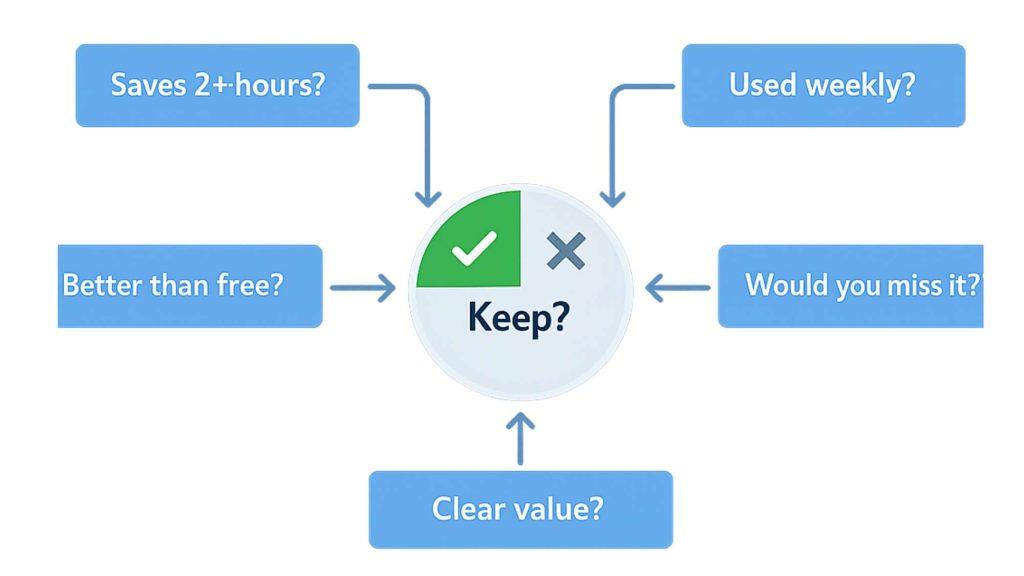
This AI tool evaluation framework works on one principle: answer these five questions honestly. Not based on what you hope the tool will do. Based on what it actually does.
Question 1: Does it save you at least 2 hours per month?
This is the minimum bar for any AI tool worth paying for.
If a tool costs $20 per month and saves you 2 hours, that’s $10 per hour saved. If you value your time at more than $10 per hour, it’s worth it.
If it saves you less than 2 hours, the math doesn’t work unless the tool is very cheap or produces significantly better quality output.
How to measure this:
Track one month of use. Every time you use the tool, estimate how long the task would have taken manually.
Example: Writing a draft in ChatGPT takes 5 minutes. Writing it manually would take 30 minutes. Savings: 25 minutes.
Do this four times in a month, you’ve saved 100 minutes. Not quite 2 hours.
Do it six times, you’ve saved 150 minutes. You hit the threshold.
Lisa in Boston tracked this for her AI writing tool. She thought she was using it constantly. Reality: She used it 3 times in February. Saved about 45 minutes total. The tool cost $30. She was paying $40 per hour of time saved.
She canceled it.
Question 2: Do you use it at least once per week?
Weekly use is the consistency threshold.
If you’re not using a tool weekly, it’s not integrated into your workflow. It’s an occasional novelty, not a core productivity asset.
Tools you use daily: Essential.
Tools you use weekly: Valuable.
Tools you use monthly: Questionable.
Tools you use “whenever I remember”: Not worth paying for.
A creator in Denver had an AI video editing tool. Used it twice in three months. Both times for the same client who required a specific format.
That’s not weekly use. That’s a specialty tool for one narrow use case. Should’ve rented it for those two projects instead of subscribing ongoing.
The test: Look at your last 30 days of activity in the tool. How many weeks did you use it?
4 weeks: Keep it.
2-3 weeks: Yellow flag. Monitor next month.
0-1 weeks: Cancel it.
Question 3: Does it do something you can’t do for Free?
If a free tool does 80% of what the paid tool does, you’re paying for the 20% difference.
Is that 20% worth the price?
Sometimes yes. ChatGPT Plus gives you faster response times and access to better models. That’s worth $20 for heavy users.
Sometimes no. A $40 per month grammar checker when free tools catch 90% of the same errors.
Jake in Phoenix paid for an AI image upscaler. Then discovered free tools that did the same job nearly as well. He was paying $15 per month for a 5% quality improvement he couldn’t even notice without zooming in.
The test: Find the best free alternative. Use it for one week. If you can’t tell the difference in your final output, the paid tool isn’t justified.
Question 4: Would you notice immediately if it disappeared?
This is the “essential tool” test.
If the tool vanished tomorrow, would your workflow break? Or would you just route around it without thinking?
Sarah in Seattle tested this by “forgetting” to use one of her AI tools for two weeks. Didn’t open it once. Workflow continued normally.
That told her everything. The tool wasn’t essential. It was optional. And optional tools aren’t worth ongoing subscriptions.
The test: Stop using the tool for one week. If you don’t instinctively reach for it, if you don’t feel its absence, it’s not worth paying for.
Question 5: Can you explain its value in one sentence?
If you can’t articulate what a tool does for you clearly and quickly, you don’t understand its value well enough to justify paying for it.
“ChatGPT drafts my first versions so I don’t stare at blank pages.”
Clear. Specific. Defensible.
“This tool helps me be more organized and productive.”
Vague. Generic. Not defensible.
My friend in Austin couldn’t explain what three of his AI tools actually did for him. When I asked, he said things like “It’s good for workflow” and “It helps with content.”
Those aren’t value statements. Those are guesses.
He canceled all three. Hasn’t missed any of them.
The test: Explain the tool’s value to someone who’s never heard of it. One sentence. If you stumble or use vague words like “helps” or “improves,” the value isn’t clear enough to justify the cost.
The decision matrix
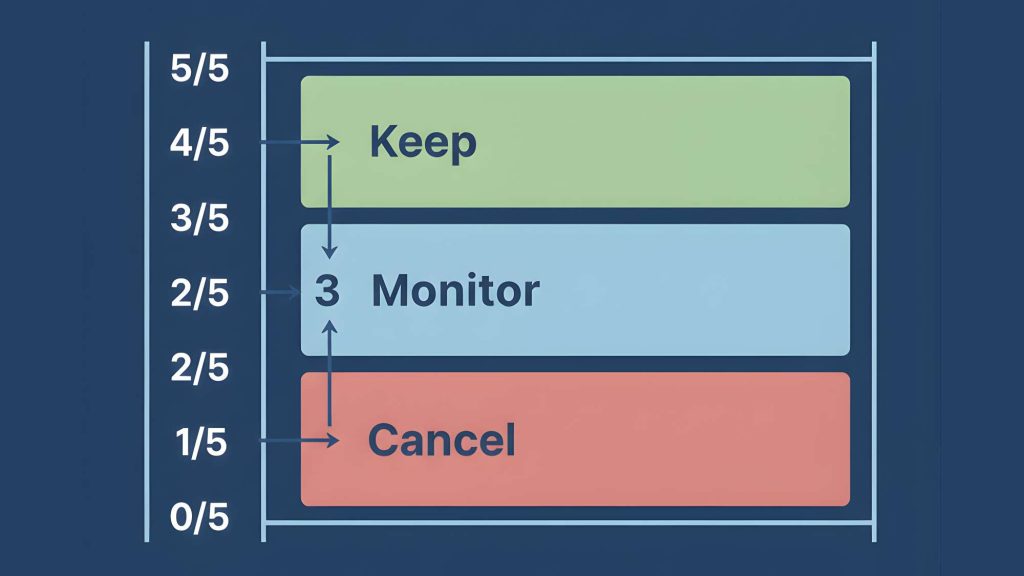
Use your answers to the five questions to make your AI tool subscription decision with clarity, not emotion.
| Number of “Yes” Answers | Decision | Action |
|---|---|---|
| 5 out of 5 | Essential tool | Keep paying. Consider annual plan for discount. |
| 4 out of 5 | Valuable tool | Keep paying. Monitor quarterly to ensure value holds. |
| 3 out of 5 | Gray zone | Run one-month audit (see next section). Decide after. |
| 2 out of 5 | Low value | Cancel unless there’s a specific upcoming project that needs it. |
| 1 out of 5 | Not worth it | Cancel immediately. No audit needed. |
| 0 out of 5 | Dead weight | Cancel and feel good about it. |
Real examples
Example 1: ChatGPT Plus ($20/month)
Q1: Saves 2+ hours? Yes. Drafts save 30-40 min each, use it 6x/month.
Q2: Weekly use? Yes. Use it 3-4x per week.
Q3: Can’t do for free? Yes. Free version is slower and lacks advanced models.
Q4: Would notice if gone? Yes. Would immediately feel the loss.
Q5: Clear value? Yes. “Drafts content so I start from 80% instead of 0%.”
Score: 5/5. Keep it.
Example 2: AI Image Generator ($25/month)
Q1: Saves 2+ hours? No. Use it twice a month, saves 20 min each time.
Q2: Weekly use? No. Use it 2x per month.
Q3: Can’t do for free? No. Free stock photos work fine for most needs.
Q4: Would notice if gone? No. Would just use stock photos.
Q5: Clear value? No. “It’s nice for custom images sometimes.”
Score: 0/5. Cancel it.
Example 3: Notion AI ($10/month add-on)
Q1: Saves 2+ hours? Maybe. Editing saves 10-15 min per doc, 6-8 docs/month.
Q2: Weekly use? Yes. Edit docs 2-3x per week.
Q3: Can’t do for free? Partially. Could use ChatGPT but requires copy-paste.
Q4: Would notice if gone? Yes. Would miss in-document editing.
Q5: Clear value? Yes. “Edits my drafts without leaving my workspace.”
Score: 4/5. Keep it.
Lisa in Denver ran this framework on her six AI tools. Two scored 4+, kept them. Three scored 2 or less, canceled them. One scored 3, ran the audit (see next section).
Saved $85 per month. Workflow got simpler, not harder.
Sometimes the problem isn’t the cost – it’s the distraction. Identifying tool problems early is covered in detail in When Your AI Tool Becomes a Distraction.
The One-Month audit rule
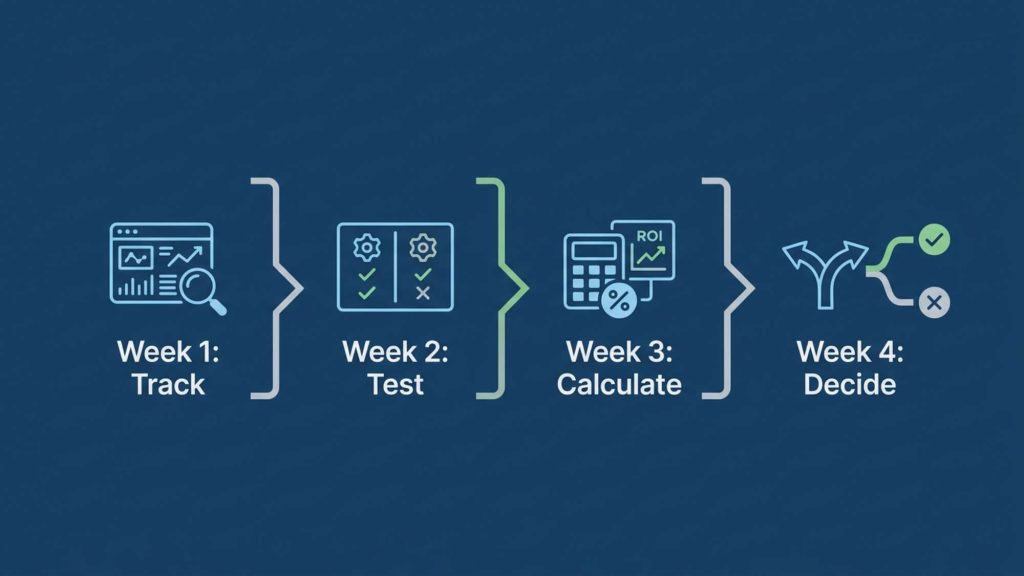
When a tool scores 3 out of 5, you can’t yet tell if it’s an AI tool worth paying for. You’re in the gray zone. It’s providing some value, but maybe not enough.
Don’t decide immediately. Run a structured one-month ai tool audit framework to get the data you need.
Week 1: Track every use
Every time you open the tool, log it.
Note: What you used it for, how long it took, how much time it saved versus doing it manually.
Use a simple spreadsheet or note file. Three columns: Date, Task, Time Saved.
Week 2: Test alternatives
Find the best free alternative or a different workflow that doesn’t require the tool.
Use the alternative for every task you’d normally use the paid tool for.
Compare: Is the free version good enough? Is the manual method tolerable?
Week 3: Calculate true cost
Add up:
Subscription fee
Time spent learning or troubleshooting the tool this month
Friction time (switching to it, waiting for it, navigating it)
Compare that total cost to the time saved.
Week 4: Make the decision
If time saved exceeds total cost by at least 50%, keep it.
If time saved barely exceeds total cost or doesn’t exceed it at all, cancel it.
If you’re unsure, lean toward canceling. You can always resubscribe if you realize you actually needed it.
Jake in Seattle ran this audit on a project management tool he was on the fence about.
Week 1: Used it 4 times, saved about 90 minutes.
Week 2: Tried free alternative, worked fine for 3 out of 4 tasks.
Week 3: Tool cost $30, plus 45 minutes of his time dealing with a sync issue.
Week 4: Canceled. The free alternative handled 75% of his needs and cost nothing.
When to ignore this framework
The framework works for most tools. But there are exceptions.
Exception 1: The tool is mission-critical
If losing the tool would break your business, the framework doesn’t apply.
Your payment processor charges fees. You don’t evaluate it with this framework. You need it to operate.
Some AI tools fall into this category. If you’re a writer and ChatGPT is your primary drafting tool, you’re not going to cancel it because it “only” saves you 2 hours per month. It’s foundational.
The test: Would canceling this tool require you to completely restructure your workflow or stop offering a service?
If yes, it’s mission-critical. Keep it regardless of framework score.
Exception 2: The tool produces revenue directly
Some tools don’t save time. They make money.
An AI tool that helps you create client deliverables that you charge for. An AI tool that improves conversion rates on your landing pages.
These tools pay for themselves in revenue, not time savings.
Sarah in Austin uses an AI tool that costs $40 per month to generate client proposals. Each proposal takes 20 minutes instead of 2 hours. She charges $500-1000 per proposal. The tool has paid for itself after one use.
The test: Does this tool directly contribute to revenue generation?
If yes, evaluate based on ROI, not time saved.
Exception 3: You’re in a learning phase
If you’re experimenting with a new content format or business model, you might subscribe to tools temporarily to learn.
You’re not evaluating long-term value. You’re paying for education.
A creator in Phoenix subscribed to three video AI tools for two months to learn which one fit his workflow. Knew upfront he’d cancel two of them.
That’s intentional temporary spending, not waste.
The test: Are you explicitly experimenting with a time-boxed goal?
If yes, give yourself a deadline (1-2 months), then apply the framework.
The AI tool budget rule
Here’s a simple budget framework to prevent subscription creep.
The 3% Rule
Your total monthly AI tool spend should not exceed 3% of your monthly revenue (or target revenue if you’re just starting).
Making $5,000 per month? AI tools budget: $150.
Making $2,000 per month? AI tools budget: $60.
Making $500 per month? AI tools budget: $15.
This forces prioritization. You can’t subscribe to everything. You have to choose the tools that deliver the most value within your budget.
Lisa in Boston makes $3,000 per month. Her AI budget: $90. She has ChatGPT Plus ($20), Notion AI ($10), and one specialized tool ($25). Total: $55. She has $35 of budget headroom.
When she sees a new tool, she asks: “Is this worth more than the $35 I have left, or should I save that buffer for something better?”
The replacement rule
Before adding a new paid tool, you must either:
- Cancel an existing tool to free up budget.
- Prove the new tool will increase revenue enough to expand the budget.
No adding tools just because they’re “only $10.” Those $10 add-ons compound into $100+ per month fast.
Jake in Denver follows this religiously. Wants to try a new tool? He looks at his current stack, identifies the weakest link, cancels it, then subscribes to the new one.
His total spend has stayed flat at $65 per month for eight months. But his stack has improved because he’s constantly upgrading, not accumulating.
The annual review
Once per year, regardless of individual tool performance, review your total AI spending.
Ask: “If I were starting from zero today, would I build this exact stack?”
If the answer is no, tear it down and rebuild.
Sarah in Seattle did this in January. Realized she’d accumulated seven tools over the past year through gradual additions. If she were starting fresh, she’d only choose three of them.
Canceled four. Saved $95 per month. Her workflow didn’t suffer. It improved.
The real shift
The question isn’t ‘Is this a good tool?’ or even ‘Is this an AI tool worth paying for?’ in the abstract.
The question is “Is this tool worth it for me, in my workflow, at this price, right now?”
Knowing how to evaluate ai tools correctly means separating objective quality from personal fit. Good tools can still be bad purchases if they don’t match your specific workflow.
The 5-question framework removes the emotion from the decision. You’re not evaluating based on features, hype, or FOMO. You’re evaluating based on measurable value.
Does it save you time? Do you use it consistently? Does it do something free tools can’t? Would you miss it? Can you explain its value clearly?
Four or five yes answers: Keep paying.
Two or fewer: Cancel without guilt.
The tools you keep after running this framework are the ones that actually earn their place in your workflow. Everything else is subscription weight you don’t need to carry.
Run the framework on every tool you’re currently paying for. You’ll probably cancel at least one. Maybe three.
That’s not failure. That’s clarity.
The best tool stack isn’t the biggest. It’s the one where every tool justifies its cost every single month.
Ready to build a tool stack where every subscription earns its place?
- How to Choose the Right AI Tools for Content Creation (Without Overwhelm) – choosing tools that deliver real value
- The Minimal AI Tool Stack for Calm Content Creation – minimal stack approach
- When Your AI Tool Becomes a Distraction – spotting tool problems early