
Speed without clarity doesn’t create efficiency. It creates fragility you won’t notice until something breaks.
Most small businesses automate to move faster. The logic feels obvious: automate repetitive tasks, save time, scale operations without adding headcount. But speed is only valuable if you’re moving in the right direction. When you automate without clarity on what you’re automating, why it matters, and what happens if it fails, you’re not building leverage. You’re building systems that will degrade invisibly until they create problems more expensive than the inefficiencies you were trying to solve.
This is why the AI automation clarity framework comes before speed. Clarity means understanding the decision, the risk, and the control requirements before you automate anything. It’s the missing layer between “this process is repetitive” and “let’s automate it.”
This article explains why the AI automation clarity framework is the foundation of reliable automation, breaks it down into three core dimensions, and shows you how to apply it to real business scenarios before you commit to automation.
Table of Contents
Why the AI automation clarity framework is the missing layer in automation
Automation projects fail at the clarity stage, not the execution stage. You build a system that works technically but doesn’t deliver the outcome you expected because you automated before you understood what you were automating.
Speed vs understanding
Speed feels productive. Clarity feels slow. But speed without understanding creates systems that work until context changes, and then they don’t.
A marketing agency in Richmond automated client reporting. The system pulled data from analytics platforms, generated PDFs, and emailed them to clients every Monday. It worked for six months. Then the agency shifted strategy and started focusing on different metrics. The reports kept going out with the old metrics. Clients noticed the reports didn’t match conversations. The agency looked disconnected from its own strategy.
The issue wasn’t technical. It was clarity. The agency automated execution without clarifying the purpose. Reports weren’t just a task to complete. They were a communication tool. When strategy changed, the automation kept running the old logic because no one had defined what the reports were supposed to accomplish beyond “send data to clients.”
Speed optimizes execution. Clarity defines what execution should accomplish. When you skip clarity, you automate motion without ensuring the motion is aligned with intent.
The false urgency trap
Urgency pushes you to automate now. Clarity requires you to pause and think. The trap is assuming urgency justifies skipping clarity. It doesn’t. Urgency without clarity creates urgent automation that solves the wrong problem.
A SaaS founder in Nashville automated lead scoring because the sales pipeline was overwhelming. The system scored leads based on engagement signals: email opens, website visits, demo requests. High engagement meant hot lead. Low engagement meant cold lead. The founder implemented it in two days.
Three months later, the founder realized the system was deprioritizing high-value enterprise leads because enterprise buyers engage differently than solo buyers. They research quietly, involve multiple stakeholders, and move slowly. The automation optimized for speed of engagement, not quality of fit. The founder had clarity on the symptom but not the problem. The symptom was too many leads. The problem was poor lead qualification criteria. Automating the symptom made the problem worse.
False urgency happens when you mistake pressure for clarity. Pressure tells you something needs to change. Clarity tells you what to change and how. Automating under pressure without clarity doesn’t solve problems faster. It locks bad decisions into systems that run unsupervised.
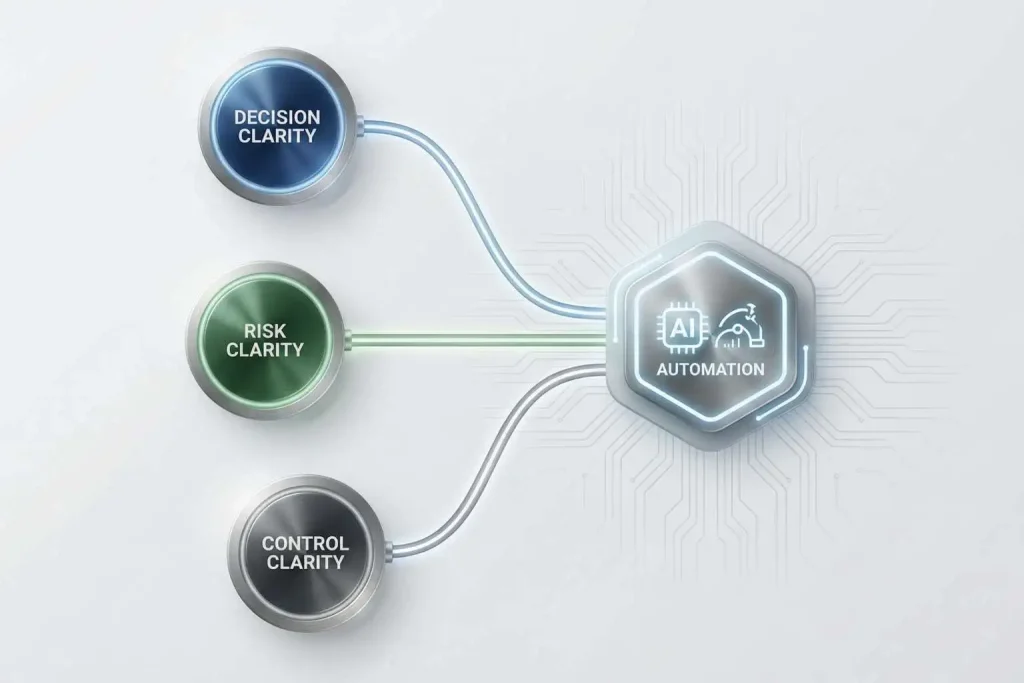
The clarity framework explained
The clarity framework is a lens for evaluating automation opportunities before you build anything. It’s built on three dimensions: decision clarity, risk clarity, and control clarity.
Decision clarity
Decision clarity means understanding what decision the automation is making, why that decision matters, and what happens if the decision is wrong.
Every automation makes decisions. Route this email. Update this field. Send this message. Flag this lead. Most are small decisions, but small decisions compound. If you automate a decision without understanding its purpose and consequences, you’re delegating judgment to a system that doesn’t have judgment.
A consulting firm in Charleston automated meeting scheduling. The system offered available time slots based on calendar availability. It worked, but the founder noticed clients were booking back-to-back meetings with no buffer time. The automation optimized for availability, not for the founder’s ability to prepare between meetings. The decision was “when can this meeting happen.” The missing clarity was “when should this meeting happen given the context.”
Decision clarity requires asking: what is this automation deciding, what criteria is it using, and are those criteria aligned with the outcome I want? If you can’t answer clearly, you’re not ready to automate.
Risk clarity
Risk clarity means understanding what happens if the automation fails, makes a wrong decision, or optimizes for the wrong outcome.
Risk isn’t binary. Some automations have low failure cost. If an internal task update fails, you fix it and move on. Other automations have high failure cost. If a customer-facing email goes to the wrong segment, you damage trust and brand perception.
A real estate agency in Phoenix automated client follow-up emails. The system sent messages based on lead status. One email was supposed to go to prospects who had toured properties. Due to a segmentation error, it went to clients who had already closed. The email asked if they were ready to schedule a tour. Clients were confused. The agency looked disorganized.
The risk wasn’t the automation failing silently. It was the automation succeeding at executing the wrong action. Risk clarity requires asking: if this automation makes a mistake, what’s the cost, and can I detect and correct it before the cost compounds?
High-risk automations need tighter control. Low-risk automations can run with lighter oversight. But you can’t design control until you’ve assessed risk.
Control clarity
Control clarity means understanding what level of oversight, intervention, and reversibility the automation requires to stay aligned with business goals.
Control isn’t about micromanaging. It’s about designing checkpoints that let you catch drift before it becomes damage.
A design studio in Boise automated invoice generation. The system created invoices based on project milestones and sent them to clients automatically. The founder added one control checkpoint: invoices generated on Friday were held for review until Monday. This gave the founder a chance to catch errors, adjust for client-specific arrangements, or delay invoices if project status had changed over the weekend.
The control didn’t slow the process. It prevented errors from reaching clients. The automation ran autonomously most of the time, but the founder maintained visibility and intervention ability at a critical point.
Control clarity requires asking: where do I need checkpoints, how often do I need to review outcomes, and can I reverse this automation if context changes? If you can’t answer, you’re building a system you can’t steer.
Applying the AI automation clarity framework to real business scenarios
The clarity framework isn’t theoretical. It’s a practical tool for evaluating whether to automate, how to automate, and what safeguards to build in.
Ops
Operations automations handle repetitive administrative tasks: data entry, task routing, status updates, reporting. The decisions are usually low-stakes, but volume is high.
A logistics company in Memphis automated shipment tracking updates. The system pulled data from carrier APIs and updated internal dashboards. Decision clarity: the automation was deciding which updates to surface and when. Risk clarity: if the automation failed, internal teams wouldn’t have real-time visibility, but customer-facing operations wouldn’t be affected. Control clarity: the operations lead reviewed the dashboard daily to catch anomalies.
The clarity framework confirmed low risk, low control requirements, and clear decision logic. The automation was safe to implement with light oversight.
Marketing
Marketing automations handle lead nurturing, content distribution, and engagement tracking. The decisions affect brand perception and customer relationships, so risk is higher.
A software company in Portland automated email sequences for trial users. Decision clarity: the automation was deciding when to send educational content, upgrade prompts, and re-engagement messages based on user behavior. Risk clarity: sending the wrong message at the wrong time could annoy users or push them to churn. Control clarity: the marketing lead reviewed sequence performance weekly and adjusted timing and messaging based on engagement data.
The clarity framework identified moderate risk and the need for regular review. The automation ran autonomously but with active monitoring and adjustment.
Customer support
Support automations handle ticket routing, response suggestions, and issue categorization. The decisions affect customer experience directly, so risk is high.
A SaaS company in Austin automated ticket routing. The system categorized incoming tickets by type and assigned them to the appropriate team. Decision clarity: the automation was deciding which team should handle which issue. Risk clarity: misrouting a ticket could delay resolution and frustrate customers. Control clarity: the support lead reviewed misrouted tickets weekly and adjusted routing rules based on patterns.
The clarity framework identified high risk and the need for ongoing oversight. The automation improved efficiency but required active governance to prevent customer experience degradation.
From clarity to governance
Once decision logic becomes stable, AI automation governance ensures the system keeps operating with visibility and control.
Linking rules to systems
The clarity framework produces rules: decision criteria, risk thresholds, control checkpoints. Governance translates those rules into systems that enforce them.
If the clarity framework tells you an automation is high-risk and requires weekly review, governance defines who reviews it, what they’re looking for, and what happens if problems are detected. If the framework says an automation needs a manual fallback, governance ensures the fallback is documented and tested.
A consulting firm in San Diego used the clarity framework to evaluate client onboarding automation. The framework identified decision clarity gaps: the automation was routing clients based on project type, but project type alone didn’t capture complexity or strategic importance. The firm adjusted the decision logic to include budget and stakeholder count. Governance ensured the routing rules were reviewed quarterly and updated when client patterns shifted.
Clarity prevents bad automation. Governance prevents good automation from degrading into bad automation.

Preventing silent failures
Silent failures happen when an automation stops working as intended but keeps executing. The system is running, so you assume it’s working. But outcomes are degrading, and you don’t notice until the damage is visible.
A design agency in Raleigh automated project status updates to clients. The system pulled data from project management software and sent weekly emails. Over time, the agency changed how they tracked project status internally, but they didn’t update the automation. The emails kept going out with outdated logic. Clients received updates that didn’t match reality. The agency didn’t realize the automation had drifted until a client asked why the status updates conflicted with what the project manager was saying.
Preventing silent failures requires designing clarity into the automation from the start. Clear decision logic, clear risk assessment, and clear control checkpoints make drift visible before it becomes damage.

How this framework feeds the decision pillar
The clarity framework is a diagnostic tool. It helps you assess whether an automation opportunity is ready for implementation. The decision framework is the strategic layer above it. It helps you decide what to automate, when to automate, and what level of control to maintain across your full automation strategy.
Internal linking strategy
Before automating, use the AI automation decision framework to evaluate the opportunity strategically. Is this the right process to automate? Is the timing right? What are the trade-offs?
Once you’ve decided to move forward, use the clarity framework to define decision logic, assess risk, and design control. Clarity turns strategic decisions into implementation plans.
If you’re unsure whether your current automations are creating hidden risk, start with when not to automate with AI. It identifies failure patterns and helps you recognize where clarity gaps exist.
CTA to pillar and traffic magnet
Clarity prevents mistakes. The decision framework prevents misalignment. Together, they create automation that works reliably and stays aligned with business goals as context changes.
What the AI automation clarity framework gives you
Clarity doesn’t slow you down. It protects you from building systems that move fast in the wrong direction.
With clarity, you automate with confidence. You know what the automation is deciding, what happens if it fails, and how to correct it when context changes. You scale operations without scaling risk.
Without clarity, automation becomes technical debt. Systems run unsupervised, decisions drift, and you discover problems only after they’ve compounded into damage that’s harder to fix than the inefficiency you were trying to solve.
The difference between automation that creates leverage and automation that creates fragility is clarity. Build it first, automate second, and you’ll move faster without losing control.