

You didn’t set out to have seven AI subscriptions.
It happened gradually. One tool worked. Someone recommended another. A newsletter mentioned a third. You signed up during a free trial and forgot to cancel. Now it’s Monday morning, you’ve got eleven browser tabs open, and somehow you’re getting less done than before you had any of these tools.
That’s the AI tool paradox. The more tools you add to solve a productivity problem, the worse the problem gets.
Here’s what actually happens with most ai tools for content creation. Every tool you add carries a hidden cost: the time to learn it, the mental energy to remember when to use it, the friction of switching between platforms, and the quiet guilt of subscriptions you barely touch. None of those costs show up on your credit card statement. They show up in your daily output.
The problem isn’t that these tools are bad. Most of them are genuinely good – in the right context, for the right workflow, at the right stage. The problem is that most people choose tools backwards. They start with the tool, not the problem. They subscribe based on features, not fit.
This guide fixes that. Here’s what you’ll get:
Table of Contents
Stop collecting tools. Start choosing them with a clear ai tool selection framework that fits your workflow.
Why most people choose AI tools for content creation backwards
Most creators choose tools by starting with the tool, not the workflow. They see a feature, get excited, subscribe. That’s exactly backwards – and it’s why 53% of SaaS licenses go unused after 90 days, with organizations wasting a median of $21 million annually on software nobody opens.
Four traps pull people into this pattern. Most creators fall into all four at some point.
| Trap | What it looks like | Why it costs you |
| The Feature Trap | You subscribe based on what the tool can do, not on what problem you actually have today. | Three weeks later you haven’t used the feature once. The problem it solves isn’t urgent enough to change your habits. |
| The FOMO Trap | Everyone on LinkedIn seems to be using the new tool. You sign up to avoid falling behind. | Decisions made from fear of missing out are rarely strategic. They’re reactive – and reactive stacks are bloated stacks. |
| The Shiny Object Trap | A new AI tool launches every week. You keep replacing tools before the learning curve pays off. | You never master any single tool. Constant disruption means your stack is always in transition and never fully working. |
| The Sunk Cost Trap | You’ve paid for three months and spent hours learning it. Canceling feels like admitting failure. | So you keep the subscription, force yourself to use it occasionally, and tell yourself it’ll become essential. It won’t. |
Research shows that context-switching between tools consumes up to 40% of productive time. That’s two full working days every week- lost to tool management instead of content creation.
The alternative is working backwards. Start with your workflow. Identify the specific moments where you lose time or consistency. Then select tools to fill those exact gaps.

3 principles of strategic AI tool selection for content creators
Before picking any tool, you need a filter. These three principles are that filter. They’re not rules about specific software – they’re the thinking framework that prevents expensive mistakes.
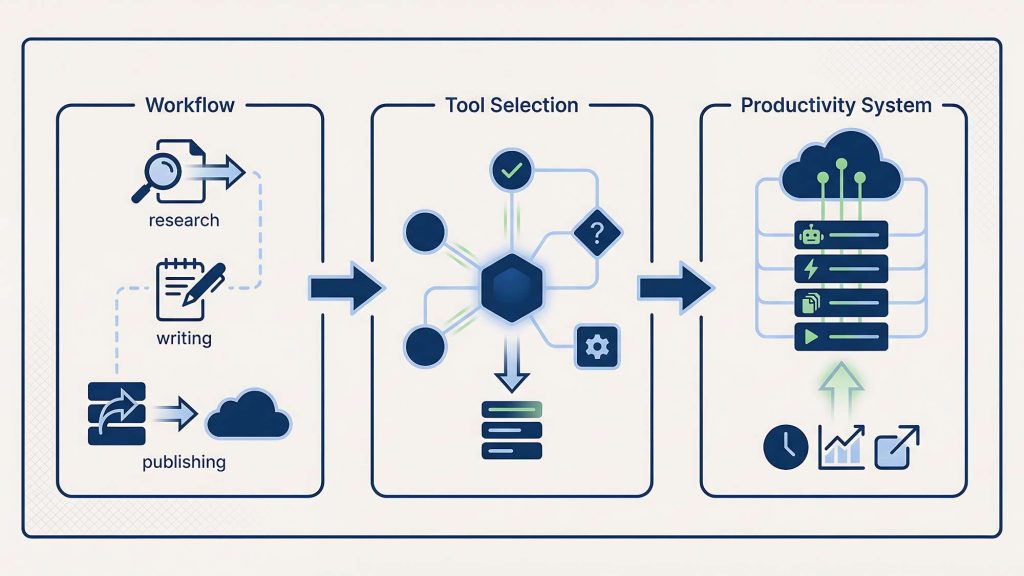
Principle 1: Choose AI tools for workflow moments, not Categories
Most tool guides organize AI software into categories: writing tools, SEO tools, scheduling tools, design tools. That framing is misleading.
What you actually need is a tool that solves a specific moment in your content process. The moment when you’re staring at a blank page. The moment when a draft needs tightening. The moment when content needs to move across formats.
Marcus, a marketing consultant in Chicago, subscribed to a premium AI writing platform because everyone called it the best tool for content creators. He used it for two weeks before realizing ChatGPT already handled 80% of what he needed. The remaining 20% addressed problems he didn’t have yet. He bought a category, not a solution.
When you think in workflow moments instead of categories, choosing ai tools for content creation gets precise and strategic. The guide on matching tools to workflow moments breaks this down for the two most commonly confused tools: ChatGPT and Notion AI. They serve completely different phases of the same workflow – and mixing those phases is what creates the copy-paste loops that waste 30 to 60 minutes per content session.
Principle 2: minimize tool count and maximize mastery
Every tool in your stack requires mental overhead. Learning the interface. Remembering when to use it. Handling updates that break your workflow. Each one is a small tax on your attention.
Research from UC Irvine shows it takes 23 minutes to fully refocus after switching contexts. Not 23 seconds. Twenty-three minutes. At five tool switches per work session, that’s nearly two hours of reorientation time that produces nothing.
Elena, a content strategist in Portland, had nine AI tools at one point. She rebuilt her minimal ai tool stack down to three – and her output didn’t drop. After tracking usage for three weeks, she found she regularly used three of them. The other six were opened occasionally or not at all. She canceled six subscriptions. Her output didn’t drop. Her clarity went up.
Principle 3: Optimize for total cost, not subscription price
A $20/month tool sounds affordable. But the real cost includes learning time, switching time, maintenance time, and the cognitive load of remembering it exists. For most AI subscriptions, the true cost is 2- 3x the subscription price once you factor in time.
The 3% Rule is a simple anchor: your total monthly AI tool spend shouldn’t exceed 3% of your monthly revenue. At $3,000/month revenue, your AI budget is $90. You can’t subscribe to everything. You have to choose.
| Monthly revenue | AI tools budget (3% rule) |
| $1,000 | $30 |
| $3,000 | $90 |
| $5,000 | $150 |
| $10,000 | $300 |
The AI tool selection framework: 5 strategic steps to build your stack
Five steps. Work through them in order. Skipping steps produces the same random stack you already have.
Step 1: Map your AI content creation workflow moments
Before evaluating any ai tools for content creation, write down your content creation process from start to finish. What do you actually do, in sequence, from the moment you have a topic to the moment something gets published?
A typical workflow looks like this: identify a topic → research angles → write a first draft → edit and refine → create visuals → format for each platform → schedule and publish → review performance.
Now identify where you lose the most time, feel the most friction, or produce the least consistent results. Those are your gaps. Tools fill gaps. They don’t create new workflows you then have to manage.
Step 2: Match AI tools for content creation to each moment
Once your gaps are visible, you can choose ai tools for workflow moments with precision instead of reacting to features. The question isn’t “is this a good tool?” It’s “does this tool eliminate this specific friction, in my workflow, at this stage?”
| Workflow moment | Right tool | Why |
| Blank page, no direction | ChatGPT | Handles ambiguity. Generates structure from nothing. |
| Draft exists, needs tightening | Notion AI | Context-aware editing without copy-paste friction. |
| Exploring different angles | ChatGPT | Iterates fast through options conversationally. |
| Formatting existing content | Notion AI | One-click commands understand doc context. |
| Scheduling across platforms | Buffer or Later | Centralizes distribution without platform-hopping. |
Step 3: Apply the 5-question test before subscribing
For any tool you’re considering, answer five questions before subscribing:
- Does it save you at least 2 hours per month?
- Do you use it at least once per week?
- Does it do something you can’t do with a free alternative?
- Would you notice immediately if it disappeared?
- Can you explain its value in one sentence?
| Score | Decision | Action |
| 5 out of 5 | Essential tool | Keep it. Consider annual plan for discount. |
| 4 out of 5 | Valuable tool | Keep it. Monitor quarterly. |
| 3 out of 5 | Gray zone | Run a one-month audit. Decide after. |
| 2 out of 5 | Low value | Cancel unless a specific project needs it. |
| 0–1 out of 5 | Dead weight | Cancel immediately. |
Step 4: Build your minimal AI tool stack
Most content creators need exactly three ai tools for content creation – one for writing, one for organizing, one for distributing.. One for AI-assisted writing. One for organizing and managing content. One for scheduling and distribution. Three tools cover 90% of content creation without the overhead of switching between seven platforms daily.
Derek, a freelance writer in Seattle, ran his entire content operation – weekly newsletter, LinkedIn, client deliverables – on ChatGPT, Notion, and Buffer for eight months. Total monthly spend: $50. He produced more consistently than colleagues with stacks ten times more complex.

Step 5: Set up a quarterly evaluation system
A stack that works today may not work in six months. Tools evolve. Your strategy evolves. Better options emerge. Without a maintenance system, even a lean stack drifts back toward bloat.
The quarterly review asks three questions: Am I still using all tools regularly? Are these still the best options available? Is anything creating friction that didn’t exist before? Two or more no answers means something leaves.
Common AI tools for content creation mistakes (and how to fix them)
Knowing the framework doesn’t help if you repeat the same patterns with better vocabulary. These four mistakes are the most common – and each has a direct fix.
Mistake 1: Choosing AI tools in isolation without testing stack fit
A tool that performs well on its own might create serious friction once it joins your existing stack. Before subscribing, test how it connects to what you already use. Does content move between them smoothly? Does it require manual copy-paste that breaks your flow? Does it reduce the number of platforms you juggle, or increase it?
Rachel, a content creator in Boston, spent two full days setting up an AI writing tool that promised seamless integration with her CMS and email platform. It broke after one software update. She went back to doing it manually. The tool cost $35/month and added complexity instead of removing it.
Mistake 2: Subscribing to AI tools before running a real workflow test
Most AI tools offer free trials. Use them seriously – not to explore features, but to run one complete real workflow. Draft an actual article. Schedule an actual post. If the tool creates friction during a real task on a free trial, it’ll create that same friction every day of a paid subscription.
The 30-day wait rule: when a new tool catches your attention, add it to a list and revisit in 30 days. If you still remember the specific problem it would solve, and that problem still exists, then try it. Most of the time, the impulse will have faded. That’s your answer.
Mistake 3: Ignoring warning signs that a tool has stopped serving you
Tools degrade gradually. The shift from useful to overhead is invisible until it’s expensive. The 5 warning signs your tool became a distraction: you avoid opening it when you could use it; you’ve stopped learning its features; you’re building workarounds around its limitations; you feel relief when a project doesn’t require it; you can’t remember the last time it solved a real problem.
When three or more apply, the right response is removal, not self-discipline. Forcing yourself to use a tool your behavior has already rejected produces guilt, not productivity.
Mistake 4: Optimizing for potential instead of proven results
“This tool could really help me if I learned it properly.” That’s the most seductive and most costly mistake in tool selection. With ai tools for content creation, potential is what gets you to subscribe. Reality is what determines whether you renew
Evaluate tools based on what they’ve already done for you – not what they might do if you invested more time. After one month of regular use, if a tool hasn’t demonstrated clear, measurable value, month two won’t change that. The data is in. Act on it.
Building your AI content creation tools stack: 3 real examples
Abstract frameworks are useful. Concrete examples are more useful. Here are three stack configurations built around actual workflow needs.
Stack 1: Minimal AI tool stack for solo text-first creators
Profile: One person publishing articles, newsletters, and LinkedIn posts. Primary output is written. Budget is tight.
| Tool | Job | Cost |
| ChatGPT Plus | First drafts, angle exploration, research synthesis, email copy | $20/mo |
| Notion (free tier) | Content calendar, draft storage, pipeline management | $0 |
| Native scheduling | LinkedIn scheduler + newsletter platform native tools | $0 |
Total: $20–$30/month. This stack covers the full content workflow without redundancy. ChatGPT handles creation from zero. Notion handles organization. Native tools handle distribution.
Key discipline: generate in ChatGPT, move to Notion, use Notion AI for in-document refinement.
Stack 2: AI content creation tools stack for video-first creators
Profile: One person creating YouTube videos and short-form content. Primary output is video with supporting written content.
| Tool | Job | Cost |
| ChatGPT Plus | Scripts, titles, descriptions, social captions | $20/mo |
| Descript | Video editing, transcription, repurposing | $24/mo |
| YouTube native tools | Scheduling, analytics, community posts | $0 |
Total: $40–$60/month. Descript earns its place here because video editing was taking two hours per video. With Descript, it takes 30 minutes. That’s a documented time saving that clears the 5-question test easily.
Stack 3: Multi-platform AI tool stack for content teams
Profile: Two to five people producing content across a blog, LinkedIn, Instagram, and a newsletter. Coordination and consistency across formats is the primary challenge.
| Tool | Job | Cost |
| ChatGPT Plus or Teams | First drafts, repurposing, shared prompt templates | $20–$30/mo |
| Notion (paid) | Shared content calendar, SOPs, brief templates, draft storage | $8–$16/mo per seat |
| Buffer | Centralized scheduling across all platforms | $15/mo |
Total: $60–$90/month for a two-person team. Notion is the single source of truth. All content moves through one pipeline. No one asks “where’s the latest version?”- the answer is always Notion.
For teams across multiple channels, the question of when to use which tool becomes critical. Using ChatGPT for in-Notion editing, or Notion AI for blank-page generation, creates friction that multiplies across every team member every day.
Maintaining your AI tools for content creation stack over time
Building a good ai content creation tools stack is a one-time investment. Maintaining it is an ongoing practice that prevents drift back into bloat. Without a maintenance system, even a lean stack drifts back toward bloat.

The quarterly review: 30 minutes every 3 months
Block 30 minutes. Ask three questions about each tool:
- Am I using this at least once per week?
- Is it saving me more time than I spend managing it?
- If it disappeared tomorrow, would I resubscribe?
Two or more no answers: the tool leaves the stack. Not “maybe next quarter.” This quarter.
The tool audit protocol provides a structured four-week process for gray-zone tools: week one tracks actual usage, week two tests free alternatives, week three calculates true cost including time, week four makes the final call.
The annual reset: Would you build this stack again from scratch?
Once a year, ask a harder question: if you were starting from zero today, would you build this exact stack?
That question bypasses the sunk cost bias that keeps dead tools alive. It shows you what you’re keeping out of habit instead of value.
Patricia, a digital marketing consultant in Austin, did her first annual reset in January. She’d accumulated seven tools through gradual additions. Starting fresh, she’d have chosen three of them. She canceled four, saved over $90/month, and said her workflow felt clearer – not smaller.
The evaluating tool value guide applies directly here. Each tool in your annual review goes through the same 5-question framework used for initial selection.
The replacement rule: Add one tool only when you remove one
The single most effective maintenance habit is also the simplest: before adding any new tool, name the tool it replaces.
Not “I’m adding Tool X to my stack.” But “I’m adding Tool X to replace Tool Y.” If you can’t name a tool to replace, you don’t add the new one.
This forces a real question: is the new tool actually better than something you already have? If yes, upgrade. If not, you’re accumulating, not improving.
From overwhelm to clarity
The goal was never to find the most AI tools.
It was to find the right ai tools for content creation and produce good content consistently, with less friction and more focus. Every tool in your stack that doesn’t clearly earn its place is quietly taxing your attention, your budget, and your energy. The overhead is invisible. The cost is real.
Here’s what a calm, strategic stack looks like:
| What changes | What you get |
| You stop choosing based on features | You choose based on workflow fit |
| You stop accumulating tools | You start upgrading them |
| You stop managing subscriptions | You start producing content |
| You stop switching platforms | You start mastering a few |
The process is straightforward. Map your workflow. Identify your gaps. Apply the 5-question test. Build a minimal viable stack. Maintain it with a quarterly review and the replacement rule.
That’s the complete system.
If you’re not sure where to start, start with your minimal stack. Three tools. Clear roles. Zero overlap. Build that first. Everything else can wait.