

AI business process optimization starts with a simple observation: every business runs processes that feel more complicated than necessary. Invoice approvals require three sign-offs when one suffices. Customer onboarding demands four forms asking overlapping questions. Monthly reporting consumes five hours compiling data nobody uses for decisions.
These inefficiencies accumulate gradually. Someone adds verification after one mistake. Another requests a new form field. A manager wants visibility and inserts themselves into approval chains.
Traditional methods map current steps and eliminate obvious redundancies. AI business process optimization analyzes patterns across hundreds of executions to identify what actually matters versus what happens out of habit. Understanding AI-powered business automation provides context for where process optimization fits in broader operational transformation.
Table of Contents
Phase 1: AI business process optimization starts with identifying your highest impact process
Ask Your team the right question
Start with one simple question: Which regular task do you dread most? Answers cluster quickly around processes consuming disproportionate time relative to value.
Sales teams mention manual data entry after calls. Customer success teams cite repetitive onboarding sequences. Finance teams point to invoice processing and reconciliation.
Look for these five characteristics
Effective AI business process optimization targets processes with five specific characteristics.
Frequency: Happens at least weekly, ideally daily. High-frequency processes deliver faster ROI.
Hand-offs: Involves multiple people or systems. Each hand-off introduces delay and error risk.
Data entry: Requires information input in multiple places. Redundant entry wastes time and introduces inconsistencies.
Approvals: Includes review or sign-off steps. Many approvals exist out of habit rather than necessity.
Dependencies: Outputs feed other processes. Optimizing upstream creates downstream improvements automatically.
Quantify current state performance
Measure exactly how the process performs today. How long from start to finish? How many people touch it? How often does it error or require rework?
Track one complete week of executions. Note fastest completion time, slowest time, and median time. Identify what causes variation.
Real case study Tech Start Invoice Processing
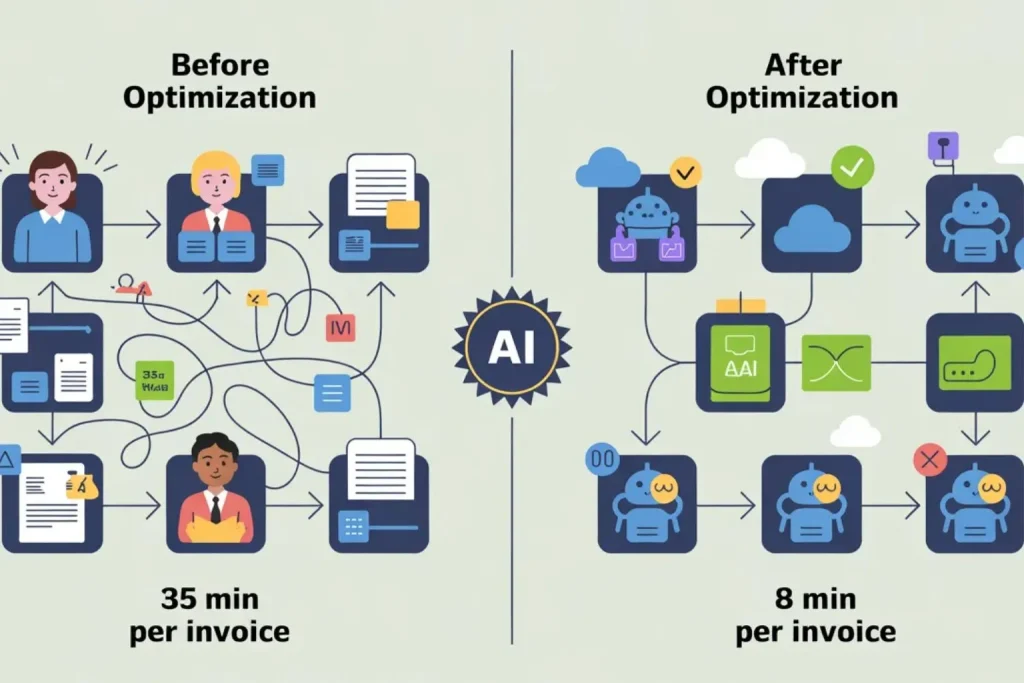
TechStart, a 45-person SaaS company, spent 8 hours weekly processing vendor invoices manually. Their AP clerk received invoices via email, extracted data into Excel, matched purchase orders, routed for approval, then entered approved invoices into accounting software.
Their journey illustrates how AI business process optimization can transform even the most manual workflows.
Baseline metrics:
- Median processing time: 35 minutes per invoice
- Weekly volume: 14 invoices
- Total weekly time: 8.2 hours
- Error rate: 12% requiring correction
- Staff cost: $37/hour loaded
Annual burden: 426 hours costing $15,762 plus error correction costs estimated at $8,400.
According to McKinsey’s automation research, businesses that automate data entry processes reduce errors by up to 90%.
Phase 2: Map data flow for effective AI business process optimization
Document how work actually flows
Shadow someone through an execution. Don’t rely on process documentation-it describes ideal state, not reality.
Watch every tool they open, field they fill, person they email, delay they experience. Record exact steps, not summarized versions.
This granular detail reveals automation opportunities invisible in high-level process maps.
Identify decision points and logic
Mark where humans make decisions based on specific criteria. Who decides what based on which information?
Traditional automation requires explicit rules: “If invoice exceeds $10,000, route to CFO.” AI automation learns decision patterns from historical data.
This is where AI business process optimization goes beyond traditional automation learning implicit patterns humans never documented.
It identifies that invoices from certain vendors always require extra review regardless of amount because payment terms are negotiable. These implicit patterns don’t exist in written procedures.
Find steps that compensate for system gaps
Look for work existing purely because systems don’t integrate. Manual data re-entry between tools. Email notifications because systems don’t communicate. Status update meetings because visibility is poor.
These compensation steps disappear when proper integration and automation exist.
TechStart’s hidden inefficiency discovery
Detailed process observation revealed the AP clerk spent 40% of time just moving data between systems. Invoice data existed in email (PDF), Excel (tracking), and accounting software (final entry).
Each invoice required typing the same information-vendor name, amount, date, description-into three different systems. This redundant entry created 80% of the errors requiring correction.
The waste: 3.3 hours weekly just retyping information that already existed digitally. That’s 172 hours annually worth $6,364.
Phase 3: Choose your AI business process optimization approach
Three paths to process simplification
Elimination removes unnecessary steps. Challenge every action: what breaks if we skip this?
Some steps exist because problems that no longer occur. Others provide verification that errors would make obvious anyway.
Automation handles repetitive steps following consistent patterns. Data entry, status updates, file routing, notification sending, report generation.
If you can describe step-by-step logic, automation handles it reliably.
For a detailed comparison of the best automation platforms, see our AI automation tools guide for small businesses.
Redesign reimagines the entire workflow around better logic. Instead of automating five approval steps, what if AI scored requests on risk factors and auto-approved low-risk items?
AI business process optimization combines all three paths elimination, automation, and redesign for maximum impact.
Start with the Bottleneck
Identify where work consistently piles up or waits longest for action. Bottlenecks constrain everything downstream.
Improving them yields immediate throughput gains visible across the entire process.
Common bottlenecks include approval queues, data entry steps, and integration points between systems.
Build for the happy path first
Create minimal automation handling straightforward cases with no special circumstances. If 70% of executions are routine, automating that 70% delivers substantial time savings.
Continue handling exceptions manually initially. As you process exceptions repeatedly, patterns emerge enabling automation expansion.
TechStart’s three-pronged approach
TechStart implemented all three optimization approaches simultaneously:
Eliminated: The Excel tracking spreadsheet. All invoice status now lives in accounting software with automated status updates.
Automated: Data extraction from invoice PDFs using AI document processing. Vendor name, amount, date, and line items automatically populate accounting system.
Redesigned: Approval routing based on risk scoring. Invoices under $1,000 from known vendors auto-approve. Invoices over $5,000 or from new vendors route to CFO. Middle tier routes to department managers based on expense category.
Implementation costs:
- AI document processing tool: $89/month
- Workflow automation platform: $149/month
- Configuration time: 22 hours @ $37/hour = $814
- Total first-year cost: $3,670
Phase 4: Implement your AI business process optimization and measure Impact
Deploy incrementally with parallel processing
Run automated and manual processes simultaneously initially. Route 20% of work through automation while maintaining existing manual process.
Compare outcomes across multiple dimensions: speed, accuracy, user satisfaction, edge cases handled correctly. Real-world testing reveals issues simulation misses.
Track both processes identically for two weeks minimum. Measure time from trigger to completion. Count errors requiring correction.
Calculate financial impact
Convert time savings to dollar value. If automation saves 10 hours weekly, calculate loaded salary cost.
Measuring financial impact is essential to proving that AI business process optimization delivers real ROI not just perceived efficiency.
For a complete financial framework, see our guide on how to calculate AI automation ROI.
$30/hour salary typically costs employers $45/hour with benefits, taxes, overhead. 10 hours at $45 = $450 weekly savings = $1,800 monthly = $21,600 annually.
Quantify error reduction separately. Manual processes averaging 8% error rates dropping to 2% with automation saves rework time, customer service handling, relationship damage control.
Use AI for exception routing
When automation encounters cases it can’t handle automatically, flag for human review with full context. “This invoice is unusual because: vendor is new, amount exceeds typical range, PO match
Continuer 21:07 is partial.”
Humans make better decisions when AI provides relevant context. The combination of automation speed with human judgment delivers better outcomes than either approach alone. For deeper insights into workflow optimization with AI, exception handling drives continuous improvement.
TechStart’s 90-day results
After 90 days of AI-powered process optimization:
Time savings:
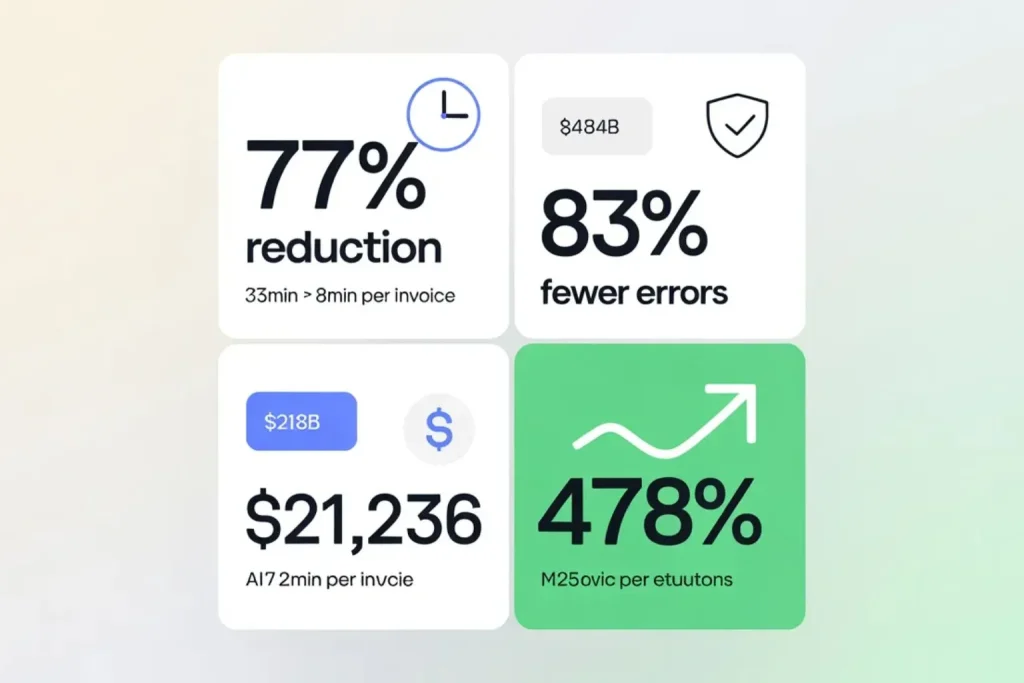
- Previous: 35 minutes per invoice
- Current: 8 minutes per invoice
- Savings: 27 minutes per invoice
- Weekly volume: 14 invoices
- Weekly time saved: 6.3 hours
- Annual hours saved: 328 hours
- Annual value saved: $12,136
Error reduction:
- Previous error rate: 12% (1.68 errors weekly)
- Current error rate: 2% (0.28 errors weekly)
- Errors eliminated: 1.4 weekly
- Average error correction cost: $125
- Weekly savings: $175
- Annual error savings: $9,100
Total annual benefit: $12,136 + $9,100 = $21,236
Net ROI: ($21,236 – $3,670) / $3,670 × 100 = 478% first-year ROI
Additional benefits not quantified: AP clerk now focuses on vendor negotiation, early payment discount capture, and cash flow optimization-activities generating 10x more value than data entry.
Phase 5: Monitor and scale your AI business process optimization
Review Automation health monthly
Check which processes complete successfully versus erroring out. What percentage flows through automated paths versus manual exceptions?
Where do failures occur most frequently? These metrics reveal whether automation is improving or degrading over time.
Capture Exception patterns systematically
When work bypasses automation, document why. Some exceptions are legitimate-truly unusual circumstances justifying manual handling.
Others reveal gaps in automation logic you can close with updates.
Track exception reasons in a simple log. After processing the same exception type five times manually, you understand the pattern well enough to automate it.
Expand to related processes
Each optimization makes the next one easier. This compounding effect is the most powerful aspect of AI business process optimization each win accelerates the next.
Friction removal reveals other problems previously obscured. Work that seemed impossible to automate when buried in a 12-step process becomes straightforward after streamlining to six steps.
For deeper insights into customer relationship optimization, explore our AI-powered CRM automation guide.
TechStart’s expansion path
Tech Start expanded from invoice processing to expense reimbursement, then purchase order creation, then vendor onboarding. Each process built on lessons and infrastructure from previous optimizations.
6-month cumulative results:
- Four processes optimized
- 18 hours weekly time saved
- $33,480 annual labor savings
- Error rates reduced 70% across all processes
- Staff satisfaction increased measurably
According to Gartner’s process automation report, organizations that continuously monitor automation health see 3x better long-term results.
Your AI business process optimization action plan
Week 1: Identification
- Survey team for most painful processes
- Select one high-frequency process
- Shadow complete execution
- Measure baseline performance
Week 2: Analysis
- Map complete data flow
- Identify decision points
- Find system compensation steps
- Calculate current time and cost burden
Week 3-4: Optimization design
- Determine elimination opportunities
- Target primary bottleneck
- Design automation for happy path
- Configure AI exception routing
Week 5-6: Implementation
- Deploy with 20% of volume
- Monitor performance metrics
- Calculate financial impact
- Adjust based on results
Week 7+: Scaling
- Expand to full volume
- Document lessons learned
- Identify next process
- Schedule monthly reviews
Transform your operations with AI business process optimization today
AI business process optimization isn’t a one-time project — it’s a continuous capability that compounds over time.
Each improvement makes the next easier. Each automation teaches patterns applicable elsewhere. Start with one painful process this week.
Document it. Map it. Optimize it. Measure the impact. Let that success drive momentum for the next optimization.
Download your free process optimization Worksheet: Answer 15 diagnostic questions to identify your highest-impact opportunity. Includes ROI calculator and implementation checklist. Get your worksheet .
Watch the TechStart case study video: 30-minute detailed walkthrough showing exactly how they reduced invoice processing time 77% using AI optimization. Watch case study .
Get your process evaluated: Send us a brief description of your most painful process. We’ll provide specific optimization recommendations within 48 hours. Submit your process .
What process is slowing your team down right now? Describe it in the comments and we’ll provide specific optimization recommendations within 24 hours. Real problems, real solutions.