
Most AI automation projects fail not because the technology doesn’t work — they fail because businesses can’t prove the investment was worth it. An AI automation ROI calculator solves exactly this problem.
You know automation could save time and reduce errors. But when your team asks “How much will this actually save us?” or “When will we break even?”, vague answers don’t cut it. Investors want numbers. Partners want proof. Your CFO wants a clear payback timeline.
This guide gives you a complete AI automation ROI calculator framework before you invest a dollar. You’ll get a free calculator (Excel + Google Sheets), three real case studies from small businesses that saved $8K to $15K annually, and a step-by-step method you can apply to your business today.
For complete context on AI business automation strategy, see our AI-powered business automation guide. But if you need to justify an automation investment right now, this AI automation ROI calculator framework is your starting point.
Table of Contents
Why calculating ROI before implementation saves small businesses thousands
Using an AI automation ROI calculator isn’t just paperwork — it’s protection against expensive mistakes.
Not every automation tool delivers positive returns. Some look impressive in demos but cost more to maintain than they save. Others solve problems you don’t actually have. Without hard numbers, you’re making decisions based on hope rather than data.
AI automation ROI calculator analysis also secures buy-in from stakeholders. Your team needs to see concrete savings before they embrace workflow changes. Partners and investors want proof that automation investments make financial sense. Budget approvals require demonstrating clear value, not just listing features.
Proper ROI analysis creates a prioritization framework. Most businesses have multiple processes they could automate. An AI automation ROI calculator shows which projects deliver the highest returns fastest. You invest in automation that moves the needle, not just automation that sounds cool.
According to McKinsey’s automation research, SMBs that calculate ROI before implementing automation see 3.2x higher success rates than those who implement without clear financial projections.
The 3-Component AI automation ROI calculator framework
Every AI automation ROI calculation follows the same basic formula:
ROI = (Total benefits – Total costs) / Total costs × 100
This framework breaks ROI into three benefit categories and one comprehensive cost analysis. Together, they give you realistic numbers you can defend to any stakeholder.
Component 1: Time savings value
Time savings represent the most tangible AI automation ROI calculator benefit. You measure exactly how long a process takes now, estimate post-automation time, and calculate the difference.
Start by tracking current time investment. Follow someone through a complete process execution. Don’t use best-case scenarios. Measure typical performance, including interruptions and edge cases.
Formula:
Time savings value = Hours saved per week × Loaded hourly rate × 52 weeks
Time savings value = Hours saved per week × Loaded hourly rate × 52 weeks
Understanding loaded hourly rate is critical. Calculate it like this: Annual salary ÷ 2,080 hours × 1.4 to 1.6 multiplier. A $50,000 salary becomes roughly $36 per hour loaded cost.
Example: A process takes 5 hours weekly. After automation, it takes 30 minutes. That’s 4.5 hours saved weekly.
At $36 loaded hourly cost: 4.5 hours × $36 × 52 weeks = $8,424 annual time savings value.
Component 2: Error reduction value
Manual processes generate errors. Automation reduces error rates dramatically, often from 5-10% down to under 1%.
Formula:
Error reduction value = (Errors avoided per month × Cost per error) × 12 months
If you process 100 monthly invoices with 8% error rate dropping to 2%: 6 errors avoided × $43 cost per error × 12 months = $3,096 annual error reduction value.
Component 3: Revenue growth enablement
This component is hardest to quantify but often delivers the largest impact. Automation frees capacity for revenue-generating activities.
For credibility, this AI automation ROI calculator recommends the conservative approach: use only time savings and error reduction. If ROI looks good without counting revenue growth, you have a bulletproof business case.
For deeper insights into ROI measurement, see our complete AI automation ROI guide.
How to account for all automation costs
Many businesses underestimate automation costs by only counting monthly subscription fees. Comprehensive AI automation ROI calculator cost accounting includes obvious expenses and hidden ones.
One-time implementation costs
- Software licenses: Annual platform costs if paid upfront
- Setup and configuration time: Track setup hours × loaded hourly rates
- Consultant fees: External implementation help at $150-300/hour
- Training costs: Include both trainer and trainee time
- Integration setup: API configuration, data mapping, and testing
- Testing period: Validating automation works correctly before full deployment
Example calculation for a typical SMB :
- Tool annual license: $1,200
- Setup time (20 hours × $40 loaded rate): $800
- Training (8 hours × $35 loaded rate): $280
- Testing time (10 hours × $40): $400
- Total one-time costs: $2,680
Recurring monthly/annual costs
- Subscription fees: Monthly or annual charges for software access.
- Maintenance time: 2-4 hours monthly even for stable automations
- Support costs: Premium support tiers if needed
- Integration maintenance: When connected apps update their APIs
Example monthly cost calculation:
- Monthly subscription: $99
- Maintenance time (3 hours × $40): $120
- Total monthly recurring: $219
- Annual recurring costs: $219 × 12 = $2,628
Total cost formula
Total year 1 cost = One-time implementation + (Monthly recurring × 12)
Using our examples: $2,680 + $2,628 = $5,308 total year 1 cost
According to Gartner’s automation research, businesses that account for all hidden automation costs report 60% more accurate ROI projections than those using simplified calculations.
Download your free AI automation ROI calculator
Theory is useful. But you need to run numbers for your specific business with a real AI automation ROI calculator.
This free calculator (Excel and Google Sheets versions) includes pre-built formulas. Just input your numbers and get instant ROI calculations with visual charts showing break-even timelines.
What’s included:
- Time savings calculator with loaded rate formulas
- Error reduction calculator with cost-per-error tracking
- Cost breakdown worksheet for implementation and recurring expenses
- ROI summary dashboard with automatic calculations
- Month-by-month payback timeline showing cumulative savings
- Scenario comparison (optimistic/realistic/conservative cases)
- Step-by-step instructions with calculation examples
Get Your free ROI calculator
- Excel version (immediate download)
- Google Sheets version (make a copy)
- No email required
Once you’ve calculated positive ROI, check out our 30-day implementation plan to get started quickly and avoid common setup mistakes.
3 Real small business case studies: $8K to $15K Annual savings
Formulas and frameworks matter. But real numbers from actual businesses matter more. Here are three case studies from small businesses that used an AI automation ROI calculator to justify and achieve significant returns.
Case study 1: E-Commerce business ($8,420 Annual savings)
Formulas and frameworks matter. But real numbers from actual businesses matter more. Here are three case studies from small businesses that used an AI automation ROI calculator to justify and achieve significant returns.
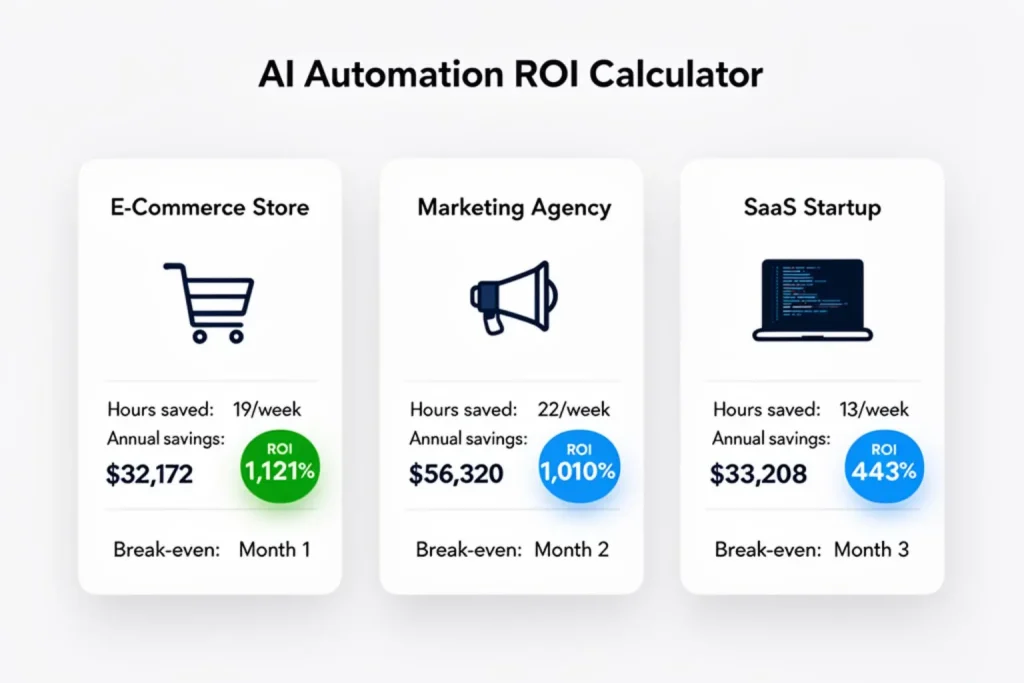
Case Study 1 E-Commerce Business ($8,420 Annual Savings)
Background: Online retailer with 8 employees and $800K annual revenue. Automated order processing and customer email responses.
Before automation: 12 hours weekly on manual order entry + 8 hours on routine customer emails. Error rate: 5%.
After automation (Shopify + Zapier + AI email tool):
Order entry became fully automated. Orders from all channels flow directly into inventory management with zero manual entry.
Customer emails route through AI tool that answers 90% of routine questions automatically. The team spends 1 hour weekly reviewing AI responses and handling complex cases manually.
Error rate dropped to 0.5% as automation eliminated transcription mistakes and address entry errors.
Implementation cost: $1,800
Monthly cost: $89
ROI calculation:
| Metric | Amount |
| Time savings (19 hrs/week) | $29,640/year |
| Error reduction savings | $5,400/year |
| Total Annual Benefits | $35,040 |
| Total Year 1 Costs | $2,868 |
| AI Automation ROI | 1,121% |
| Break-Even | Month 1 |
Case study 2: Professional services firm ($15,240 annual savings)
Background: Marketing agency has 12 employees and generates $1.2M annually. They automated client reporting and social media scheduling.
Before automation: Compiling client reports consumed 15 hours weekly. Staff pulled data from multiple platforms, created charts, and formatted presentations manually.
Social media scheduling for clients took another 10 hours weekly. Each client’s content calendar required manual posting across platforms.
Error rate of 3% meant wrong data in reports or missed social posts requiring apologies and rush fixes. Employee cost: $55K salary ($39/hour loaded).
After automation (Monday.com+ Buffer + Make):
- Automated dashboards pulling real-time data.
- Social scheduling reduced to 1 hour weekly review .
- Error rate fell to 0.2%
ROI Calculation:
| Metric | Amount |
| Time savings (22 hrs/week) | $44,616/year |
| Error reduction savings | $17,280/year |
| Total Annual Benefits | $61,896 |
| Total Year 1 Costs | $5,576 |
| AI Automation ROI | 1,010% |
| Break-Even | Month 2 |
Case study 3: SaaS startup ($12,180 Annual savings)
Background: B2B SaaS company provides project management software with 6 employees and $400K annual revenue (growing). They automated lead qualification and customer onboarding.
Before automation: Lead qualification took 8 hours weekly. Staff reviewed every inbound lead manually, checking company fit, budget indicators, and engagement signals before routing to sales.
Customer onboarding required 6 hours weekly sending welcome emails, setup instructions, and tutorial sequences manually to each new customer.
Error rate of 10% meant missed follow-ups or incomplete onboarding setups that hurt activation rates. Employee cost: $65K salary ($46/hour loaded).
After automation (HubSpot + Intercom + custom scripts):
- AI lead scoring evaluates every prospect automatically.
- 95% of onboarding handled automatically.
- Error rate dropped to 1%
ROI Calculation:
| Metric | Amount |
| Time savings (13 hrs/week) | $31,096/year |
| Improved conversion value | $9,600/year |
| Total Annual Benefits | $40,696 |
| Total Year 1 Costs | $7,488 |
| AI Automation ROI | 443% |
| Break-Even | Month 3 |
Summary Comparison Table
| Metric | E-Commerce | Agency | SaaS Startup |
|---|---|---|---|
| Annual Savings | $32,172 | $56,320 | $33,208 |
| Year 1 Investment | $2,868 | $5,576 | $7,488 |
| Year 1 ROI | 1,121% | 1,010% | 443% |
| Break-Even | Month 1 | Month 2 | Month 3 |
| Hours Saved / Week | 19 | 22 | 13 |
| Tools Used | Shopify + Zapier + AI Email | Monday + Buffer + Make | HubSpot + Intercom |
What these numbers tell us about industry benchmarks
These three case studies reveal consistent patterns across different business types and sizes.
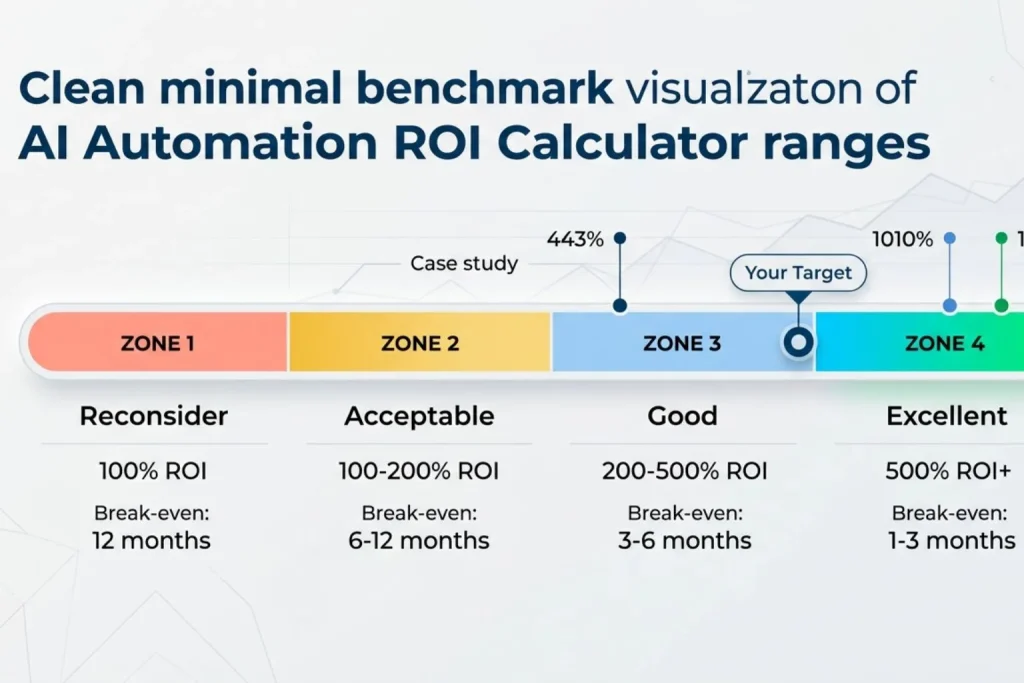
E-commerce businesses typically see 300-600% first-year ROI from automation. High transaction volumes and repetitive processes create strong opportunities for time savings. Lower margins mean labor cost reduction directly impacts profitability.
Professional services firms often achieve 400-1,000% ROI. High labor costs and billable hour models make time savings extremely valuable. Every hour redirected from admin work to client work generates revenue.
SaaS companies generally land in the 300-500% range. Tech-savvy teams implement faster but often have more complex integration requirements. Growth-stage companies benefit most as automation enables scaling without proportional headcount increases.
General SMB AI Automation ROI Calculator Benchmarks
| Result | ROI Range |
| Excellent | 500% Year 1 |
| Good | 200-500% Year 1 |
| Acceptable | 100-200% Year |
| Reconsider | <100% Year 1 |
Break-even timeline benchmarks:
- Fast: 1-3 months
- Normal:3-6 months
- Longer but acceptable:6-12 months
If your conservative AI automation ROI calculator shows less than 100% first year or break-even beyond 12 months, either find a different process to automate or wait until your business scales enough to justify the investment.
5 Common AI automation ROI calculator mistakes to avoid
Even with a solid AI automation ROI calculator, businesses make predictable mistakes. Avoid these to keep projections realistic..
Mistake 1: Ignoring implementation time costs many calculations count only monthly subscription fees. But your team spends 20 hours setting up and testing the automation. That’s $800+ in labor costs that impact Year 1 ROI significantly.
Fix: Include all team time spent on setup, configuration, integration, and testing. Multiply hours by loaded rates.
Mistake 2: Using best-case scenarios measuring your fastest process execution time rather than typical performance inflates savings projections. Assuming 100% team adoption on day one sets unrealistic expectations.
Fix: Use median performance times, not best cases. Assume 70-80% adoption in first 90 days, ramping to 90-95% by month 6. Conservative estimates produce defendable ROI numbers.
Mistake 3: Not accounting for ongoing maintenance automation isn’t “set and forget.” Business processes change. Connected apps update. Workflows need monitoring and occasional adjustments.
Fix: Budget 2-4 hours monthly for maintenance and optimization, even for stable automations. This ongoing cost continues indefinitely.
Mistake 4: Claiming credit for unrelated growth revenue increased 15% after implementing automation? That might be automation impact, market trends, new sales hires, or seasonal patterns. Correlation isn’t causation.
Fix: Use control groups when possible. Compare automated processes to similar non-automated ones. Be conservative in attribution. If uncertain about causation, don’t count the benefit.
Mistake 5: Stopping measurement after initial success month 3 ROI might differ dramatically from Month 12. Automation often improves as teams learn to use tools better. But it can also degrade if maintenance falls behind or business processes change without updating workflows.
Fix: Track continuously. Review ROI quarterly for first year, then every 6 months. Update projections based on actual performance.
Your AI automation ROI calculation action plan
You have the framework, calculator, and real-world examples. Here’s how to apply this to your business starting today.
Step 1: Download and Review the Calculator :Get the Excel or Google Sheets version from the download section above. Open the example scenarios. See how formulas work with sample data before inputting your own numbers.
Step 2: Gather Your Baseline Data (Week 1) :Track one complete week of the process you’re considering automating. Measure actual time spent, not estimated time. Document error rates and what errors cost to fix.
Step 3: Research Automation Tool Costs (Week 1) :Check our AI automation tools ROI guide for options matched to specific use cases. Get real pricing quotes from vendors. Factor in implementation time based on complexity.
Step 4: Calculate Three Scenarios: Run numbers three ways: optimistic, realistic, and conservative. Conservative counts only guaranteed savings with no assumptions about improved revenue.
Step 5: Make Your Decision :If conservative ROI exceeds 200% and break-even happens within 6 months, you have a strong business case. Below 100% means reconsidering or finding a different process first.
Step 6: Implement with Tracking: Once approved, follow our 30-day implementation guide to deploy quickly while avoiding common setup mistakes. Track actual time savings and costs from day one.
AI automation ROI calculator analysis protects you from bad investments while revealing opportunities that genuinely improve your business. The framework is straightforward: quantify time savings and error reduction, account for all costs including hidden ones, and project realistic timelines.
Real small businesses are seeing 300-1,100% first-year ROI from carefully chosen automation projects. Even conservative estimates show strong returns.
Download the calculator today. Spend 30 minutes running your numbers. Make a data-driven decision this week about whether automation makes financial sense for your business right now.
The small businesses that calculate ROI before automating are the ones that actually see results.