
You manage your ecommerce with five different tools. Shopify for sales, Mailchimp for emails, a spreadsheet for inventory, a chatbot for support, Meta Ads for advertising. Each tool operates in isolation. You spend your days copying data from one system to another.
This fragmentation costs time and creates errors. An order arrives. You manually update your inventory, create a support ticket if needed, add the customer to your email list. Multiply by dozens of daily orders.
Building an AI automation system ecommerce connects all your tools together. An action in one tool automatically triggers actions in others. Without code, without a developer, with simple visual interfaces.
This guide shows you how to build a complete system in 90 days. From order management to marketing automation, from stock alerts to performance reports.
Let’s start with why an integrated system changes everything for your ecommerce operations.
Table of contents
Ecommerce automation tools: why an integrated system outperforms isolated tools

A high-performing ecommerce operates like an organism. Every part communicates with others in real time. Sales inform inventory. Inventory triggers supplier orders. Support accesses delivery data. Marketing uses purchase data.
Without automation, you are the link between all these systems. You manually transfer information. Each transfer takes time and introduces error risks.
Consider a store processing dozens of orders per day. Manual process: export orders from Shopify, update stock, create shipping labels, send confirmation emails. Each order requires several minutes of manual work. Across all daily orders, this represents hours of repetitive tasks every single day.
After building an AI automation system ecommerce, the same process requires zero human intervention. Order received, stock automatically updated, label created, email sent, customer added to the appropriate marketing segment.
The gain is not just time. It is also reliability. Your ecommerce automation tools eliminate oversights, data entry errors, and delays simultaneously.
Key insight: an isolated tool solves one problem. An integrated AI automation system ecommerce solves the entire process. The difference is not incremental. It is structural.
No code ai automation: the 3 pillars of a complete ecommerce system

Pillar 1: no-code connectors
Zapier, Make, and n8n are platforms that connect your applications to each other without writing a line of code. You create visual workflows. If this happens in application A, then do that in application B.
Simple example: a new order in Shopify automatically triggers creation of a row in your Google Sheet tracker. Zapier permanently observes your store. As soon as an order arrives, it copies data to your spreadsheet.
Make goes further with complex workflows. If order over a certain amount and new customer, send thank-you email via Gmail and create task in Asana to prepare a gift. If returning customer, simply add to loyalty list in Mailchimp.
These platforms cover the vast majority of no code ai automation needs for a standard ecommerce. Zapier is simpler but limited on the free plan. Make offers more flexibility from the start. n8n is open source and more technical but free without limits.
Start with Zapier to understand concepts. Move to Make when your needs become complex.
Pillar 2: centralized databases
Airtable and Notion serve as your system’s central brain. All your important data is stored there and accessible by all your other tools.
Instead of duplicating customer information in Shopify, Mailchimp, and your CRM, create a single base in Airtable. Each tool reads from and writes to this central base. A customer changes address on Shopify. The information automatically updates everywhere.
This centralization eliminates desynchronization. You always have a single source of truth. No more searching three different places to verify information.
A practical example: a store uses Airtable as its central hub. Product base with real-time stock, customer base with purchase history, supplier base with deadlines and conditions. All automation workflows read from and write to these bases. Result: total data consistency and custom reports generated in a few clicks.
Pillar 3: intelligent triggers
Webhooks and API integrations allow systems to communicate instantly. An event in one tool immediately triggers an action in another.
The difference from classic connectors is speed. Zapier checks your applications every 15 minutes on the free plan. A webhook triggers action in under 5 seconds.
For critical processes like order management or stockout alerts, webhooks are essential. For less urgent tasks like adding a contact to a newsletter, Zapier suffices.
Most modern ecommerce applications support webhooks natively. Shopify, WooCommerce, and Stripe all send instant notifications when something happens.
Key insight: your AI automation system ecommerce is only as strong as its weakest pillar. No-code connectors without a centralized database create data chaos. A centralized database without intelligent triggers creates delays. All 3 pillars must work together.
Build ai automation workflows in 90 days: the complete ecommerce roadmap

Building a complete system in one week creates confusion. A progressive approach works better. Three months, three phases.
Month 1: automate order management
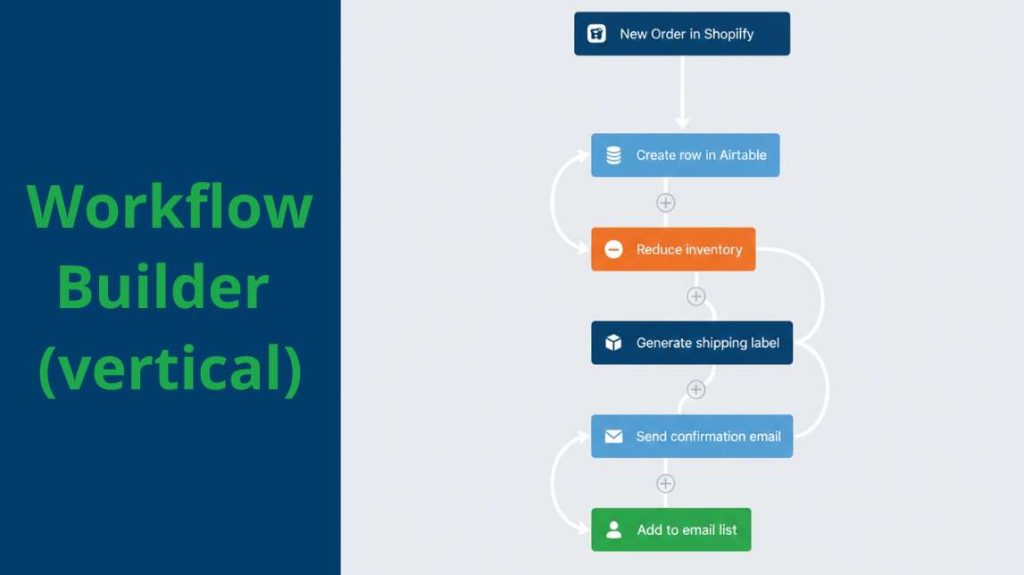
The first phase concerns your sales process. From order to shipment. It is your most critical flow and the one consuming most time.
Week 1: create your central database in Airtable. Three tables: orders, customers, products. Import your existing data. Shopify and WooCommerce allow direct CSV export.
Week 2: connect Shopify or WooCommerce to Airtable via Zapier. Simple workflow: new order automatically creates a row in your orders table with all information. Customer, products, amount, delivery address.
Week 3: add automatic stock update. Validated order triggers stock reduction in your Airtable base. If stock falls below your minimum threshold, automatically create alert in Slack or by email.
Week 4: integrate your shipping solution. ShipStation, Sendcloud, or your carrier. Paid order automatically generates shipping label. Tracking number added to Airtable and sent to customer by automatic email.
At the end of month 1, your order process is fully automated. Zero manual intervention from validation to delivery tracking.
Month 2: Automate marketing and customer relations
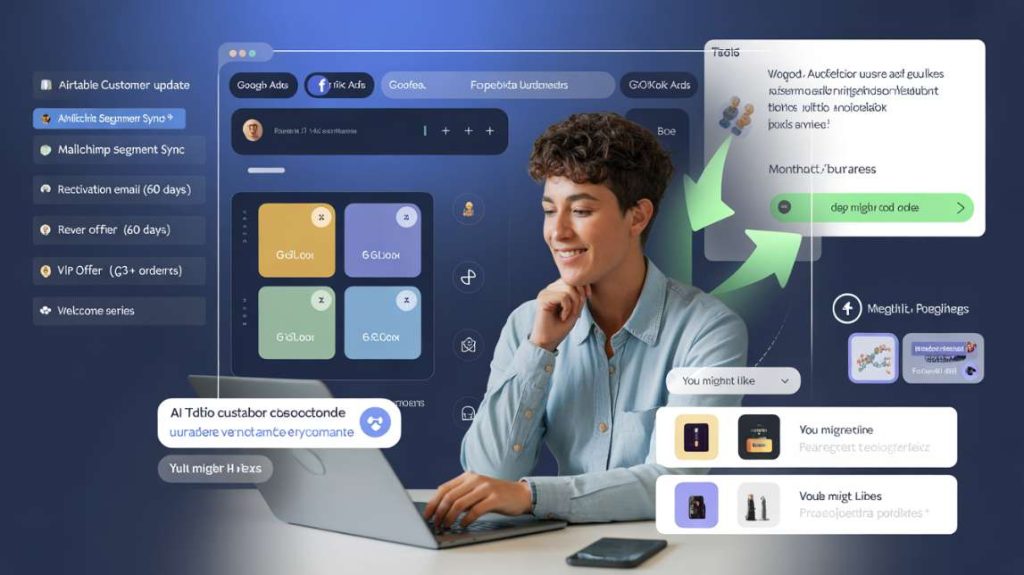
The second phase concerns your communication with customers. Emails, segmentation, support.
Week 5: connect your email tool to Airtable. Mailchimp, Klaviyo, or Brevo. New customer in Airtable automatically creates contact in your email tool with all attributes. Amount spent, number of orders, purchased categories.
Week 6: create dynamic segments. Customers who bought more than 60 days ago automatically receive reactivation email. Customers with more than 3 orders receive VIP offer. New customers receive welcome series. All these workflows trigger automatically based on Airtable data.
Week 7: integrate your support chatbot. Tidio, Intercom, or Crisp. When a customer contacts support, the chatbot automatically accesses their order history in Airtable. It answers tracking questions without human intervention.
Week 8: connect your ticket system. Zendesk or Gorgias. Created ticket automatically generates task in your project management tool. Notion, Trello, or Asana. Your team sees all actions to process in one place.
At the end of month 2, your customer communication is automated and personalized according to each customer’s real behavior.
Month 3: automate analysis and optimization
The third phase concerns your business decisions. Reports, alerts, optimizations.
Week 9: create automatic dashboards. Google Data Studio or Notion. Connect them to Airtable. Daily revenue, best-selling products, conversion rate, average cart. Automatic update every hour.
Week 10: configure performance alerts. If sales drop more than 20% compared to the previous week, Slack alert. If a product generates more than 5 returns in one week, email alert with detailed reasons.
Week 11: automate your supplier reports. Every Monday, automatic generation of report with products to restock based on your sales velocity and stock thresholds. Report automatically sent by email with pre-filled purchase order.
Week 12: integrate your advertising tools. Meta Ads and Google Ads connected to your Airtable base. Daily budget automatically adjusted based on previous day’s sales. If sales rising, 10% budget increase. If sales dropping, 10% reduction.
At the end of month 3, your build ai automation workflows system operates autonomously. You intervene only on strategic decisions, no longer on execution.
Key insight: building an AI automation system ecommerce in 90 days works because each month builds on the previous one. Orders first. Then marketing. Then optimization. Skipping phases creates gaps that break the entire system.
AI automation system ecommerce: 5 workflows to automate without coding
If you could only create five automations, here are those delivering the most value immediately.

Workflow 1: automatic order management
Trigger: new paid order in Shopify or WooCommerce.
Actions: create order in Airtable, reduce stock, generate shipping label, send confirmation email, add customer to email list if new, create support ticket if amount over $200 for VIP tracking.
This single workflow eliminates the most time-consuming manual task in your AI automation system ecommerce. Every order processed automatically, without human intervention.
Workflow 2: stockout alert
Trigger: product stock falls below minimum threshold in Airtable.
Actions: send Slack or email alert, create task in your project management tool, if product is best-seller, directly send email to supplier with recommended quantity.
For a complete AI inventory forecasting ecommerce system that predicts demand before stockouts occur, this workflow is your first line of defense.
Workflow 3: automatic customer segmentation
Trigger: customer profile update in Airtable after an order.
Actions: calculate total amount spent, calculate number of orders, automatically assign segment. Bronze if under $100, Silver between $100 and $300, Gold above $300. Update segment in Mailchimp. Trigger appropriate email based on new segment.
Real-time segmentation replaces monthly manual updates. Communication personalization becomes immediate and automatic.
Workflow 4: proactive support on delays
Trigger: order not delivered 48 hours after announced deadline according to carrier data.
Actions: automatically create priority ticket in your support system, send proactive email to customer with apologies and detailed tracking, offer discount code for next order, notify your logistics team.
This workflow connects directly with your AI customer service ecommerce system. Proactive management reduces complaints and improves satisfaction even when problems occur.
Workflow 5: automatic reports
Trigger: every Monday at 9 AM.
Actions: generate report with previous week’s sales, top 10 products, conversion rate, average cart, comparison with previous week and same week last year. Send by email. Automatically create calendar meeting if sales dropped more than 15%.
This workflow replaces hours of manual data compilation every week. Your team receives actionable insights without lifting a finger.
Key insight: these 5 workflows form the operational core of any AI automation system ecommerce. Start with workflow 1. Add one workflow per week. Within a month, your ecommerce runs on autopilot for the most repetitive tasks.
AI automation system ecommerce: 3 mistakes that break your workflows
Three technical traps regularly sabotage automation systems, even well-designed ones.
Mistake 1: creating infinite loops
You create a workflow: when contact added in Mailchimp, add it in Airtable. Then another workflow: when contact added in Airtable, add it in Mailchimp. Result: infinite loop. Each addition triggers the other system which retriggers the first.
Your system breaks in minutes. Hundreds of useless actions. Your API quotas consumed. Your tools block.
Solution: always define one-way direction for each data type. Airtable is your source of truth. Other tools read from Airtable but never write to it except for data specific to them. Mailchimp can write email open statistics to Airtable but not modify customer coordinates.
Mistake 2: not managing errors
A workflow works perfectly for weeks. Then one day, your email provider changes its API format. Your workflow breaks. All your automatic actions stop. You discover it days later when a customer complains about not receiving their order tracking.
Configure error notifications on all critical workflows. Zapier and Make send alerts when a workflow fails. Activate them systematically.
Also create monitoring workflows. A workflow that checks every morning that number of processed orders matches number of received orders. If discrepancy, immediate alert.
Mistake 3: multiplying tools unnecessarily
Each new tool adds complexity. You find a tool for a micro-function. You add it. Then another. Then another. Months later, you manage a large number of interconnected tools. Your AI automation system ecommerce becomes fragile. An update in one tool breaks multiple workflows.
Simple rule: before adding a new tool, ask if an existing tool can do 80% of the same thing. If yes, keep the existing tool even if less optimal. Simplicity beats perfection.
A practical example: a store starts with a large number of tools connected via Zapier. Maintenance becomes a significant time drain every month. After consolidation to a smaller set of essential tools, the same functionality is maintained with a fraction of the workflows. Maintenance time drops dramatically.
Key insight: the most common reason an AI automation system ecommerce breaks is not technical failure. It is human decisions: adding too many tools, skipping error management, and creating circular workflows.
How to safely test your AI automation system ecommerce before going live
Never deploy a workflow in production without testing. Create a separate test environment first.
Duplicate your Shopify store in development mode. Create a test Airtable base. Connect everything via Zapier. Place fictitious orders. Verify each step works correctly.
Test your edge cases
Do not only test standard scenarios. Test edge cases. Order with out-of-stock product. Order with incomplete address. Order canceled after payment. Product return. Each situation must be handled properly by your AI automation system ecommerce.
A workflow that handles standard orders perfectly but breaks on returns creates customer experience problems. Edge cases represent a small percentage of orders but a large percentage of support tickets.
Deploy progressively
Once validated in test, deploy progressively in production. Start with 10% of your orders. If everything works for one week, move to 50%. Then 100%.
This cautious approach avoids catastrophes. A misconfigured workflow processing 5 orders causes limited damage. The same workflow on 500 orders creates a major crisis.
Progressive deployment also gives you time to identify unexpected behaviors. Real orders reveal edge cases your test environment did not anticipate.
Monitor continuously
After full deployment, monitoring is not optional. Check your error notifications daily during the first month. Review your workflow logs weekly.
Your AI automation system ecommerce is a living system. Tools update their APIs. Customer behaviors change. New product categories create new scenarios your original workflows did not anticipate.
Key insight: testing your AI automation system ecommerce before going live is not a precaution. It is the difference between a system that scales your business and one that creates new problems at scale.
From manual chaos to automated ecommerce operations
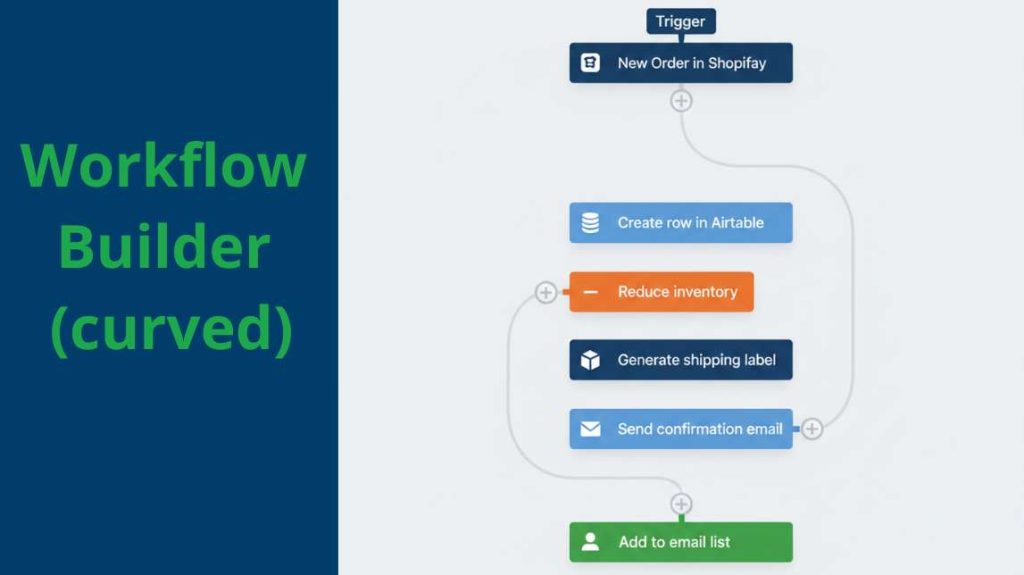
An AI automation system ecommerce does not replace your judgment. It eliminates the repetitive tasks that consume your time and introduce errors.
Start with month 1. Automate your order management first. It is your most critical flow and the one consuming most time. Add marketing automation in month 2. Build your reporting and optimization layer in month 3.
Use Zapier or Make to connect your tools. Use Airtable as your central data hub. Keep your system simple. Every tool you add is a potential point of failure.
The five priority workflows deliver immediate value. Order management, stockout alerts, customer segmentation, proactive support, and automatic reports. Together they free your team from repetitive execution and redirect their energy toward growth.
The goal is not total automation. It is building an AI automation system ecommerce that scales your operations without scaling your workload.
Read next: AI ecommerce automation: proven workflows, systems and tools to scale your store