
You attract 5,000 visitors per month to your Shopify store. Only 1.2% convert. Adding more ads will not fix that. AI product content optimization will.
Your product pages are losing sales right now. Descriptions are generic. Visuals do not reassure. Trust signals are missing. Visitors land, hesitate, and leave without buying. You paid for that traffic. You lost the sale.
The good news is that you do not need more visitors to make more money. You need pages that convert the visitors you already have.
This guide shows you exactly how to use AI to optimize your product content, descriptions, visuals, and SEO, to increase your conversion rate without increasing your ad spend. Which elements to fix first. Which mistakes to avoid. And how to measure real results.
Let’s start with why product content is your most underused conversion lever.
Table of contents
AI product descriptions ecommerce : why weak content costs you sales every day
AI product descriptions ecommerce sellers use are copied directly from supplier specs, and that is exactly why they fail to convert. Most ecommerce owners blame traffic quality when conversions stagnate. The real problem usually comes from the product content itself.
Weak descriptions cost money. A visitor lands on your product page, reads three generic lines copied from the supplier, and leaves. You paid for that click. You lost the sale.
A Denver Shopify store owner generated significant monthly traffic with poor conversion rates. After rewriting product descriptions to focus on customer benefits instead of technical specs. After rewriting product descriptions to focus on customer benefits instead of technical specs, the conversion rate improved by 30-40% within weeks. Same traffic, substantially more sales.
Product content answers objections before they appear. It transforms features into concrete benefits. It gives visitors the information they need to decide now.
Key insight : Optimized content converts existing traffic better than adding more visitors.
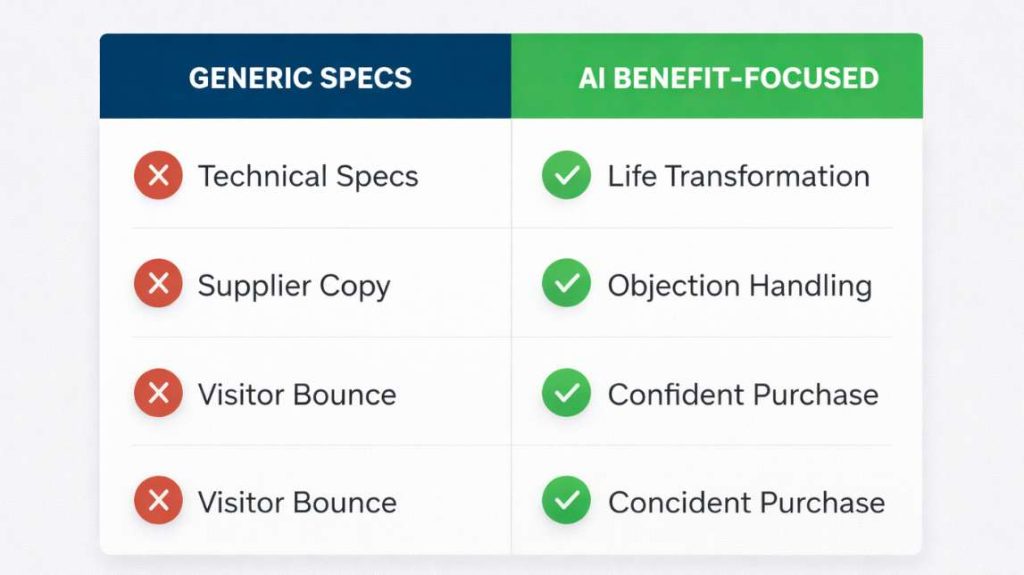
Descriptions that answer objections before they’re asked
A good product description doesn’t list specs. It explains what the product changes in the customer’s life.
Bad description : 500ml stainless steel insulated bottle, BPA-free, shockproof.
Good description : Your coffee stays hot for 6 hours even in winter. The steel withstands drops from your bag or desk. No plastic taste, no chemicals.
The second version answers real questions. How long does it keep things hot? Will it break if I drop it? Will my coffee taste weird?
A Portland WooCommerce seller applied this method across his product catalog. He identified the three most frequent objections per product category using customer support data and integrated them into each description. Return rate dropped significantly because customers knew exactly what they were buying.
Key insight : Match descriptions to customer objections, not supplier specs.
Visual content that builds trust
Product images don’t just show the product. They reassure.
One white background photo isn’t enough. The visitor can’t project themselves. They don’t see the product in context. They can’t gauge real size. They hesitate.
Add photos in usage situations. Show the product being used by a real person. Include a scale photo with a known object like a hand or coffee mug. Add a short video if possible.
An Austin Shopify seller sold laptop accessories. Photos showed products alone on white backgrounds. Conversion rates were poor. After adding three photos per product (one in office context, one with a hand for scale, one showing finish details), conversion rates improved substantially. Same products, same prices.
Visuals answer the visitor’s silent question: what does this really look like?
Key insight : Context photos outperform isolated product shots.
SEO that brings the right buyers
Product SEO isn’t about stuffing keywords everywhere. It’s about using the terms your customers actually type when looking to buy.
Classic mistake : optimizing for “running shoes” when your customers search “beginner running shoes road pavement.”
A Seattle WooCommerce store owner sold camping gear. He optimized pages for “camping tent.” Traffic was decent but conversions were low. After analyzing Google Search Console data, he discovered customers were typing more specific queries like “lightweight 2 person hiking tent.” He rewrote descriptions targeting these precise searches. Qualified traffic increased substantially along with conversions.
The right keyword brings visitors searching for exactly what you sell. The wrong keyword brings traffic that bounces.
Key insight : Use customer search terms, not category labels.
Ecommerce product page optimization: how AI rewrites, tests and ranks your content
Ecommerce product page optimization starts with understanding what AI can and cannot do for your content. AI accelerates rewriting but does not replace your judgment. You keep control over tone and accuracy.
AI to generate benefit-focused descriptions
Give AI the product’s technical features and ask it to transform them into customer benefits. Example: Technical feature is ‘5000 mAh battery.’ Customer benefit becomes ‘A full day of battery life even with heavy use. No need to search for an outlet at noon.’
AI proposes a first version. You edit to adjust the tone to your brand and correct approximations. Writing time drops substantially without sacrificing quality.
A Miami Shopify seller used this method to rewrite hundreds of product descriptions. Manual writing would have taken weeks. With AI generation plus human editing, the work finished in days with identical conversion results.
Key insight: AI speeds up production, human editing maintains quality.
AI to test variations
AI generates multiple versions of the same description. You test each version via A/B testing on your best-selling products.
A Phoenix online store tested three AI-generated descriptions for their flagship product. Version A focused on durability. Version B focused on long-term savings. Version C focused on ease of use. Version C converted better than the other two. They deployed it across the similar product line.
Manual testing would have taken weeks. AI allowed creation and testing in days.
AI to integrate SEO keywords naturally
Forcing keywords into text produces robotic results. AI integrates them smoothly if you give it the right context.
Bad integration : ‘This lightweight running shoe is a lightweight running shoe ideal for lightweight running shoe beginners.’
Good integration : ‘This shoe is perfect for beginners looking for a lightweight model for their first road runs.’
AI reformulates until achieving natural text. You validate the final version.
Key insight: AI integrates keywords naturally when guided properly.
Increase ecommerce conversion rate : 4 steps to optimize product pages with AI
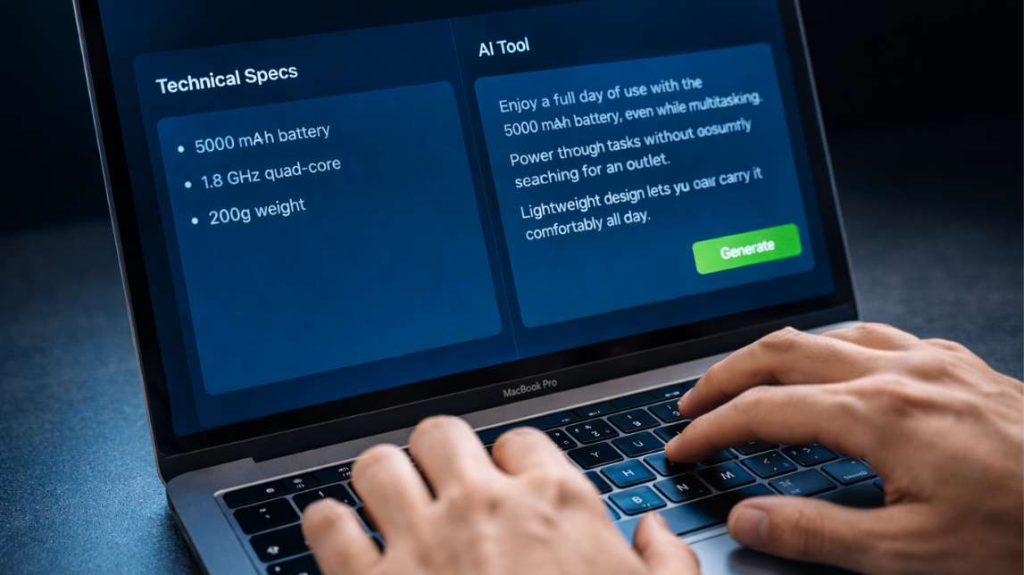
The goal of each step is simple: increase ecommerce conversion rate without adding more traffic or ad spend.
Step 1 : Audit current product content List your top 20 most visited products using Google Analytics or Shopify Analytics. For each product, note number of views, conversion rate, and average time on page.
Identify products with high traffic but low conversion. These are your priorities.
Step 2 : Generate optimized descriptions with AI Take the technical specs of each priority product. Ask AI to transform each feature into concrete customer benefits. Request three variations for each product.
Example AI instruction : Transform these technical specs into customer benefits for an ecommerce seller targeting busy parents.
Step 3 : Edit and validate tone AI proposes. You edit. Correct approximations. Adjust vocabulary to your brand. Verify that each sentence answers a customer objection or need.
Never publish an AI-generated description without human review. AI can invent details or use an inappropriate tone.
Step 4 : Test and measure Publish the new descriptions on your priority products. Wait 2 to 3 weeks. Compare before and after conversion rates.
If the rate increases, deploy the method across the rest of your catalog. If the rate stagnates, test another variation.
Key insight : Test before full deployment, measure results, adjust strategy.
AI product description generator : 5 mistakes to avoid before full deployment
The most common mistake US sellers make with any ai product description generator is publishing content without human review.
Mistake 1 : Publishing AI content without review AI sometimes generates incorrect information or awkward phrasing. A San Diego Amazon seller published dozens of AI-generated descriptions without verification. Several contained factual errors about product dimensions. Customer returns and negative reviews followed.
Solution : Always review and validate each description before publication. AI accelerates, it doesn’t replace your quality control.
Mistake 2 : Ignoring purchase intent in descriptions Generating SEO-optimized content means nothing if the text doesn’t speak to buyers. A Charlotte Shopify store optimized for generic terms when their customers searched for specific product attributes.
Solution : Analyze your internal search data and Google Search Console. Use the exact terms your customers type.
Mistake 3 : Creating identical descriptions for similar products AI can generate overly similar texts if you don’t give precise instructions. A Nashville WooCommerce seller had dozens of products with nearly identical descriptions. Google penalized the site for duplicate content.
Solution : Give different instructions for each product even if they’re similar. Vary the angles: durability for one, savings for another, performance for the third.
Mistake 4 : Neglecting visuals while focusing solely on text Optimized written content doesn’t compensate for mediocre photos. A Columbus online store rewrote all descriptions but kept poor quality images. Conversion rates showed no improvement.
Solution : Optimize text and visuals in parallel. If you don’t have the budget for new photos, add at minimum usage-context images.
Mistake 5 : Not testing variations Publishing one version and hoping it works is a mistake. A Boise Shopify seller generated one AI description, published it, and never tested alternatives. Conversion rates remained flat.
Solution : Test at minimum two variations per flagship product. Keep the best performer. Testing takes a few weeks but avoids months of stagnation.
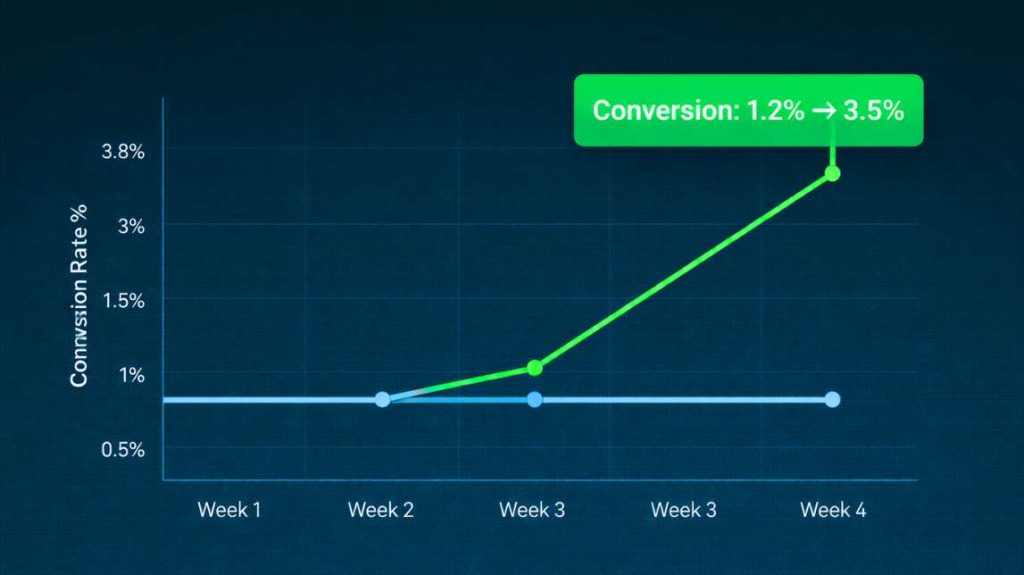
Shopify product page optimization: next steps to build your complete revenue system
Shopify product page optimization is not a one-time task, it is an ongoing process that compounds results over time.
Strong product content is the foundation of every revenue system. Without it, personalization has nothing to amplify. Ads send traffic to pages that do not convert. Analytics show problems but cannot fix them.
You now have the method. The 4-step process works for any catalog size. Start with your top 20 products. Measure results after 3 weeks. Then expand.
What you should take away from this
Ai product content optimization is not a writing project. It is a conversion project.
Generic descriptions lose sales every day. Weak visuals create doubt. Wrong keywords bring the wrong visitors. Each of these problems has a concrete fix, and AI makes that fix faster than any manual process.
Start with your top 20 most visited products. Audit their content. Generate AI-optimized descriptions. Test two variations. Measure conversion rate before and after.
That process alone can double your conversion rate without touching your ad budget.
Your next step : strong product content is Layer 1 of your revenue system. Discover how personalization multiplies what each customer spends in our guide on AI personalization for ecommerce revenue.
Related : AI personalization for ecommerce revenue /ai-personalization-ecommerce-revenue
Related : See the complete system in our AI revenue optimization framework, /ai-revenue-optimization-framework-ecommerce