
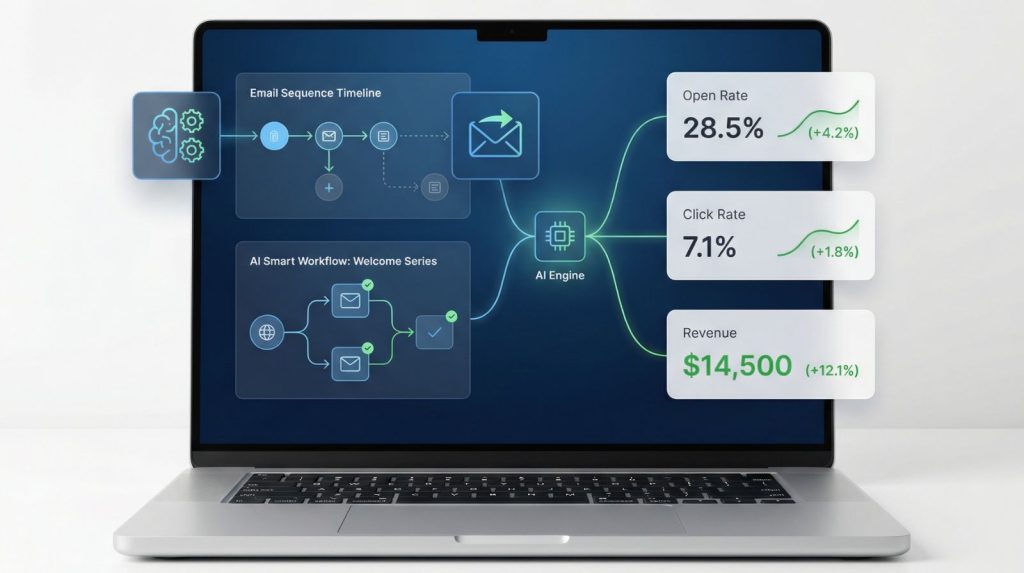
In today’s digital landscape, AI email marketing automation stands as the most powerful tool for businesses, delivering between $36 and $42 for every $1 spent. This makes it, without question, the highest ROI marketing channel available to marketers today. But achieving these results requires more than just sending occasional updates; it requires a strategic approach.
Businesses that implement AI email marketing automation properly see open rates jump from 18% to 32% and leads increase by over 200% all without adding manual work to their plate. The difference isn’t budget or team size. It’s automation done right.
Sending monthly newsletters to your entire list isn’t true email marketing that’s email broadcasting. Real AI email marketing automation segments your audience, delivers personalized content based on behavior, and nurtures leads 24/7 without manual work.
This guide walks you through complete AI email marketing automation setup from platform selection to your first automated workflow running live. No prior experience required. No expensive tools necessary. Just a practical, step-by-step system that works for businesses doing $300K-$2M in annual revenue.
If you’re launching your first AI marketing campaign, see our 7-day launch guide first. But if you’re ready to build sophisticated AI email marketing automation, this is your playbook.
Table of Contents
Visual transformation before vs after AI email marketing automation:
BEFORE AUTOMATION
Results:
- 15–20 hours/month on manual email tasks
- Inconsistent follow-up
- 18% open rate, 1.8% click rate
- 10–15 leads/month
AFTER AUTOMATION
Results:
- 2–3 hours/month (monitoring only)
- Every lead followed up instantly
- 32% open rate, 5.2% click rate
- 40–50 leads/month (200% increase)
Setup time: 8 hours (one-time)
Time saved: 12 hours/month ongoing
Leads gained: +30/month (3× revenue impact)
Here’s what changes when you automate email properly:
Before AI email marketing automation:
- You manually send emails when you remember (sporadic, inconsistent)
- Everyone gets the same message regardless of their interests or stage
- New leads wait hours or days for follow-up while you’re busy
- You have no idea which emails actually drive sales
After AI email marketing automation:
- New leads receive welcome sequences within 2 minutes of signup
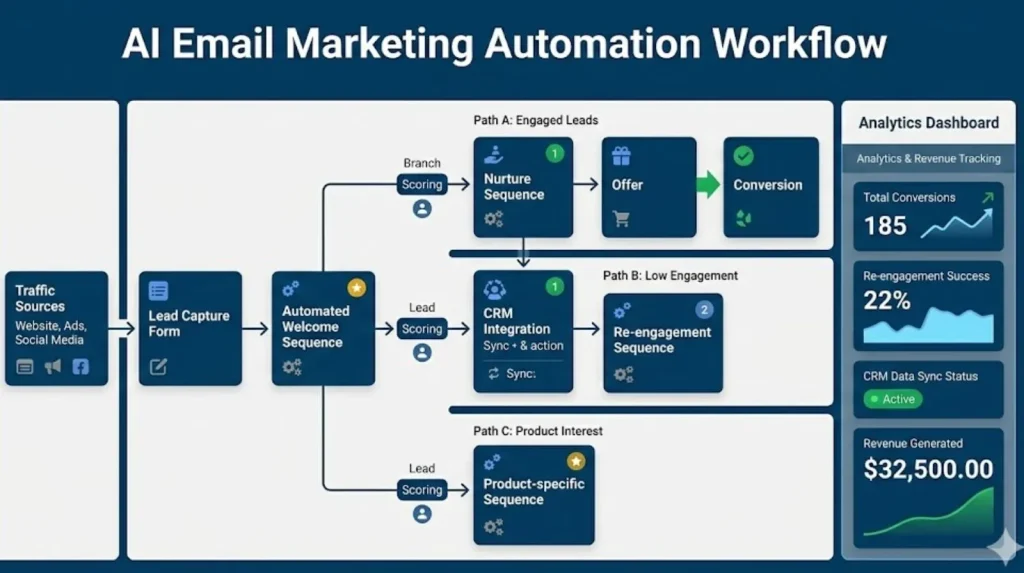
- Each subscriber gets personalized content based on their actions (what they download, which links they click, which pages they visit)
- Your email platform scores leads and alerts you when someone’s ready to buy
- You track exact revenue attributed to each email sequence
The small businesses winning with AI email marketing automation set it up once, then spend 2-3 hours monthly optimizing based on performance data. The rest runs automatically.
Choosing your AI email marketing automation platform
Selecting the best tool for your AI email marketing automation stack depends on three key factors: use case, budget, and technical skill. Your email automation platform is the foundation of all automation. Choose poorly and you’ll outgrow it in 3 months. Choose right and you’ll scale from 100 to 10,000 subscribers without switching tools.
Decision framework: Which platform fits your business?
Answer these three questions:
1. What’s your primary use case?
- Lead nurturing for B2B sales → ActiveCampaign or HubSpot
- E-commerce customer retention → Klaviyo or Mailchimp
- Simple automation for service business → Mailchimp or MailerLite
- All-in-one CRM + email + landing pages → HubSpot
2. What’s your subscriber count?
- 0-500 contacts → Start with free tiers (HubSpot Free, Mailchimp Free)
- 500-2,500 contacts → Budget $30-80/month (ActiveCampaign, Mailchimp Essentials)
- 2,500-10,000 contacts → Budget $150-350/month (ActiveCampaign Plus, HubSpot Starter)
- 10,000+ contacts → You need enterprise pricing ($500+/month)
3. What’s your technical skill level?
- Beginner (never used email automation) → HubSpot or Mailchimp
- Intermediate (used basic automation before) → ActiveCampaign
- Advanced (comfortable with APIs, integrations) → ActiveCampaign or HubSpot Professional
Platform Deep-Dive Comparison
Choosing the right platform is the foundation of your AI email marketing automation system. Below is a detailed breakdown of the top five platforms.
HubSpot (Free – $800/month)
- Best for: Businesses wanting all-in-one solution (CRM + Email + Landing Pages + Forms)
- Pros: free tier includes 2,000 emails/month + full CRM, user-friendly, excellent analytics.
- Cons: Free tier has HubSpot branding, advanced automation requires paid tiers ($45+/month)
- Best use case: First-time automators consolidating multiple tools.
- Setup time: 3-4 hours
ActiveCampaign ($29 – $150/month for 1,000 contacts)
- Best for: Email-first businesses (B2B, SaaS, coaching, consulting)
- Pros: Most powerful automation builder, advanced segmentation, predictive sending
- Cons: Steeper learning curve, pricing increases with subscriber growth
- Best use case: Email-first businesses needing sophisticated workflows
- Setup time: 4-5 hours
According to Active Campaign’s benchmark data, businesses using predictive sending see 25% higher open rates on average.
Mailchimp ($13 – $350/month)
- Best for: Simple automation, e-commerce beginners
- Pros: User-friendly, free tier up to 500 contacts, good e-commerce integrations
- Cons: Less advanced automation, basic reporting
- Setup time: 2-3 hours
Klaviyo ($20 – $700/month, e-commerce focused)
- Best for: E-commerce businesses only (Shopify, WooCommerce, BigCommerce)
- Pros: Built for e-commerce, excellent Shopify integration, strong SMS features
- Cons: Only makes sense for e-commerce, aggressive pricing at scale
- Setup time: 4-6 hours
MailerLite ($10 – $50/month, budget option)
- Best for: Small businesses, bloggers, creators on tight budgets
- Pros: Most affordable, clean interface, includes landing pages
- Cons: Limited advanced features, no CRM integration
- Setup time: 2 hours
Quick Selection Guide.
Choose Your Email Automation Platform
First Time Automating?
Recommendation:
HubSpot (Free)
All-in-one platform. Beginner-friendly with built-in CRM.
E-commerce Business?
Recommendation:
Klaviyo ($20/mo)
Built for Shopify integration and product-based automation.
Email-Driven Business?
Recommendation:
ActiveCampaign ($29/mo)
Advanced automation workflows and powerful segmentation.
Budget Under $20?
MailerLite ($10/mo)
Affordable, simple automation for small lists.
Want Simplicity?
Mailchimp ($13/mo)
Easy setup with basic automation features.
Need Built-In CRM?
HubSpot or ActiveCampaign
Best for sales integration and lead tracking.
Platform Comparison at a Glance:
| Platform | Price | Best For | Difficulty | Scalability |
|---|---|---|---|---|
| HubSpot | Free – $800 | All-in-One Beginners | Easy | Excellent |
| ActiveCampaign | $29 – $150 | Email-First Power Users | Medium | Excellent |
| Mailchimp | $13 – $350 | Simple E-commerce | Easy | Good |
| Klaviyo | $20 – $700 | E-commerce Only | Medium | Excellent |
| MailerLite | $10 – $50 | Budget Basic Users | Easy | Limited |
Choose HubSpot if: You’re new to automation, want all-in-one platform, okay starting with free tier and upgrading later.
Choose ActiveCampaign if: Email is your primary customer communication channel, you need advanced automation, you’re willing to invest time learning.
Choose Mailchimp if: You want simple, beginner-friendly automation without complexity.
Choose Klaviyo if: You run an e-commerce store and want best-in-class product-focused automation.
Choose Mailer Lite if: Budget is primary concern and you need basic automation only.
For most small businesses, ActiveCampaign or HubSpot delivers the best balance of features, ease of use, and scalability. See our AI automation tools guide for detailed ROI comparisons.
5 AI email marketing automation workflows that run 24/7
These five workflows form the core of any effective AI email marketing automation strategy. Start with #1 and add the others over 4-8 weeks.
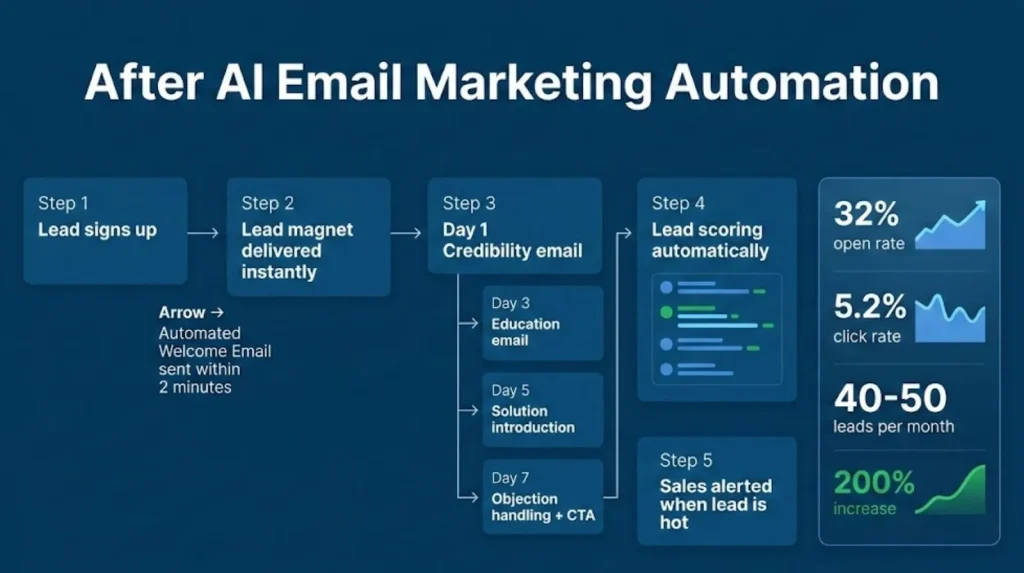
Workflow 1: Welcome sequence (Priority 1 – build this first)
Purpose: Onboard new subscribers, deliver promised lead magnet, build trust.
Triggered by: Form submission, lead magnet download, newsletter signup.
Sequence structure (5 emails over 7 days):
- Email 1 :Immediate delivery: Thank subscriber, deliver lead magnet, set expectations. Open rate target: 50-70%
- Email 2 : Day 1: Introduce your business and story, share credentials. Open rate target: 35-45%
- Email 3 : Day 3: Educate on the problem you solve, share common mistakes. Open rate target: 30-40%
- Email 4 : Day 5: Introduce your offer as solution, include case study. Open rate target: 25-35%
- Email 5 : Day 7: Address objections, add urgency, strong CTA. Click-through target: 5-10%
7-Day Email Automation Workflow
Email 1 – Welcome & Deliver
Timing: Immediate (0 minutes)
Goal: Deliver lead magnet instantly
Expected Open Rate: 50–70%
Email 2 – Build Credibility
Timing: Day 1 after signup
Goal: Introduce your story & authority
Expected Open Rate: 35–45%
Email 3 – Problem Education
Timing: Day 3 after signup
Goal: Deepen problem awareness
Expected Open Rate: 30–40%
Email 4 – Present Solution
Timing: Day 5 after signup
Goal: Introduce your offer
Expected Open Rate: 25–35%
Email 5 – Overcome Objections
Timing: Day 7 after signup
Goal: Convert subscriber into customer
Expected Click Rate: 5–10%
Setup time: 3-4 hours (including writing and workflow building)
Expected results: 20-30% of new subscribers will take your primary CTA (book call, start trial, make purchase) within 30 days if sequence is well-written.
Workflow 2: Abandoned Cart Recovery (E-commerce Only)
Purpose: Recover lost sales from shoppers who added products but didn’t complete purchase.
Triggered by: Cart abandonment (product added, checkout started, but no purchase within 1-3 hours).
Sequence structure (3 emails over 3 days):
Abandoned Cart Recovery Workflow
Email 1 – Gentle Reminder
Sent: 1 hour after cart abandonment
Message: Friendly reminder that items are still in the cart
Include: Product images and cart summary
Expected Recovery: 5–10% of abandoned carts
Email 2 – Address Objections
Sent: 24 hours after abandonment
Message: Clarify shipping, returns, guarantees
Add: Social proof and customer reviews
Optional: 10% discount incentive
Additional Recovery: 3–5%
Email 3 – Final Reminder
Sent: 72 hours after abandonment
Message: Create urgency and scarcity
Offer: 15–20% discount (if needed)
Include: Customer service contact
Additional Recovery: 2–3%
Real-World Revenue Example
100 abandoned carts × $75 average order = $7,500 potential revenue
12% recovery rate = 12 carts recovered
12 × $75 = $900 recovered revenue from automation
- Email 1 : 1 hour after: Gentle reminder, show products. Recovery rate: 5-10%
- Email 2 : 24 hours after: Address objections, add social proof, 10% discount. Recovery rate: 3-5% additional
- Email 3 : 72 hours after: Last chance messaging, stronger discount (15-20%). Recovery rate: 2-3% additional
Expected results: 10-15% total cart recovery rate (industry average). At average order value of $75, recovering 100 carts = $7,500 revenue.
Workflow 3: Lead nurture drip (B2B/Services)
Purpose: Educate leads who aren’t ready to buy immediately. Keep your business top-of-mind.
Triggered by: Specific lead magnet downloads, demo requests, or prospect tag.
Sequence structure (8 emails over 4 weeks):
- Week 1: Problem awareness and education
- Week 2: Solution exploration (your approach + alternatives)
- Week 3: Case studies and proof (show it works)
- Week 4: Overcome objections and offer trial/demo
Expected results: 5-12% of nurtured leads will convert to sales-qualified within 60-90 days.
Workflow 4: Re-engagement campaign
Purpose: Win back subscribers who’ve gone dormant (haven’t opened emails in 60-90 days).
Triggered by: No email opens for 60 days OR no clicks for 90 days.
Sequence structure (3 emails over 2 weeks):
- Email 1: Friendly “We’ve missed you” check-in
- Email 2: Value reminder highlight content they missed
- Email 3: Final offer exclusive resource or easy unsubscribe
Expected results: 8-15% reactivation rate. Better to remove inactive subscribers than let them drag down engagement metrics.
Workflow 5: post-purchase onboarding
Purpose: Ensure customer success, reduce churn, increase lifetime value.
Triggered by: First purchase or trial signup.
Sequence structure (5-7 emails over 2-4 weeks, frequency depends on product complexity):
- Email 1: Immediate welcome, access credentials, expectations
- Emails 2-4: Educational sequence, key features, best practices
- Email 5: Check-in, feedback, advanced features
- Emails 6-7: Expansion complementary products, upgrade offers
Expected results: 15-30% reduction in early churn compared to no onboarding sequence.
AI email marketing automation features you must enable
Modern email platforms include AI features that improve AI email marketing automation performance automatically. Enable these:
Predictive send-time optimization
What it does: AI learns when each individual subscriber typically opens emails and sends at their optimal time (instead of same time for everyone).
Expected impact: 5-15% increase in open rates.
Available in: Active Campaign (all plans), HubSpot (Marketing Hub Professional+), Mailchimp (Standard+).
Note: Requires 2-4 weeks of data to work effectively.
How to enable:
- ActiveCampaign: Campaign settings → “Predictive sending”
- HubSpot: Workflow settings → “Optimize send time”
- Mailchimp: Campaign settings → “Send Time Optimization”
Note: Requires 2-4 weeks of data to work effectively. Don’t expect immediate results.
AI subject line optimization
What it does: AI analyzes your subject lines and suggests improvements based on what typically performs well for your audience.
Expected impact: 10-20% better open rates on AI-optimized subject lines.
Available in: Mailchimp, HubSpot (Marketing Hub), Phrasee (third-party add-on for most platforms).
Smart Segmentation
What it does: AI automatically groups subscribers based on engagement patterns, predicted interests, and behavior.
Expected impact: 20-35% better engagement on segmented sends vs. broadcast to everyone.
Available in: ActiveCampaign (predictive content), HubSpot (predictive lead scoring), Klaviyo (predictive analytics).
Setting up advanced segmentation for AI Email Marketing Automation
Generic emails get generic results. Segmentation multiplies the effectiveness of your AI email marketing automation system.
Visual Overview – Segmentation Strategy:
Email List Segmentation Strategy
Your Email List
1,000 Total Subscribers
Segment by Engagement
Open rate 50%+
Send more frequently + direct offers
Open rate 20–49%
Current cadence works – maintain frequency
Open rate under 20%
Send less + re-engagement campaign or remove
Segment by Behavior
Nurture on Topic A + related content
Trigger sales alert + demo offer
Launch 3-email cart recovery sequence
Segment by Demographics
Industry case studies + vertical content
E-commerce examples + ROI-driven content
Local market messaging + proximity offers
The Power of Segmentation – Real Example:
Impact of Email Segmentation
Before Segmentation – Generic Email Blast
Audience: 1,000 subscribers receive the same email
Open Rate: 22%
Click Rate: 2.5%
Conversions: 8 total (0.8%)
After Segmentation – Targeted Campaigns
Open rate: 42% | Click rate: 8% → 10 conversions
Open rate: 28% | Click rate: 4% → 8 conversions
Open rate: 12% | Click rate: 1% → 1 conversion
Performance Improvement: 137% increase compared to generic blast
Behavioral segmentation (Most powerful)
Engagement level:
- High: Opened 50%+ of last 10 emails → Send more frequently, introduce offers
- Medium: Opened 20-49% → Current cadence is fine
- Low: Opened <20% → Send less frequently, change content approach, or consider re-engagement/removal
Content interests:
- Track which blog topics or resources they click
- Tag subscribers based on interests
- Send content aligned with their demonstrated preferences
Stage in buyer journey:
- Awareness: Downloaded early-stage content → Educational emails
- Consideration: Viewed pricing, compared options → Case studies, demos
- Decision: Added to cart, requested quote → Direct sales focus
Purchase behavior (e-commerce):
- VIP customers (high lifetime value) → Exclusive offers, early access
- One-time buyers → Re-engagement offers, loyalty program invites
- Browsers (never purchased) → First-time buyer discounts
Implementation:
- Create tags for each segment
- Set up automation to apply tags based on behavior
- Build separate email sequences for each major segment
Demographic segmentation
Industry (B2B): Send industry-specific case studies and examples.
Company size (B2B):
- Small business (1-20 employees): Budget-conscious messaging, DIY focus
- Mid-market (20-200 employees): ROI focus, team efficiency
- Enterprise (200+ employees): Compliance, security, integration capabilities
Location (local businesses):Segment by zip code, city, or state. Send location-specific offers.
Product owned (e-commerce):
- Cross-sell related products
- Send replenishment reminders for consumables
Implementation priority
Start with these segments:
- Engagement level (high/medium/low) – Takes 30 days of data to establish
- Lead magnet downloaded – Immediate, segment on signup
- Email clicks – Track which topics they engage with
Add later (Month 2-3): 4. Purchase behavior (if e-commerce) 5. Industry/company size (if B2B) 6. Predictive scoring (if platform offers it)
Don’t over-segment initially. Start with 3-5 segments maximum, add more as you prove ROI.
Technical setup checklist for AI email marketing automation
Before launching your AI email marketing automation, complete this technical checklist. Skip these steps and your emails will land in spam not your subscribers’ inboxes.
Visual overview – complete technical setup process:
Technical Setup Roadmap
Complete in order – do not skip steps
Step 1 – Email Authentication
Estimated Time: 30–60 minutes + 24h wait
Priority: Critical – must be completed first
Add DKIM Signature
Add DMARC Policy
Wait 24–48 hours for DNS propagation
Verify authentication inside your email platform
Step 2 – Domain Warm-Up
Estimated Time: 4–5 weeks
Gradually increase sending volume to build reputation.
Week 2: 100–300 emails/day – Prove legitimacy
Week 3: 300–600 emails/day – Gain trust
Week 4: 600–1,200 emails/day – Scale safely
Week 5+: Normal volume – Full speed operations
Step 3 – Enable Tracking
Estimated Time: 15–20 minutes
Monitor performance and campaign effectiveness.
Enable click tracking
Enable conversion tracking
Step 4 – Unsubscribe Process
Estimated Time: 10 minutes
Ensure compliance with legal requirements and email regulations.
Final Step – Test Send
You are now ready to launch your email automation system.
Email authentication (Critical – do this first)
What it is: Proves to email providers (Gmail, Outlook) that you’re authorized to send from your domain.
The three authentication pillars:
Email Authentication Explained
1. SPF (Sender Policy Framework)
What it does: Lists authorized servers that are allowed to send email from your domain.
Example record:
Think of it as: Your email whitelist.
2. DKIM (DomainKeys Identified Mail)
What it does: Adds a digital signature that proves the email was not altered during transmission.
Example: Each email is cryptographically signed using a key from your domain.
Think of it as: Your email signature.
3. DMARC (Domain-based Message Authentication)
What it does: Instructs email providers what action to take if SPF or DKIM fail.
Example policy:
Think of it as: Your email enforcement policy.
All three properly configured = Strong deliverability and inbox placement
Missing one or more records = Higher risk of emails landing in spam
Required authentication:
- SPF record (Sender Policy Framework)
- DKIM signature (DomainKeys Identified Mail)
- DMARC policy (Domain-based Message Authentication)
Step-by-Step Setup Process
DNS Setup Action Guide
How to set up:
- Your email platform will provide DNS records (text strings)
- Log into your domain registrar (GoDaddy, Namecheap, Cloudflare, etc.)
- Add the DNS records provided by your email platform
- Wait 24-48 hours for DNS propagation
- Verify in your email platform that authentication passed
For step-by-step DNS setup instructions, refer to Google’s Email Sender Guidelines.
Why this matters: Emails without proper authentication are 10x more likely to land in spam. This is non-negotiable.
Setup time: 30-60 minutes (mostly waiting for DNS propagation)
Warm up your sending domain
Warm-up schedule:
- Week 1: 50-100 emails/day
- Week 2: 100-300 emails/day
- Week 3: 300-600 emails/day
- Week 4: 600-1,200 emails/day
- Week 5+: Normal volume
Set up tracking
Enable these tracking features:
- Open tracking: Tells you who opened each email (uses invisible pixel)
- Click tracking: Shows which links were clicked
- Conversion tracking: Connects email clicks to purchases/signups (requires Google Analytics or platform CRM)
Privacy note: Open tracking accuracy has decreased ~20% since Apple Mail Privacy Protection launched. Focus more on click rates and conversions than open rates.
Build your unsubscribe process
Legal requirement: Every email must have easy, one-click unsubscribe (CAN-SPAM law in US, GDPR in EU).
Best practice:
- Unsubscribe link in footer of every email
- One-click process (don’t make people log in or fill out forms)
- Option to reduce frequency instead of full unsubscribe
- Confirm unsubscribe within 1-2 seconds
Measuring success: AI email marketing automation KPIs
Track these metrics to know if your AI email marketing automation is working.
Your email automation dashboard – what to monitor:
Email Automation Dashboard
Key metrics to review weekly
Open Rate
How many subscribers opened your email?
Below 20% – Poor (Improve subject lines)20–25% – Average (Room for optimization)
25–35% – Good (On track)
35–45% – Excellent (Top-tier performance)
Click-Through Rate
How many clicked your links?
Below 2% – Poor (Weak CTA or content)2–4% – Average (Typical range)
4–7% – Good (Strong engagement)
8–12% – Excellent (Highly compelling)
Most important engagement metric
Conversion Rate
How many completed your desired action?
Lead generation: 3–8% typicalE-commerce: 1–3% typical
B2B demos: 5–10% typical
Varies by industry and offer strength
Unsubscribe Rate
How many subscribers left?
Below 0.5% – Healthy (Normal attrition)0.5–2% – Concerning (Review targeting)
Above 2% – Problem (Improve quality and segmentation)
List Growth Rate
Formula: (New Subscribers − Unsubscribes) ÷ Total List × 1002–5% monthly – Healthy growth
0–2% monthly – Stagnant (Increase lead generation)
Negative growth – Declining (Fix acquisition or content quality)
Real dashboard example – month 1performance:
Campaign Performance Snapshot
Business: E-commerce Store
List Size: 2,500 subscribers
Time Period: January 2025
28.5%
Good
4.2%
Good
2.1%
Good for E-commerce
0.4%
Healthy
+3.2%
Growing
Revenue Performance
Total Revenue Generated: $3,850
Emails Sent: 8,500
Revenue per Email: $0.45
Primary metrics :Check weekly
Track these metrics to know if your AI email marketing automation is working.
Open rate:
- Industry average: 20-25%
- Good performance: 25-35%
- Excellent performance: 35-45%
According to Mailchimp’s Email Marketing Benchmarks, average open rates vary by industry between 19% and 28% so always compare your results to your specific sector, not general averages.”
Click-through rate (CTR):
- Industry average: 2-4%
- Good performance: 4-7%
- Excellent performance: 8-12%
- This is your most important engagement metric
Conversion rate (email click → desired action):
- Lead generation: 3-8% typical
- E-commerce: 1-3% typical
- B2B demo requests: 5-10% typical
Unsubscribe rate:
- Healthy: <0.5% per send
- Concerning: 0.5-2%
- Problem: >2% (review content quality and targeting)
Secondary metrics: Check monthly
Revenue per email:
- Total revenue attributed to emails ÷ number of emails sent
- E-commerce target: $0.10-$1.00 per email
- B2B/high-ticket: $5-$50 per email (due to longer sales cycles)
List growth rate:
- (New subscribers – unsubscribes) ÷ total subscribers × 100
- Healthy: 2-5% monthly growth
- Stagnant: 0-2%
- Declining: Negative growth (losing more than gaining)
Engagement over time:
- Are subscribers staying engaged or declining?
- Track cohort analysis: Do Month 1 subscribers still engage in Month 6?
30-Day benchmarks for AI email marketing automation
Welcome sequence:
- 35-45% average open rate across 5 emails
- 5-10% click-through on final CTA
- 20-30% take desired action (trial, purchase, booking) within 30 days
Abandoned cart:
- 10-15% recovery rate
- $500-$2,000 recovered revenue per 100 abandoned carts (at $75 average order value)
Lead nurture:
- 25-35% open rate
- 5-12% conversion to sales-qualified lead within 60 days
If you’re below these benchmarks after 30 days, optimize subject lines, email content, or segmentation. If you’re above, you’re doing great now focus on scaling.
Common AI email marketing automation mistakes to avoid
Mistake 1: Sending Before Warming Up Domain The problem: You import 5,000 contacts and blast a campaign Day 1. Gmail flags you as spam. The fix: Follow the warm-up schedule. Start slow, build reputation over 4-6 weeks.
Mistake 2: Not Segmenting Your List The problem: Everyone gets the same email regardless of interests or stage. The fix: Start with basic segmentation (engagement level, lead source). Add more segments as you grow.
Mistake 3: Over-Automating Welcome Sequences The problem: 15-email welcome sequence over 30 days nobody wants that many emails. The fix: 5-7 emails maximum. Space them appropriately (not daily).
Mistake 4: Ignoring Mobile Users The problem: 60-70% of emails are opened on mobile devices. Your emails look great on desktop but terrible on phones. The fix: Use single-column templates, keep subject lines <50 characters, make buttons large.
Mistake 5: Not Testing Before Activating The problem: Typos, broken links, or personalization errors in automated sequences once active, hundreds of people see the mistake. The fix: Send test emails to yourself and 2-3 team members. Check every link. Activate only after testing.
Your AI email marketing automation next steps
Week 1: Platform Setup
- Day 1-2: Choose email platform, sign up, configure domain authentication
- Day 3-4: Import existing contacts (if any), set up forms/landing pages
- Day 5-7: Build your first automation (welcome sequence)
Week 2: First Automation Live
- Day 1-2: Write 5-email welcome sequence
- Day 3-4: Build workflow, test thoroughly
- Day 5: Activate automation
- Day 6-7: Monitor first results, fix any issues
Week 3-4: Expand Automations
- Add second workflow (abandoned cart if e-commerce, lead nurture if B2B)
- Enable AI features (predictive sending, subject line optimization)
- Set up basic segmentation (engagement levels)
Month 2: Optimize
- Review 30-day performance data
- A/B test underperforming emails
- Add more sophisticated segmentation
For the complete ROI measurement framework, see our AI automation ROI guide.
Automate your email marketing starting today
Ready to turn your AI email marketing automation into a 24/7 lead generation machine?
Launch Your Complete Marketing Campaign: 7-Day Launch Plan A complete day-by-day guide with checklists, templates, and rapid deployment strategies.
Add Social Media Automation: Social Media Automation Guide Content scheduling, recommended tools, and engagement tactics to maximize your reach.
Discover the Full Strategy: Complete Marketing Automation Playbook A big-picture view of marketing automation, a complete framework, and detailed ROI calculations.
Need help getting started? All of our guides include real-world examples, ready-to-use templates, and tool recommendations tailored for small and medium-sized businesses
Final thoughts: AI email marketing automation as your growth engine
AI email marketing automation isn’t about sending more emails it’s about sending smarter ones. The businesses generating 30-50% more leads from email didn’t hire big marketing teams. They set up smart AI email marketing automation once, then optimized based on data
Their email platform works 24/7, nurturing leads, recovering abandoned carts, and converting subscribers to customers while they focus on other parts of the business.
You now have the complete playbook:
- Platform selection criteria
- Five essential automation workflows
- AI features to enable
- Segmentation strategy
- Technical setup checklist
- Success metrics and benchmarks
The question isn’t whether AI email marketing automation works. It’s whether you’ll implement it before your competitors do.
Start with your welcome sequence this week. Build it, test it, activate it. In 30 days, you’ll have real data showing impact. In 90 days, you’ll wonder how you ever managed email manually.
Your AI email marketing automation automation can be live in 7 days. Start today