
AI business automation for small businesses starts with a simple reality: most small businesses waste 20-40% of their productive hours on tasks a computer could handle better, faster, and cheaper.
Your team manually enters data. Your support inbox overflows with repetitive questions. Your invoicing system requires three people and still generates errors. You know automation could fix this but where do you start? What actually works for businesses with 5-50 employees and budgets under $10K/year?
This isn’t another hype piece about AI replacing humans. This is a practical guide to AI business automation for small businesses that delivers measurable returns operating in real-world constraints: limited budgets, small teams, and zero tolerance for expensive experiments.
You’ll learn what AI business automation for small businesses actually means (minus the buzzwords), which processes to automate first for maximum ROI, how to calculate whether automation makes financial sense, and how to implement automation in 30 days without disrupting operations.
The small businesses automating intelligently see 200-800% first-year ROI. The ones chasing trends waste money on tools they don’t need. This guide puts you in the first category.
Understanding AI-powered business automation provides the strategic context for where each automation fits in your broader operational transformation .
Table of Contents
What is AI business automation for small businesses?
AI business automation for small businesses uses artificial intelligence to handle repetitive business processes with minimal human intervention.
Here’s what it means in practice:
When a customer emails asking “Where’s my order?”, AI business automation for small businesses checks your order management system, pulls tracking number, and sends a personalized response within 90 seconds without touching your support team’s inbox.
When an invoice arrives, automation reads it, categorizes the expense, routes it to the right approver, schedules payment, and updates your accounting software no data entry, no missed due dates.
When a lead fills out your contact form at 2 AM, AI automation scores their fit, adds them to your CRM, triggers a personalized email sequence, and alerts your sales team to hot prospects before competitors wake up.
The three types that matter for small businesses:
Process Automation: Handles structured, repetitive tasks. Data entry, invoice processing, report generation, email routing.
Decision Automation: Makes rule-based decisions using AI. Lead scoring, fraud detection, inventory reordering, customer segmentation.
Communication Automation: Manages interactions using natural language AI. Customer support chatbots, email responses, appointment scheduling, follow-up sequences.
Most successful AI business automation for small businesses strategies use all three working together. Your lead form (communication) scores the prospect (decision) and creates a CRM record with tasks (process) all without human involvement until the lead is qualified.
Key distinction: You don’t need custom AI development. Modern platforms provide pre-built AI capabilities you configure rather than code. A marketing coordinator can build sophisticated workflows, not just engineers.
Key benefits of AI business automation for small businesses
Time reclamation (The primary benefit)
Small business teams wear multiple hats. Every hour spent on manual tasks is an hour not spent on revenue-generating activities.
Real numbers from SMBs using AI business automation for small businesses:
- E-commerce businesses save 15-25 hours weekly on order processing
- Professional services firms save 10-20 hours weekly on client reporting
- SaaS startups save 8-15 hours weekly on lead qualification
At a loaded labor cost of $35-50/hour, those savings translate to $28K-$65K annually for a typical small business automating 2-3 core processes.
According to McKinsey’s automation research, businesses that automate repetitive processes free up 20-30% of employee time for higher-value work.
Error reduction (The hidden profit center)
Manual processes generate errors. AI business automation for small businesses reduces error rates from typical 3-8% down to under 1%.
Case example: A wholesale distributor processing 500 monthly orders reduced shipping errors from 6% to 0.4% through automated address verification. That eliminated $2,800 monthly in reshipping -costs $33,600 annually from one automation.
Scalability without headcount (The growth multiplier)
Traditional scaling means hiring. AI business automation for small businesses means handling 2-3x volume with the same team.
Your customer support handles 100 inquiries daily. With AI answering routine questions (70% of volume), the same team handles 300+ daily inquiries while focusing on complex issues requiring human judgment.
A bootstrapped SaaS company went from 50 to 200 monthly signups without adding customer success staff. Automated onboarding handled the volume increase while the team focused on high-touch enterprise accounts.
Competitive advantage (The market position shift)
Your competitors manually process leads for 24-48 hours. You respond in 2 minutes with personalized outreach. Who wins that customer?
Larger competitors have bigger teams but slower processes. AI business automation for small businesses makes your 10-person team perform like a 30-person team in key areas. That’s how small businesses compete up-market.
Essential AI business automation tools for small businesses
The automation tool landscape has hundreds of options. Most small businesses need 2-4 tools maximum for effective AI business automation for small businesses.
The four tool categories that matter:
1. Workflow Automation platforms
Connect your existing apps and automate data flow without coding.
Top choices: Zapier ($20-50/month) for beginners with 6,000+ integrations. Make ($9-30/month) for complex logic. n8n ($0-50/month) open-source for tech teams.
Best for: Order processing, lead routing, data syncing, report generation.
2. All-IN-One Platforms
Combine CRM, marketing automation, and sales tools with built-in automation.
Top choice: HubSpot ($45-800/month) for businesses where marketing drives growth.
Best for: Lead nurturing, email campaigns, sales pipeline management.
3. Communication Automation
Handle customer interactions using AI for email, chat, and voice.
Top choices: Intercom ($39-99/month), Tidio ($0-394/month), AI email assistants.
Best for: Customer support, sales conversations, FAQ handling.
4. Specialized Automation
Solve specific functions with deep automation.
Examples: ActiveCampaign ($29-150/month) for email marketing, QuickBooks automation ($30-200/month) for accounting, Calendly ($8-16/user) for scheduling.
For a detailed comparison of the best platforms with real payback periods, see our AI automation tools guide for small businesses.
Quick Tools Comparison:
| Tool | Best For | Monthly Cost | Setup Time | Skill Level |
|---|---|---|---|---|
| Zapier | First-timers, broad apps | $20–$50 | 2–4 hours | Beginner |
| Make | Complex workflows | $9–$30 | 6–8 hours | Intermediate |
| HubSpot | Marketing-heavy SMBs | $45–$800 | 20–30 hours | Beginner |
| n8n | Tech teams, high volume | $0–$50 | 10–15 hours | Advanced |
| ActiveCampaign | Email-driven businesses | $29–$150 | 8–12 hours | Beginner |
The 3-Question selection framework
Question 1: Does this solve a problem costing us $200+/month in time or errors?
Question 2: Can we implement this with our current team’s technical skills?
Question 3: Does this integrate with our existing systems?
How to calculate ROI for AI business automation
Calculate AI business automation for small businesses ROI before you buy any tool — not after.
The tree-component ROI framework
Component 1: Time Savings Value
Measure current time spent weekly. Estimate post-automation time. Calculate the difference. Multiply by loaded hourly labor cost.
Formula: Time Savings = (Hours Saved per Week) × (Loaded Hourly Rate) × 52 weeks
Example: Process takes 6 hours weekly, drops to 1 hour automated. At $40 loaded rate: 5 hours × $40 × 52 = $10,400 annual savings.
Component 2: Error Reduction Value
Calculate current error rate and cost per error. Estimate automated error rate (typically 80-95% reduction). Multiply errors avoided by cost per error.
Formula: Error Reduction Value = (Errors Avoided per Month × Cost per Error) × 12
Example: 100 monthly invoices, 5% error rate (5 errors), $50 cost per error. Automation reduces to 1% (1 error). Savings: 4 errors × $50 × 12 = $2,400 annually.
Component 3: Growth Enablement
Hardest to quantify but often largest impact. Freed capacity enables revenue-generating activities.
Conservative approach (recommended): Don’t count it. If ROI works without it, you have a bulletproof case.
For the complete ROI calculation methodology, see our AI automation ROI guide.
Real case studies

Case 1: E-Commerce Store (8 employees, $800K revenue)
Automated order processing and customer emails using Shopify + Zapier.
- Time saved: 19 hours weekly
- Error reduction: 4.5% improvement
- Investment: $2,868 Year 1
- Savings: $32,172 annually
- ROI: 1,121% Payback: Month 1
Case 2: Marketing Agency (12 employees, $1.2M revenue)
Automated client reporting and social scheduling using HubSpot + Buffer.
- Time saved: 22 hours weekly
- Client retention: +13% (better reporting)
- Investment: $5,576 Year 1
- Savings: $56,320 annually
- ROI: 1,010% Payback: Month 2
Forrester Research confirms that well-chosen automation projects for SMBs typically deliver 300-800% first-year returns because labor costs are high and automation costs are low.
Implementation Framework: 30 Days to deployed AI business automation
ROI looks good. You’ve chosen your tool. Now you need a tactical plan for AI business automation for small businesses.
The 4-Week implementation Roadmap
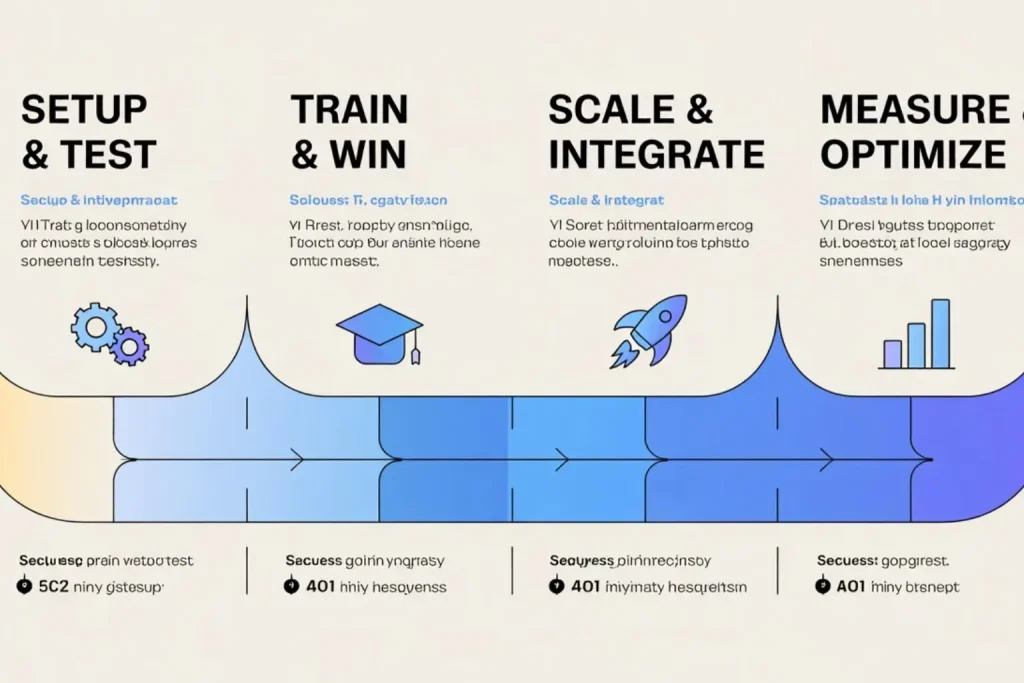
Week 1: Tool Setup & First Automation Test
Days 1-2: Account setup, core integrations connected, team members added.
Days 3-4: Build your first automation (choose simple, high-frequency, low-risk). Map on paper first, then build in tool.
Days 5-7: Test with dummy data, then run 5-10 real cases in parallel with manual process. Compare results. Fix discrepancies.
Success metric: One working automation running on 25% of volume.
Week 2: Team Training & Quick Wins
Day 8: Train team hands-on (not PowerPoint). Show how to check if it worked, what to do if it fails.
Days 9-10: Team members process real cases with supervision. You watch, they execute.
Days 11-14: Identify 2-3 additional quick wins. Build one, test it, deploy at 50% volume.
Success metric: Team confidently monitors automation. Second automation deployed.
Week 3: Scale & Integrate
Days 15-17: Increase first automation to 100% volume. Remove manual backup. Monitor closely for 48 hours.
Days 18-21: Build and test third automation. Connect automations together (output of one becomes input of another).
Success metric: First automation fully deployed at 100%. Third automation in testing.
Week 4: Measure, Optimize, Plan
Days 22-24: Calculate actual ROI (time saved × loaded rate). Compare to projections. Document wins and issues.
Days 25-28: Optimize existing automations (reduce steps, improve error handling). Plan next automation cycle.
Days 29-30: Document complete process, update team training, present results to stakeholders.
Success metric: 2-3 automations fully deployed, actual ROI measured, next phase planned.
Critical success factors
Start with high-frequency processes. Automating something happening 50 times daily delivers faster wins than quarterly reports.
Run parallel for 5-10 iterations minimum. Don’t go 100% automated on day one.
Budget 2-4 hours weekly for optimization. AI business automation for small businesses isn’t “set and forget.”
Measure continuously. Track time saved, errors avoided, user adoption. Review weekly in Month 1, then monthly.
For complete day-by-day implementation with checklists and templates, see our AI marketing automation campaign guide.
Common AI business automation mistakes to avoid
Mistake 1: Automating before standardizing
The problem: You automate a process done 3 different ways by 3 team members. Now you have inconsistent AI business automation for small businesses.
The fix: Document the “one right way” first. Get team agreement. Standardize manually for 2 weeks. Then automate.
Mistake 2: Choosing tools based on features
The problem: You buy the tool with the longest feature list, not the tool solving your specific expensive problem.
The fix: Identify your problem first ($X monthly cost). Then find the simplest tool solving that specific problem.
Mistake 3: No Clear Success Criteria
The problem: You implement automation but can’t tell if it’s working. Arguments about whether it’s “better.”
The fix: Define success numerically before implementation: “Reduce order processing from 8 to 2 hours weekly.” Measure from day one.
Mistake 4: Automating low-value processes first
The problem: You automate easy stuff that doesn’t cost much while ignoring expensive manual processes.
The fix: Calculate ROI for every candidate. Prioritize by ROI × ease. Attack high-ROI processes first.
Mistake 5: Treating Automation as “Set and Forget”
The problem: You deploy and never touch it. Business processes change. Automation becomes outdated. Value degrades.
The fix: Schedule monthly automation reviews. Check error rates. Update workflows when processes change. Budget 2-4 hours monthly for maintenance.
According to Gartner’s process automation report, organizations that continuously optimize their automation see 3x better long-term results than those that treat it as a one-time project.
Getting started: Your AI business automation action plan
Day 1-2: Identify Your Biggest Time Sink
TTrack where your team spends time for 2 days. Actual time, not estimates.
Look for processes that are repetitive (same way every time), high-frequency (multiple times daily/weekly), time-consuming (takes 2+ hours weekly total), and low-skill (could be explained in 10 minutes).
Common winners for AI business automation for small businesses: data entry between systems, email responses to routine questions, invoice processing, lead routing.
Deliverable: One process identified with current time cost calculated.n winners: data entry between systems, email responses to routine questions, invoice processing, lead routing.
Day 3-4: Calculate ROI
Use our [ROI calculator]. Input current weekly time, loaded hourly rate ($30-60 for most SMBs), current error rate, estimated automation cost.
Run conservative, realistic, and optimistic scenarios.
Decision point: If conservative ROI exceeds 150% and payback is under 6 months, proceed.
Deliverable: ROI calculation showing projected annual savings and payback period.
Day 5-6: Choose your Tool
Based on your process and ROI numbers, pick one tool from our [ROI-justified tools guide].
Start a free trial. Don’t commit to annual payment yet.
Spend 2-3 hours building a basic version with test data.
Deliverable: Free trial account with one test automation built.
Day 7: Get buy-in
Present to stakeholders:
- Problem: We spend X hours weekly on [process]
- Cost: That’s $Y annually in labor
- Solution: Automate with [tool] for $Z/month
- ROI: Pays back in [X] months, saves $Y annually
- Next steps: 30-day implementation
Get approval. Schedule Week 1 implementation time.
Deliverable: Approval to proceed and calendar blocked.
After Day 7: Execute the 30-Day Plan
- Week 1: Deploy first automation at 25%
- Week 2: Train team, reach 75%
- Week 3: Scale to 100%, add second automation
- Week 4: Measure results, optimize, plan next phase.
Final thoughts: the small business automation advantage
Large companies have bigger budgets and more staff. You have something better: the ability to move fast, make decisions quickly, and implement changes without committees.
AI business automation for small businesses is your force multiplier. The right automations make your 10-person team perform like a 25-person team in key areas. You respond to leads in minutes while competitors take hours. You process orders without errors while they scramble with corrections. You scale without proportional headcount increases.
But only if you automate strategically. The businesses winning with AI business automation for small businesses:
- Calculate ROI before investing (not after)
- Start with one process and do it well
- Measure actual results against projections
- Iterate and expand based on what works
- View automation as ongoing optimization, not one-time projects
You have everything you need: the framework, the tools, the ROI methodology, and the implementation roadmap. The question isn’t “should we automate?” It’s “why haven’t we started yet?”