
A stockout on a best-selling product costs you sales. Surplus on a slow-moving product ties up your cash.
Between the two, finding the right balance requires constant monitoring and decisions based on imprecise data.
AI inventory forecasting ecommerce systems solve this problem. Not by guessing, but by analyzing your sales history, detecting trends, and calculating optimal quantities to order automatically.
This guide shows you how to build a forecasting system that reduces your stockouts, optimizes your cash flow, and eliminates the costly errors of manual inventory management.
Let’s start with why manual inventory management fails at scale.
Table of contents
Inventory management automation: why manual methods fail ecommerce businesses

Managing a catalog of 50 or more products manually creates dangerous blind spots. You closely track your best-sellers but neglect slower products that still represent a significant share of your revenue.
You order based on intuition or last month’s history. But sales fluctuate. A product sold 30 times in March might only sell 18 in April. If you order based on March, you create surplus. If you order based on April, you risk a stockout in May.
Most ecommerce businesses running manual inventory management face the same two problems: stockouts on popular products and dormant stock on slow movers. Both situations cost money. Both are largely preventable.
This es where ai inventory forecasting ecommerce integrates with broader ecommerce automation. It analyzes patterns you cannot manually track. It coordinates with your marketing, customer service, and order management systems to optimize your entire business flow.
External factors further complicate the situation. Weather, social trends, competitor actions, and holidays each impact demand differently by product. Tracking these signals manually across dozens of references is simply not realistic.
Key insight: manual inventory management does not scale. Beyond 50 references, the blind spots cost more than the time saved by avoiding automation.
AI demand forecasting ecommerce: 3 approaches based on your catalog size

Basic trend-based forecasting
For catalogs under 100 references and histories under 12 months, simple trend analysis suffices.
Tools like Inventory Planner or Ecomdash calculate your sales velocity per product. How many units sold per week on average over the last three months. They add a safety margin and tell you when to order.
This method works well for products with stable demand. Consumables, basics, items without strong seasonality.
The advantage: quick setup, immediate results, and low monthly cost. The limitation: no anticipation of seasonal variations or emerging trends. The system reacts to changes but does not predict them.
Use this approach if you are starting with AI demand forecasting ecommerce or if your products have regular turnover.
Advanced forecasting with seasonality
For catalogs over 100 references with at least 18 months of history, advanced systems detect seasonal patterns.
Cogsy and Inventory Planner analyze your sales over multiple annual cycles. They identify recurrences. Sales spike in October for costumes, drop in January for fitness equipment, rise in June for beach accessories.
These patterns become forecasts. The system calculates not on the global average but on the comparable period of the previous year adjusted for your current growth.
A practical example: a store selling string lights averages 40 units per month. In November and December, demand reaches 280 units. With basic forecasting, the store orders 60 units in October. Guaranteed stockout by late November.
An advanced system detects the seasonal pattern. It recommends ordering early October based on the previous year’s peak. Result: zero stockout during the holiday season and stock cleared by mid-January.
Predictive multi-factor forecasting
For large volumes and complex catalogs, predictive systems integrate external data. Weather, Google Trends, local events, and planned marketing actions.
Tools like NetSuite and Blue Yonder analyze these signals. An announced heat wave automatically increases forecasts on fans. A drop in Google searches on a term related to your niche reduces forecasts on the concerned category.
Reserve this approach if you manage more than 500 references or exceed $100,000 in monthly revenue. The investment is significant. The ROI is only justified at scale.
Key insight: choosing the wrong AI inventory forecasting ecommerce approach for your catalog size is one of the most common mistakes US SMBs make. Start simple. Scale when your data justifies it.
Ecommerce inventory forecasting ai: a 5-step method to deploy your system
Step 1: clean your historical data
Forecasting systems learn from your history. Dirty data produces false forecasts.
Export your sales from the last 18 months. Check three elements: are returns properly deducted from sales. Are canceled orders excluded. Are exceptional promotions marked.
A common mistake: leaving a large one-time B2B order in your history. The system considers this sale recurring and recommends permanent high stock levels. The result: significant cash tied up in surplus inventory for months.
Mark all exceptional sales. Flash promotions, bundle sales, one-time B2B orders. Your AI inventory forecasting ecommerce system must ignore them to calculate your normal demand.

Step 2: define your target stock levels
Each product requires a minimum stock, optimal stock, and maximum stock. These three thresholds guide system recommendations.
Minimum stock: the level that triggers a restocking alert. Generally two weeks of average sales plus supplier lead time.
Optimal stock: the level that comfortably covers demand without tying up too much cash. Generally six to eight weeks of average sales.
Maximum stock: the threshold never to exceed. Generally twelve weeks of average sales except very high-turnover products.
These thresholds vary by category. Consumables accept higher maximum stock because demand is predictable. Fashion products require lower maximum stock because obsolescence risk is high.
Create a table by category with your three thresholds. The system will use these references to calculate its recommendations.
Step 3: configure your supplier delays and constraints
A good forecasting system calculates not just what to order but also when to order.
Enter for each supplier three pieces of information: average delivery time, minimum order quantity, and possible order frequency.
Example: your supplier delivers in 45 days with a minimum of 100 units per product and accepts one order per month. The system adjusts its recommendations accordingly. It will not alert you to restock 30 units in 15 days if that is impossible to execute.
These constraints avoid unrealistic recommendations that clutter your dashboard.
Step 4: activate intelligent alerts
The system analyzes continuously but you should not check daily. Configure alerts for three critical situations.
Stock below minimum threshold considering supplier lead time: priority email alert.
Demand variation greater than 30% over the last seven days compared to the comparable period: investigation alert. Check if real trend or anomaly.
Maximum stock reached on a product: temporary blocking alert. Stop all promotion on this product until clearance.
These three alerts cover the vast majority of situations requiring your immediate attention.
Step 5: compare forecasts to actual for three months
The first months, the system learns and refines its models. You must validate that its forecasts match reality.
Each week, compare actual sales to system forecasts. Create a simple table: product, forecast, actual, percentage variance.
A variance of plus or minus 15% is acceptable. A variance above 30% requires investigation. Either your historical data contains anomalies, or an external event impacts demand, or system parameters need adjustment.
After three months, your ecommerce inventory forecasting AI system has integrated your specific patterns and produces reliable recommendations.
Key insight: deploying an AI inventory forecasting ecommerce system without clean historical data and defined stock thresholds is the most common reason forecasts fail in the first 90 days.
3 mistakes that break your AI stock replenishment ecommerce system
Mistake 1: ignoring past stockouts in your history
Your history shows 20 sales in March on a product. But you were out of stock for 10 days. Real demand was probably significantly higher.
If you do not correct this, the system considers March demand was 20. It will systematically underestimate future needs.
Mark all your stockout periods in your history. Good AI stock replenishment ecommerce systems like Cogsy automatically adjust forecasts by extrapolating lost demand.
A common example: a store with multiple stockout days on a flagship product during the previous year. Without correction, the system significantly underpredicts future demand. After stockout adjustment, the forecast aligns with actual sales. The correction avoids major under-ordering.
Mistake 2: mixing multiple sales channels without distinction
If you sell on your site, Amazon, and marketplaces, your total demand hides different realities.
Amazon experiences spikes linked to Prime Day. Your site generates more sales during your email campaigns. A system analyzing everything together misses these nuances.
Configure separate forecasts by channel when patterns differ significantly. Inventory Planner and Cogsy allow creating views by channel. You see global demand but also each platform’s specifics.
Your AI inventory forecasting ecommerce system is only as accurate as the data you feed it. Mixed channel data produces mixed results.
Mistake 3: not adjusting for your marketing actions
You launch a paid campaign on a product. The system does not know. It predicts sales based on organic history. Your campaign generates significantly more sales than predicted. Stockout in a few days.
Advanced systems allow indicating your planned marketing actions. You enter campaign details, budget, and dates. The system automatically adjusts its forecast by applying your average conversion rate.
This feature exists in Cogsy and Inventory Planner. Use it systematically for any action that will impact demand by more than 20%.
Key insight: these 3 mistakes share one root cause. Your AI inventory forecasting ecommerce system learns from the data you provide. Incomplete or mixed data produces unreliable forecasts regardless of the tool you use.
Ecommerce cash flow optimization: how to eliminate dormant stock with AI forecasting
Forecasting does not just avoid stockouts. It also identifies products turning too slowly and draining your cash flow.
Create a monthly velocity report. Your AI inventory forecasting ecommerce system calculates for each product the number of days of remaining stock at current sales pace.
Any product with an excessive number of days of remaining stock enters the red zone. Three possible actions depending on the situation.

Action 1: wait for natural seasonal spike
If the product has favorable seasonality in the next three months, keep it and wait. Your ecommerce cash flow optimization strategy sometimes requires patience over panic discounting.
Action 2: launch a targeted promotion
If the product declines with no recovery signal, launch a promotion to clear a significant portion of stock quickly. Recovering most of your investment is better than letting stock age and lose all value.
Action 3: remove from catalog
If the product has not moved for several months, remove it from your catalog. Sell remaining stock in bulk or donate. Free up space and cash for performing products.
A practical example: a store identifies a group of products representing the majority of its dormant stock value. It launches aggressive promotions on these products for one month. Stock clears. Cash is recovered and reinvested in new items. The AI forecasting system had identified these at-risk products months before the situation became critical.
Key insight: ecommerce cash flow optimization starts with visibility. Your AI inventory forecasting ecommerce system does not just tell you what to order. It tells you what to stop holding.
Ecommerce stockout prevention: the 4 metrics that measure your forecasting performance
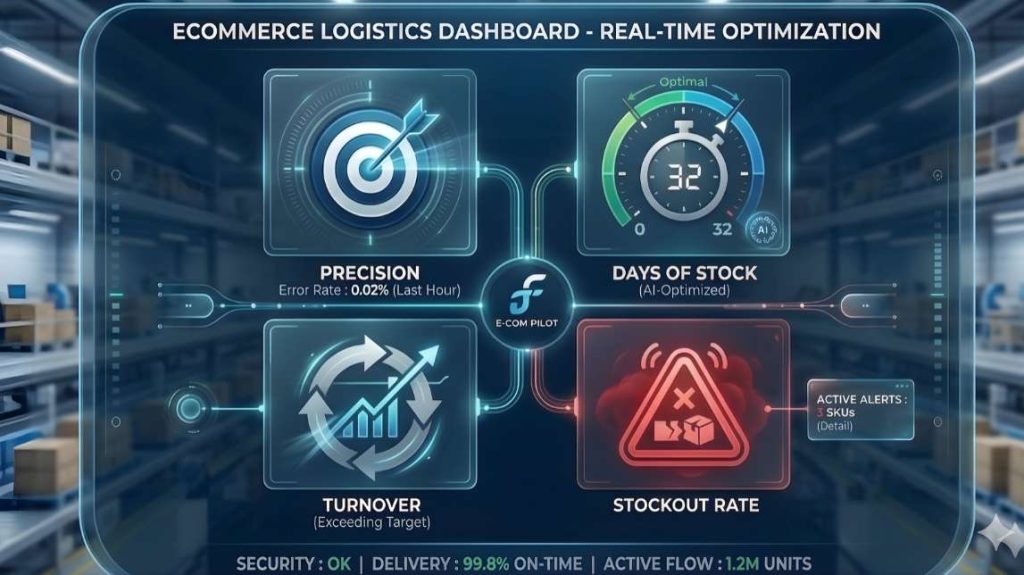
Four indicators measure whether your AI inventory forecasting ecommerce system is working correctly.
Metric 1: forecast accuracy rate
Average variance between forecasts and actual sales. Target a minimum of 80% accuracy. Calculate this monthly across your entire catalog.
If your accuracy falls below this threshold, review your historical data quality first. Dirty data is the most common cause of poor forecast accuracy.
Metric 2: stockout rate
Percentage of days when at least one product is out of stock. Target under 5% for best-sellers and under 10% for the rest of your catalog.
This is your primary ecommerce stockout prevention indicator. If this number is rising, your forecasting parameters need immediate adjustment.
Metric 3: average days of stock
Total stock divided by average daily sales. Target between 45 and 60 days depending on your business model.
If above 75 days, you are tying up too much cash in inventory. Your AI inventory forecasting ecommerce system should flag these products automatically in your monthly velocity report.
Metric 4: inventory turnover rate
Number of times your stock renews per year. Target a minimum of 6 annual turnovers for classic ecommerce and 12 for consumables.
A low turnover rate signals dormant stock problems. Combined with your velocity report, this metric helps you decide which products to promote, discount, or remove from your catalog.
Key insight: these 4 metrics give you a complete view of your ecommerce stockout prevention performance. Monitor them monthly. Do not wait for a stockout to investigate.
From inventory chaos to predictable cash flow
An AI inventory forecasting ecommerce system does not eliminate uncertainty. It reduces it to a manageable level.
Start with a simple tool if you manage fewer than 100 references. Clean your historical data first. Define your stock thresholds. Let the system run three months in monitoring mode before trusting its recommendations fully.
Move to an advanced system when your catalog grows or shows strong seasonality. Add predictive multi-factor forecasting only when your volume justifies the investment.
The goal is not perfect forecasting. It is eliminating the gross errors that cost thousands of dollars in lost sales or dormant stock every year.
To improve your customer experience alongside your inventory system, discover how to build an AI customer service ecommerce system that works 24/7.