
Small businesses don’t fail at automation because of bad tools. They fail because they automate the wrong things, at the wrong time, for the wrong reasons.
The automation promise is compelling: save time, reduce errors, scale without hiring. But the path from promise to reality is full of traps. Most SMBs approach automation with enterprise logic, copying patterns designed for companies with dedicated operations teams, IT departments, and margin for error. What works at scale doesn’t work at small scale. The stakes are different, the resources are different, and the failure modes are different.
This article identifies the most costly AI automation mistakes small businesses make, explains why these mistakes happen, and shows you how to avoid them before they create problems that are harder to fix than the inefficiencies you were trying to solve.
Table of Contents
Why SMBs copy enterprise automation mistakes

Small businesses learn about automation from case studies, vendor marketing, and advice written for companies ten times their size. The result is automation strategies that sound smart but don’t match SMB realities.
Tool overload
Enterprise automation strategies assume you have a dedicated team to manage integration, troubleshooting, and optimization. SMBs don’t. When you add tools without considering maintenance cost, you create a stack that’s fragile and expensive to keep running.
A consulting firm in Columbus automated client onboarding using five different tools: a CRM, a scheduling platform, a contract generator, an email automation tool, and a payment processor. Each tool worked individually. Together, they created 12 integration points, three of which broke regularly. The founder spent more time fixing integrations than the automation saved.
Tool overload happens when you optimize for coverage instead of simplicity. You want to automate everything, so you add tools for every function. But each tool adds complexity, and complexity creates failure surface area.
The rule for SMBs is different: fewer tools, tighter integration, more manual backup. You’re not trying to automate everything. You’re trying to automate the few things that create disproportionate leverage without creating disproportionate maintenance burden.
Complexity without ROI
Enterprise automation projects justify themselves with efficiency gains across hundreds of employees. SMB automation projects don’t have that leverage. When you automate a process that saves 30 minutes a week but takes two hours a month to maintain, you’re net negative on time and you’ve added cognitive load.
A design agency in Raleigh automated invoice generation and payment reminders. The system worked, but it required monthly updates to handle client-specific billing arrangements, exceptions, and edge cases. The founder spent three hours a month managing the automation to save four hours of manual invoicing. The time savings were marginal, and the founder now had one more system to think about.
Complexity without ROI happens when you automate for the idea of automation, not the outcome. You assume automation is always better than manual. It’s not. Automation is better when the ROI is clear, the process is stable, and the failure cost is manageable.
Before automating, ask: what does this save, what does it cost to maintain, and what happens if it breaks? If the answers don’t justify the investment, don’t automate yet.
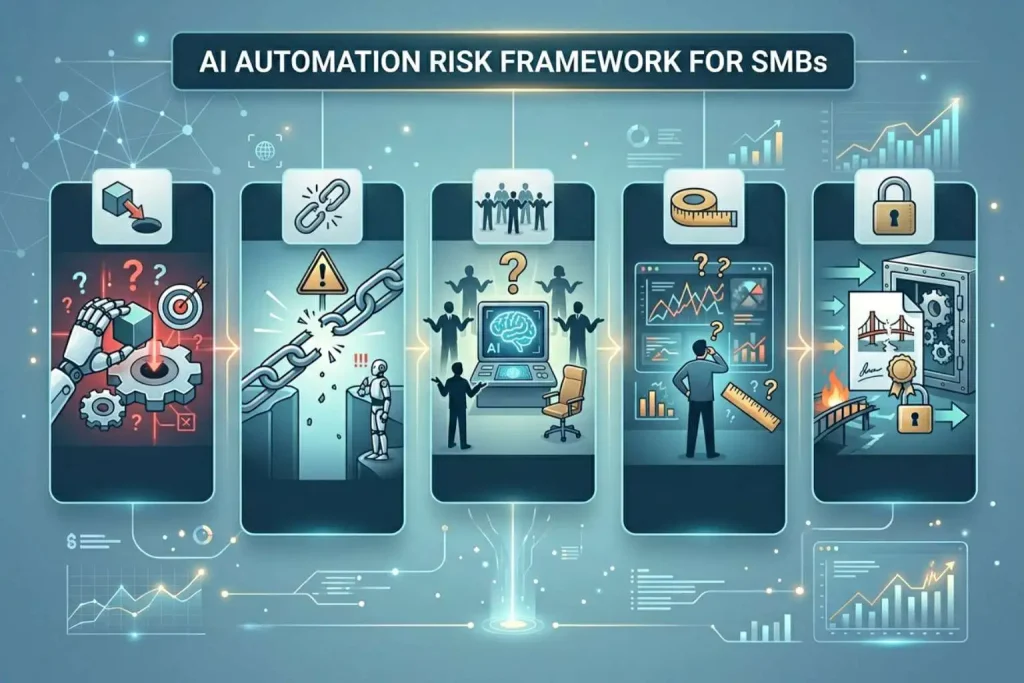
The 5 most costly AI automation mistakes
These mistakes appear across industries and business models. They’re not tool-specific. They’re strategic errors that turn automation into a liability.
Automating the wrong problems
The wrong problems are the ones that aren’t stable enough, aren’t high-value enough, or aren’t repeatable enough to justify automation.
A solo founder in Tampa automated social media posting. The system pulled content from a library and posted on a schedule. It worked technically, but the founder realized the real problem wasn’t posting, it was content creation. Automating distribution didn’t solve the bottleneck. It just made the bottleneck less visible.
Automating the wrong problem feels productive because something is happening. But if you’re automating downstream of the real constraint, you’re creating motion without progress.
The fix is simple but requires honesty: identify the actual constraint before automating anything. If content creation is the bottleneck, automate ideation or drafting. If client acquisition is the bottleneck, automate lead qualification. Don’t automate the easy thing. Automate the thing that removes the constraint.
Ignoring reversibility
Reversibility is the ability to undo an automation and return to manual processes without losing data, relationships, or operational continuity.
A real estate agency in Kansas City automated lead follow-up. The system sent emails based on engagement triggers. Six months in, the agency realized the emails felt robotic and were damaging brand perception. Reversing the automation required rebuilding the entire follow-up process manually, re-engaging cold leads, and explaining the change to prospects who had been receiving automated messages.
Ignoring reversibility happens when you assume automation is permanent. But business context changes. Customer expectations shift. What worked last year might not work now. If you can’t reverse an automation without major disruption, you’ve locked yourself into a system that might become a liability.
The fix is designing reversibility from the start. Keep manual processes documented. Don’t delete workflows when you automate them. Maintain the ability to take over manually if the automation fails or becomes misaligned with how you want to operate.
No ownership
Ownership means someone is responsible for monitoring the automation, adjusting it when context changes, and fixing it when it breaks. Without ownership, automations run unsupervised until something fails visibly.
A SaaS company in Indianapolis automated customer onboarding emails. The system worked for a year. Then the product changed, and the onboarding sequence no longer matched the actual product experience. New users were confused. The support team noticed an increase in questions, but no one connected it to the onboarding automation because no one owned it.
No ownership happens when you treat automation as “set and forget.” You build it, it works, and you move on. But automations aren’t static. They need monitoring, adjustment, and occasional intervention.
The fix is assigning a clear owner for each automation. That person doesn’t need to be technical, but they need to understand the business outcome the automation is supposed to deliver and have the authority to change it when it doesn’t.
No fallback
A fallback is a manual process you can execute if the automation fails. Without a fallback, automation failures become operational emergencies.
A marketing agency in Omaha automated client reporting. The system pulled data from analytics platforms and generated PDFs every Monday. One week, a platform API went down. The automation failed, and the agency had no way to generate reports manually because they’d deleted the original spreadsheets and documentation when they automated.
No fallback happens when you assume automation won’t fail. It will. Systems break, APIs change, dependencies fail. If you don’t have a way to operate manually, failures escalate from inconvenience to crisis.
The fix is maintaining fallback capability. Keep documentation for manual processes. Don’t delete workflows when you automate them. Test the fallback occasionally to make sure it still works.
No measurement
Measurement means tracking whether the automation is delivering the intended outcome. Without measurement, you don’t know if the automation is working, degrading, or failing silently.
A consulting firm in Boise automated meeting scheduling. The system worked, but the founder never checked whether clients were actually booking meetings or abandoning the process. Six months in, the founder discovered that 40% of prospects were dropping off at the scheduling step because the system offered time slots that didn’t align with client time zones.
No measurement happens when you assume automation is working because it’s running. Running doesn’t mean working. It just means executing.
The fix is defining success metrics before automating and reviewing them regularly. For scheduling, measure completion rate and drop-off points. For email, measure open rates and conversions. For lead scoring, measure how well scored leads convert compared to manual picks.
Measurement tells you whether the automation is solving the problem or just moving it somewhere less visible.
How to audit your current automations

If you’ve already automated and you’re not sure whether your automations are working or creating hidden problems, audit them.
Simple diagnostic questions
For each automation, ask:
Does this automation have a clear owner? If no one is responsible for monitoring it, it’s running unsupervised.
Can I reverse this automation without major disruption? If reversing it would be harder than building it, you’ve locked yourself in.
Am I measuring whether this automation is delivering the intended outcome? If you’re not tracking results, you don’t know if it’s working.
Does this automation have a manual fallback? If it fails, can you operate without it, or does the business stop?
Is the time saved greater than the time spent maintaining it? If maintenance cost exceeds savings, the ROI is negative.
These questions surface problems before they compound.
What to pause or remove
If an automation fails multiple diagnostic questions, pause it. Don’t try to fix it while it’s running. Stop it, evaluate it, and decide whether to redesign it or remove it.
A design studio in Tucson automated project status updates. The system pulled data from project management software and emailed clients weekly. After auditing, the founder realized the updates were generic and clients weren’t reading them. The automation was running, but it wasn’t creating value. The founder paused it, redesigned the update format based on client feedback, and relaunched with better targeting.
Pausing isn’t failure. It’s correction. If an automation isn’t delivering value, stopping it is the right move.
Safer alternatives to full automation

Full automation isn’t always the right answer. Partial automation and assisted workflows often deliver better results with less risk.
Partial automation
Partial automation automates execution but keeps humans in the decision loop.
A law firm in Louisville automated contract review using AI to flag clauses that needed attorney attention. The system didn’t approve contracts. It prepared them for human review. Attorneys spent less time reading standard clauses and more time on high-risk sections. The firm got speed without losing judgment.
Partial automation works when the decision is too complex or too high-stakes to fully automate, but the preparation work is repetitive and time-consuming.
The key is designing the human checkpoint so it’s fast. If reviewing AI output takes as long as doing the work manually, partial automation doesn’t save time. It just shifts where the time is spent.
Assisted workflows
Assisted workflows give humans better tools without removing them from the process.
A solo founder in Albuquerque used AI to draft client proposals. The system pulled information from intake forms, generated a draft, and handed it to the founder for editing. The founder still wrote the final proposal, but the AI eliminated the blank page problem and structured the content.
Assisted workflows reduce cognitive load without removing ownership. You’re still doing the work, but you’re starting from a better position.
This approach works when the task requires judgment, creativity, or relationship sensitivity. Automation handles the scaffolding. You handle the substance.
Re-aligning with the decision framework
Mistakes happen when you automate without a clear decision process. The decision framework helps you evaluate what to automate, when to automate, and what level of control to maintain.
Internal link to pillar
Before automating, step back and use the AI automation decision framework. It walks through how to evaluate automation opportunities, assess risk, and decide whether to automate, assist, or keep manual.
If you’re already experiencing automation problems, the framework helps you diagnose why. Most mistakes trace back to skipping the decision layer and jumping straight to execution.
Next step guidance
If you’ve identified mistakes in your current automations, start with the audit questions. Pause automations that aren’t delivering clear value. Redesign ones that are strategically sound but poorly executed. Remove ones that are creating more problems than they solve.
Automation should make your business stronger. If it’s making it more fragile, correction isn’t optional.
What avoiding mistakes gives you
Avoiding automation mistakes doesn’t mean automating less. It means automating better.
When you automate the right things, at the right time, with the right level of control, automation becomes leverage. You scale operations without scaling complexity. You reduce manual work without losing oversight. You move faster without losing clarity.
When you automate poorly, automation becomes technical debt. Systems break, decisions drift, and you spend more time managing automation than you saved by building it.
The difference between automation that works and automation that creates problems is discipline. Automate strategically, measure continuously, and maintain the ability to reverse. That’s how small businesses scale without losing control.