

A study by Guidant Financial reveals that 48% of entrepreneurs claim they lack sufficient time to complete everything on their plates. You’re probably juggling investor pitches, team management, strategic planning, and operational firefighting while trying to maintain some semblance of work-life balance.
The uncomfortable truth is that time isn’t your actual problem. How you manage it determines everything. Effective time management isn’t just another productivity hack but rather the fundamental differentiator separating thriving founders from those perpetually playing catch-up.
AI-powered tools have transformed this equation dramatically over the past three years. Intelligent systems now analyze your behavioral patterns, automate repetitive decisions, and optimize attention allocation without constant manual intervention. This quiet revolution enables thousands of entrepreneurs to reclaim the equivalent of two full working days every single week.
The transformation happens across three distinct AI-driven levels that compound exponentially when combined correctly. Automation eliminates operational friction while smart algorithms optimize your daily choices and predictive models anticipate bottlenecks before they materialize.
The data backing these claims comes from documented real-world implementations rather than marketing promises. Small business owners report meaningful time savings within the first few months of adoption. Content creators recover significant hours from their production workflows. Sales teams dramatically improve productivity on specific tasks like lead qualification and proposal preparation.
This guide explores methodically how you can concretely recover substantial time currently lost to operational overhead. Each section addresses a specific optimization lever with concrete tools, proven methodologies, and quantified examples from entrepreneurs who’ve successfully made this transformation.
Why AI time management matters for modern entrepreneurs
How AI transforms time management : The 3-level framework.
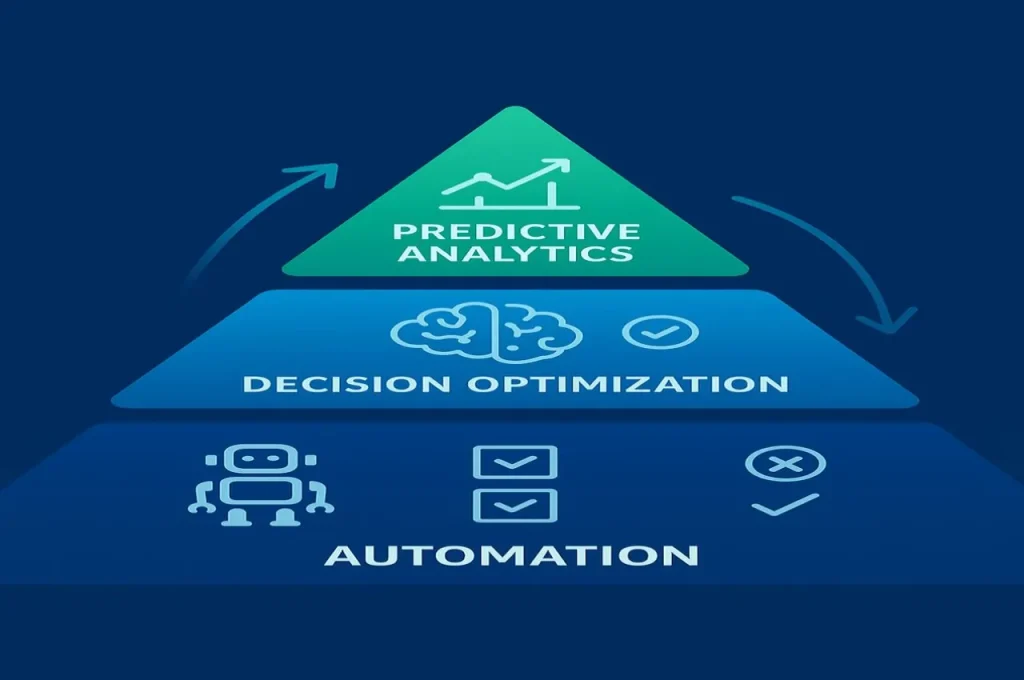
The transformation operates simultaneously across three AI-driven levels that reinforce each other, creating exponential rather than additive returns. Understanding this framework prevents the common mistake of implementing tools randomly without strategic coherence.
Level 1: AI automation of repetitive tasks
Level one focuses on automating repetitive tasks that consume time without requiring human judgment. Email management, meeting scheduling, report generation, and routine follow-ups fall squarely in this category.
Smart email filtering
Consider your inbox dynamics for a moment. Approximately 60 to 70% of messages follow standard templates that don’t require creative thinking. AI-powered smart filtering now categorizes incoming messages by genuine urgency rather than simple chronological order. Urgent items requiring action within 24 hours surface immediately. Important messages needing thoughtful response get flagged for focused review. Informational content suitable for batch processing moves to a separate queue.
AI-powered response generation
AI-powered suggested responses provide contextually appropriate drafts you can approve in three seconds instead of composing for three minutes. On a typical day receiving 80 emails, this automation can save 45 to 60 minutes of pure typing time. Multiply across five working days and you recover several hours weekly from this single intervention.

AI meeting transcription
AI meeting transcription demonstrates automation at peak effectiveness. You previously spent 45 minutes after each hour-long meeting writing structured notes. Modern transcription tools capture conversations, identify speakers, extract key decisions, and generate action lists without manual intervention. Your role shrinks to 10 minutes of review and light refinement.
Across five weekly meetings, that shift represents nearly 3 hours reclaimed. Major organizations have documented substantial reductions in time spent on administrative tasks through systematic automation.
Level 2: AI-driven decision optimization
Level two addresses the invisible drain of constant micro-decisions consuming cognitive energy before you’ve produced anything tangible. Every morning, entrepreneurs face dozens of choices about prioritization, scheduling, and resource allocation.
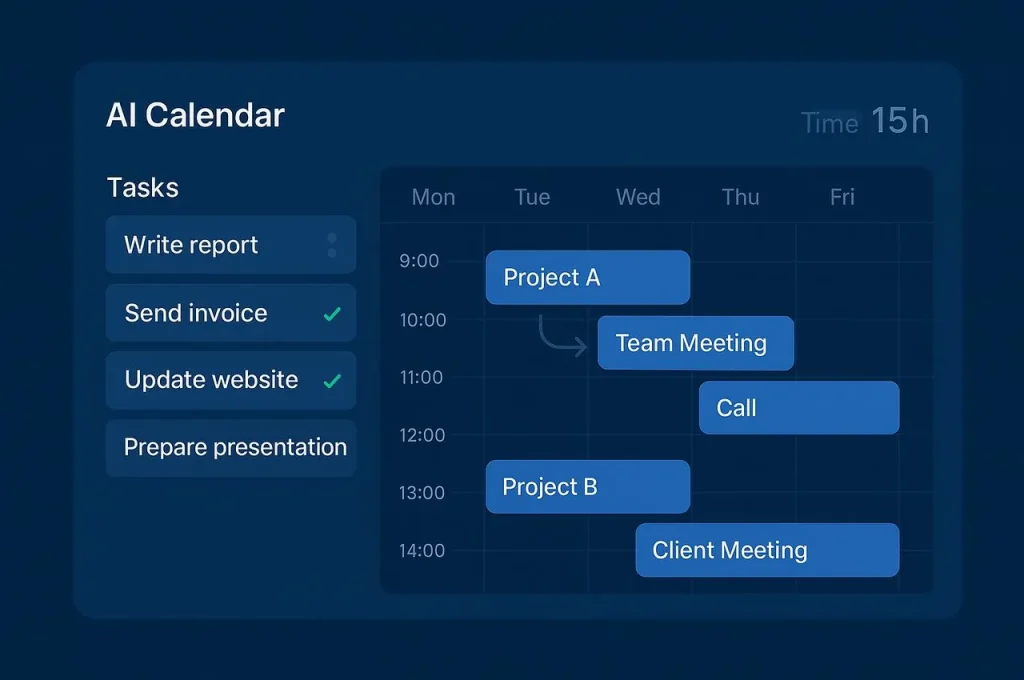
Intelligent calendar management.
Intelligent scheduling systems resolve these dilemmas automatically by analyzing your constraints and priorities. Your calendar organizes itself based on peak productivity windows, existing commitments, and task dependencies. Motion, for example, helps users save significant coordination time according to user reports—for an entrepreneur spending substantial hours weekly on schedule management, this represents meaningful time recovered.
The benefit extends beyond minutes saved. You preserve mental energy otherwise spent juggling variables and second-guessing choices. This cognitive preservation often matters more than the time savings because it protects your capacity for creative and strategic thinking.
AI priority scoring
AI-powered priority scoring transforms another exhausting daily ritual into objective analysis. Instead of relying on intuition or reacting to whoever screams loudest, you receive systematic evaluation across multiple dimensions. Business value, technical feasibility, and velocity to results each get assessed consistently.
Level 3: predictive AI analytics and problem prevention
Level three moves beyond reactive optimization into proactive problem prevention through predictive analytics. AI systems monitor patterns to detect issues before they become crises requiring emergency response.
Early warning systems
A project consistently consuming more time than estimated triggers early warning alerts. A team member accumulating excessive hours without corresponding output receives rebalancing recommendation before burnout occurs. This anticipation fundamentally changes your operational posture from firefighter to strategist.
Behavioral pattern recognition
Behavioral analytics identify concerning trends in your own work patterns weeks before consequences materialize. Gradual increase in working hours, progressive decrease in breaks, or accumulation of evening work sessions often precede burnout by substantial margins.
The compounding AI effect
The compounding effect emerges when these three levels integrate properly. Automation frees several hours weekly, decision optimization adds additional hours, predictive intervention prevents crises that would consume considerable time monthly. But the real leverage appears in interactions between levels.
Time saved through automation gets protected by decision optimization, which allocates it to high-value activities rather than letting new busywork expand to fill available space. Predictive analytics ensures this optimized schedule remains sustainable long-term.
Entrepreneurs documenting this transformation consistently report significant time recovered weekly after 90 days of systematic implementation. That represents hundreds of hours annually.
Reduced decision fatigue improves strategic thinking. Fewer crises decrease stress hormones affecting health. Protected focus time enables deeper creative work producing better outcomes. Improved boundaries strengthen relationships outside work.
The 12 best AI time management tools for entrepreneurs.
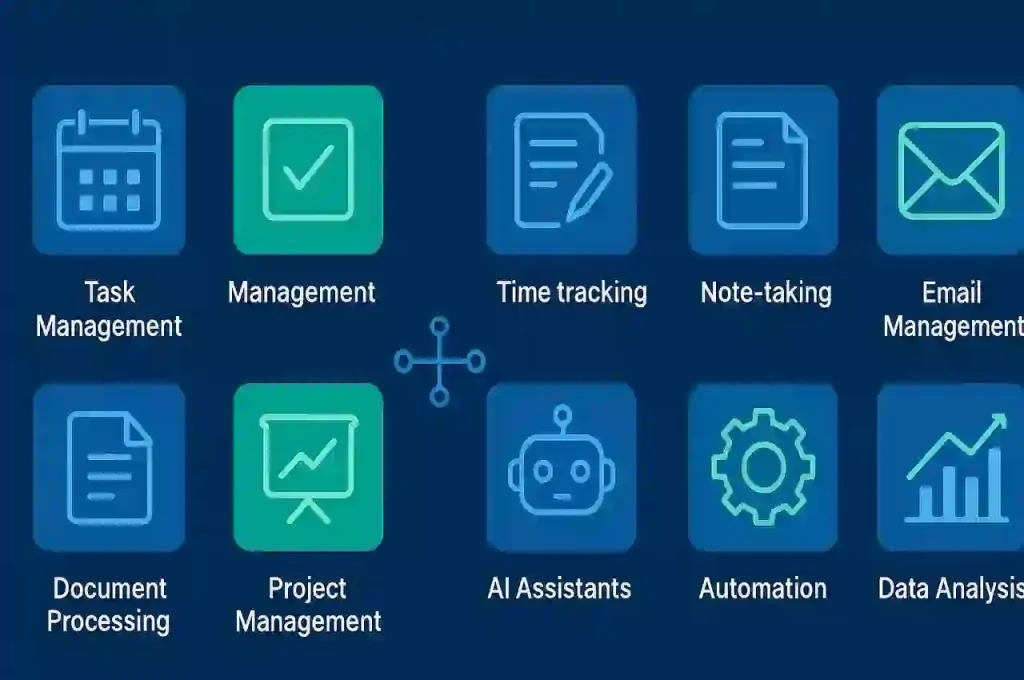
The market for AI-powered productivity platforms has exploded with more than 50 new solutions launching quarterly. Each promises to revolutionize your workflow, but this abundance creates a new challenge when choosing becomes harder than the original problem.
Your ideal stack depends on several critical factors. Do you bill clients hourly or manage projects on fixed fees? Do you work solo or coordinate distributed teams across time zones? Do you prefer complete automation or manual control with intelligent assistance?
Motion: The AI-Powered All-in-One project manager
Motion positions itself as the comprehensive solution combining task management, calendar optimization, and project tracking in a single interface. The platform automatically schedules your tasks, meetings, and projects based on priorities, deadlines, and dependencies between activities.
Dynamic calendar intelligence
The intelligence shines brightest when handling interconnected work. If one project falls behind, Motion reorganizes your entire calendar dynamically to absorb the delay without manual replanning.
Users consistently report saving substantial hours weekly on pure coordination overhead. Pricing sits at $29 per user monthly, positioning Motion as premium investment but potentially replacing multiple subscriptions.
Reclaim AI: Protecting what matters most
Reclaim takes a fundamentally different approach by focusing on defending your time against constant invasion. The platform has already scheduled millions of hours of protected focus time according to their published metrics.
Flexible habit protection
The signature feature called Habits allows blocking time for recurring personal and professional activities. Exercise, lunch, deep work sessions, and one-on-one meetings all receive protected but flexible slots. The blocks adapt automatically if a genuinely priority meeting emerges but resist less important requests.
Native integration with Asana, ClickUp, Jira, Linear, and Todoist represents major advantage for those attached to current project tools. At $8 per user monthly, Reclaim offers exceptional value proposition for solo entrepreneurs or small teams.
Clockwise: The AI team calendar optimizer
Clockwise excels in one specific domain and executes better than any competitor. The tool reorganizes flexible meetings automatically to create long uninterrupted blocks of focus time for all participants simultaneously.
Team-wide optimization
The magic happens most visibly in organizations where multiple people share numerous meetings. Clockwise analyzes all participant calendars and intelligently moves sessions to maximize everyone’s deep work time.
Pricing starts at $6.75 per user monthly, making Clockwise the most affordable option for larger teams. Solo entrepreneurs gain limited value here—the platform shines brightest orchestrating group schedules.
Trevor AI: Simplicity for daily planning
Trevor embraces minimalism in stark contrast to feature-heavy competitors. The visual interface allows dragging tasks onto your calendar to plan each day. This simplicity appeals to people intimidated by complex productivity systems.
AI intelligence operates behind clean interface, suggesting optimal time slots based on historical patterns and adjusting automatically when you fall behind schedule. At $3.99 monthly, Trevor claims the most economical price point on this list.
Calendly: AI-Powered external meeting scheduling
Calendly doesn’t manage your internal planning but excels at one frustrating task that wastes surprising amounts of time. The platform eliminates back-and-forth email tennis when scheduling with external contacts by sharing a personalized link displaying your real availability.
For consultants, sales professionals, and recruiters organizing frequent external meetings, Calendly becomes indispensable within days. At $10 per user monthly, the investment pays for itself quickly for high-volume schedulers.
RescueTime: AI-powered attention guardian
RescueTime operates silently in background, categorizing every application and website by productivity level without conscious interaction. The platform reveals attention leaks invisible without objective measurement.
Automatic Activity Tracking
Daily productivity scoring creates natural gamification that gently nudges behavior toward better habits without forced discipline. Premium features unlock at $6 monthly, positioning RescueTime as accessible option for individual contributors.
Toggl Track: AI-Enhanced precision for billing
Toggl prioritizes manual control over automation with explicit start-stop timers for each activity. This approach demands more discipline but delivers superior precision for client billing and project profitability analysis.
Comprehensive Integrations
Integration with 100+ applications allows starting timers directly from Trello, Asana, or your project tool without interface switching. Pricing starts at $10 per user monthly for basic plans.
Timely: AI-Powered hybrid tracking approach
Timely bridges the gap between fully automatic and fully manual tracking through innovative hybrid approach. The platform captures all digital activities automatically, then presents visual timelines you can assign to projects with quick clicks.
Memory AI technology
Automatic capture ensures nothing gets forgotten while manual assignment maintains accuracy for client billing. Pricing ranges from $8 to $20 per user depending on features selected.
Choosing your AI stack
Your decision between these platforms depends primarily on three critical factors. Solo operation versus team coordination drives fundamental tool selection. Billing structure matters significantly, as hourly consultants requiring detailed time tracking need different capabilities than project-based entrepreneurs.
The highest ROI often comes from combining 2 to 3 specialized tools rather than seeking one perfect solution. Calendly for external scheduling plus Reclaim for internal optimization plus RescueTime for awareness creates powerful synergy at reasonable total cost.
Automate your calendar: Complete setup in 30 minutes.
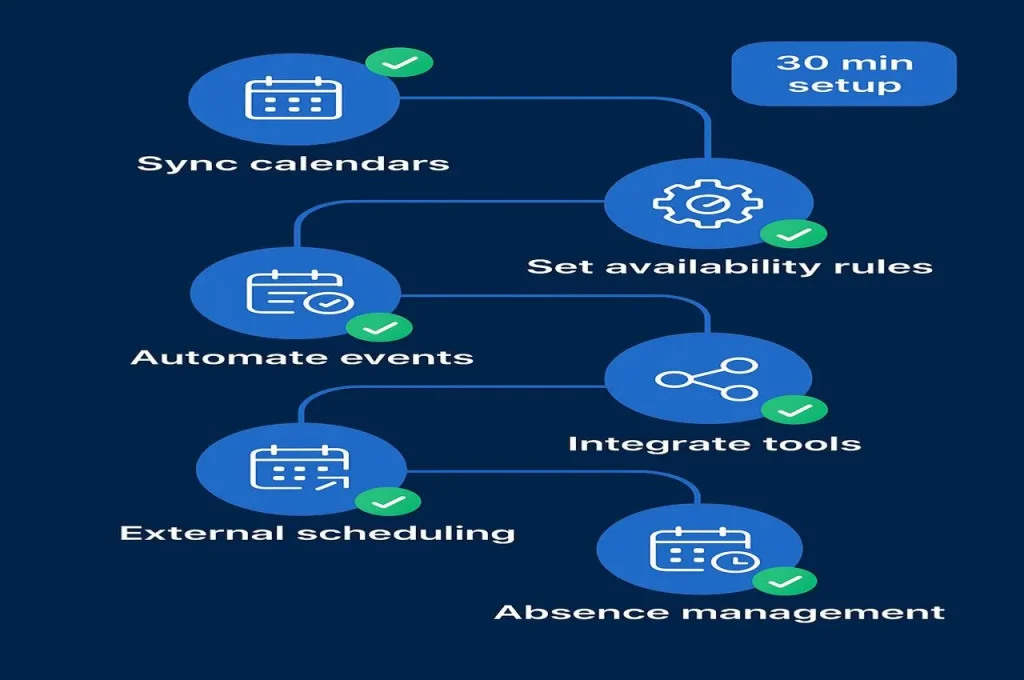
Calendar automation represents the highest ROI investment for busy founders, yet most entrepreneurs never progress beyond basic features. You probably still manually hunt for meeting slots, send multiple coordination emails, and frantically check three different calendars before confirming availability.
The transformation from coordination chaos to intelligent scheduling takes surprisingly little time when following the right sequence. These seven configuration steps build progressively on each other. Each takes 3 to 5 minutes and delivers immediate value before moving to the next level.
Step 1: Connect all your calendars with AI sync
Centralizing calendar visibility
The foundation starts with centralizing visibility across every calendar you maintain. Most entrepreneurs juggle at least two or three separate calendars, and this fragmentation creates inevitable conflicts that damage professional credibility.
The solution requires true bidirectional synchronization, not simple one-way feeds that create stale copies. Changes in any calendar must propagate instantly everywhere else. You add a personal appointment in Google Calendar and it automatically blocks that time in Outlook without exposing private details to colleagues.
Setting up bidirectional sync
For truly bidirectional workflows where modifications flow both directions, tools like CalendarBridge provide robust solutions. This visibility across multiple calendars simultaneously with appropriate privacy controls represents the critical foundation.
Step 2: Define your availability rules with AI
Establishing working parameters
The second step establishes your default working parameters so the system can make smart suggestions automatically. Start by indicating your standard meeting hours. Perhaps you accept external meetings only between 2pm and 5pm to protect morning focus time for strategic work.
Configuring buffer times
Buffer times between consecutive meetings prevent the exhausting experience of back-to-back sessions with no breathing room. A 10 to 15 minute gap allows restroom breaks, quick preparation for next conversation, or simply mental reset.
Default durations by meeting type accelerate scheduling decisions. Candidate interviews typically need 45 minutes while quick team check-ins work fine in 15 minutes. The system suggests appropriate lengths automatically based on meeting category.
Step 3: Automate event creation and modification with AI
Building custom workflows
The third level enables your system to create, adjust, and delete events without manual intervention. This automation transforms your calendar from passive display into active coordinator that anticipates needs and executes routine coordination autonomously.
Platforms like n8n allow building custom workflows triggered by specific conditions. For example, every completed sales call in your CRM automatically creates a follow-up meeting 48 hours later with the prospect.
Step 4: Integrate communication and project tools with AI
Connecting your ecosystem
The fourth step connects your calendar to the broader ecosystem where work actually happens. Connect Slack or Discord to send automatic meeting reminders. Participants receive notification 15 minutes before start time without you remembering to ping everyone.
Sync with project management platforms so calendar events generate corresponding tasks automatically. A client meeting creates a follow-up task for sending summary notes and another for delivering promised materials.
Step 5: Enable intelligent AI external scheduling
Eliminating coordination dance
The fifth step tackles the frustrating coordination dance with people outside your organization. Modern scheduling assistants eliminate this friction entirely. Calendly represents the established solution—you share a personalized link that displays your real availability based on all connected calendars.
CalendarBridge takes different approach by operating entirely through email. You simply copy the assistant on scheduling conversations and it negotiates directly with your contacts. Both approaches eliminate significant scheduling coordination time for external meetings.
Step 6: Automate absence and out-of-office management with AI
Streamlining unavailability workflows
The sixth step handles the tedious sequence of actions required when you’ll be unavailable. Vacation periods, sick days, or even full-day off-site commitments typically demand multiple manual steps consuming 30 to 45 minutes.
Comprehensive automation transforms this into single declaration. You simply indicate your absence period and the system executes the complete workflow. Calendar blocks appear automatically with appropriate privacy settings. Regular contacts receive proactive notification. Auto-responders activate at the right moment.
Step 7: Configure advanced AI rules and personalization
Customizing system behavior
The seventh step adds sophisticated customization that adapts the system to your unique working style. Automatic category assignment organizes events without manual tagging. Create rules that categorize synchronized events based on keywords or participants.
Conditional sync direction provides flexibility for different calendar types. Perhaps your personal calendar should block time on your work calendar without exposing details. Privacy levels ensure appropriate information visibility for different audiences.
AI task prioritization: Methods beyond eisenhower matrix.
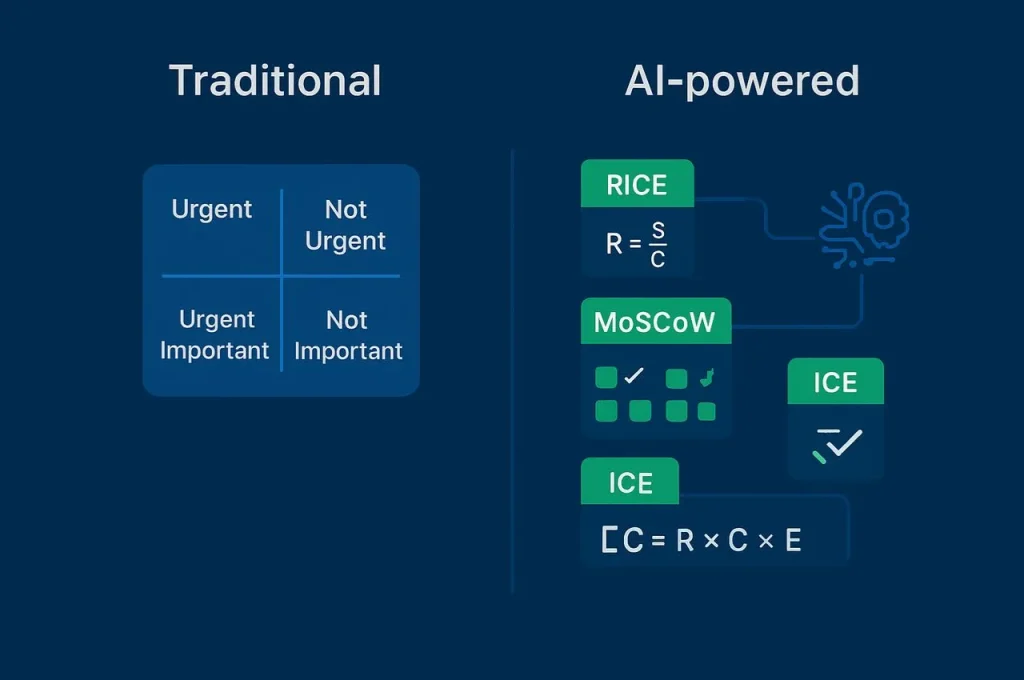
The traditional urgent-important matrix fails entrepreneurs managing 50+ competing priorities across multiple projects simultaneously. You stare at your endless task list each morning and familiar anxiety creeps in about where to start when everything seems important and urgent.
Modern AI-powered prioritization frameworks leverage multi-criteria scoring that evaluates tasks against multiple variables, then recalibrates continuously as contexts shift. These methods transform paralyzing overwhelm into objective clarity about where your attention creates maximum leverage right now.
Why the eisenhower matrix falls short
Binary classification limitations
President Eisenhower’s two-by-two grid dividing tasks into urgent-important combinations revolutionized productivity thinking decades ago. The concept remains sound, but implementation at scale becomes problematic.
The binary classification forces artificial choices. Many tasks exist in gray areas where urgency and importance both register moderate levels. Cognitive biases corrupt manual classification consistently. The matrix assumes static conditions, but entrepreneurial contexts change constantly.
RICE: AI-enhanced reach × impact × confidence ÷ effort
Understanding the four dimensions.
The RICE methodology developed by Intercom provides elegant solution for product and project prioritization. The framework evaluates four dimensions that capture nuanced trade-offs better than binary urgent-important classification.
Reach measures how many people or customers this task will affect. Impact assesses the intensity of effect on those reached. Confidence reflects your certainty about the reach and impact estimates. Effort estimates the total person-months required to complete the work.
Calculating RICE scores.
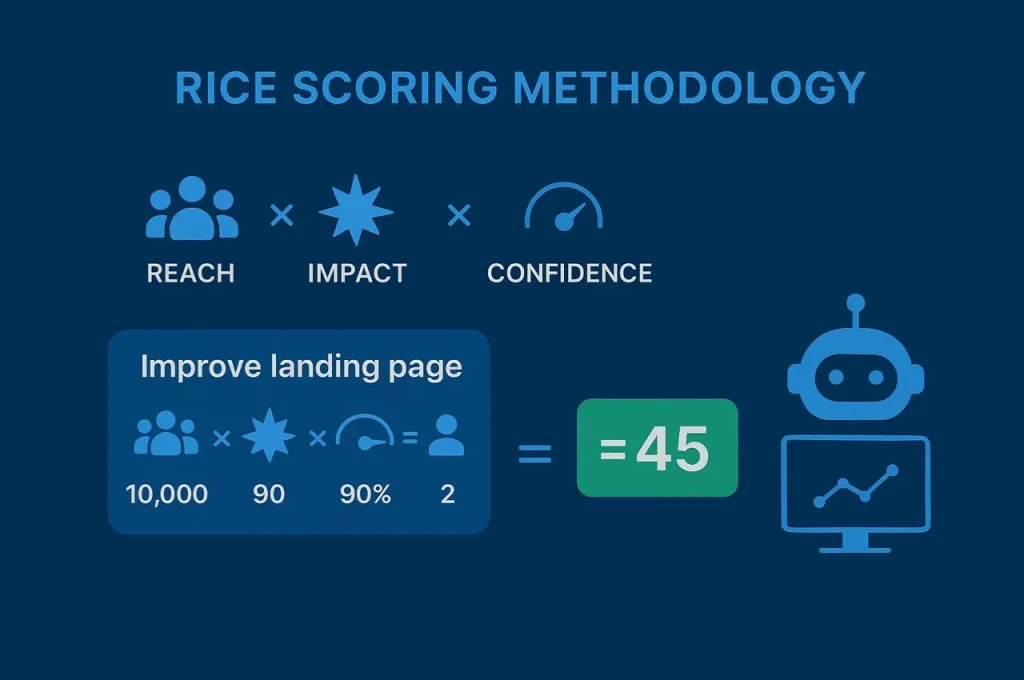
The RICE score multiplies reach times impact times confidence, then divides by effort. Higher scores indicate better returns on invested resources.
AI-powered tools like Monday and ClickUp automate RICE scoring once you define evaluation criteria. New tasks receive calculated scores automatically based on attributes you assign.
MoSCoW: AI-powered must-should-could-won’t framework
Four-bucket categorization
The MoSCoW method created for software development applies beautifully to entrepreneurial resource allocation. The framework categorizes every item into four explicit buckets that clarify trade-offs.
Must-have items represent non-negotiables without which the project fails entirely. Should-have activities bring significant value and rank just below must-haves. Could-have tasks improve the experience but remain clearly optional. Won’t-have this time items get explicitly documented as out of scope for current phase.
Forcing explicit decisions
The brilliance lies in forcing explicit classification rather than implicit assumptions. Asana enables MoSCoW implementation through custom fields that auto-sort and filter tasks.
Value versus effort matrix: AI-powered visual prioritization
Understanding the four quadrants
The value-effort matrix provides visual prioritization especially useful for cross-functional discussions. The two-axis grid plots every initiative by estimated business value and required effort, creating four analyzed quadrants.
Quick wins land in the high-value, low-effort quadrant and deserve immediate attention. Major projects occupy the high-value, high-effort quadrant and require careful scheduling. Fill-ins appear in the low-value, low-effort quadrant. Time wasters occupy the low-value, high-effort quadrant and deserve elimination.
Facilitating team alignment
The visual representation facilitates alignment during team discussions. Disagreements about priority become concrete debates about value and effort estimates rather than abstract arguments.
Automated time tracking: Measuring what actually matters.
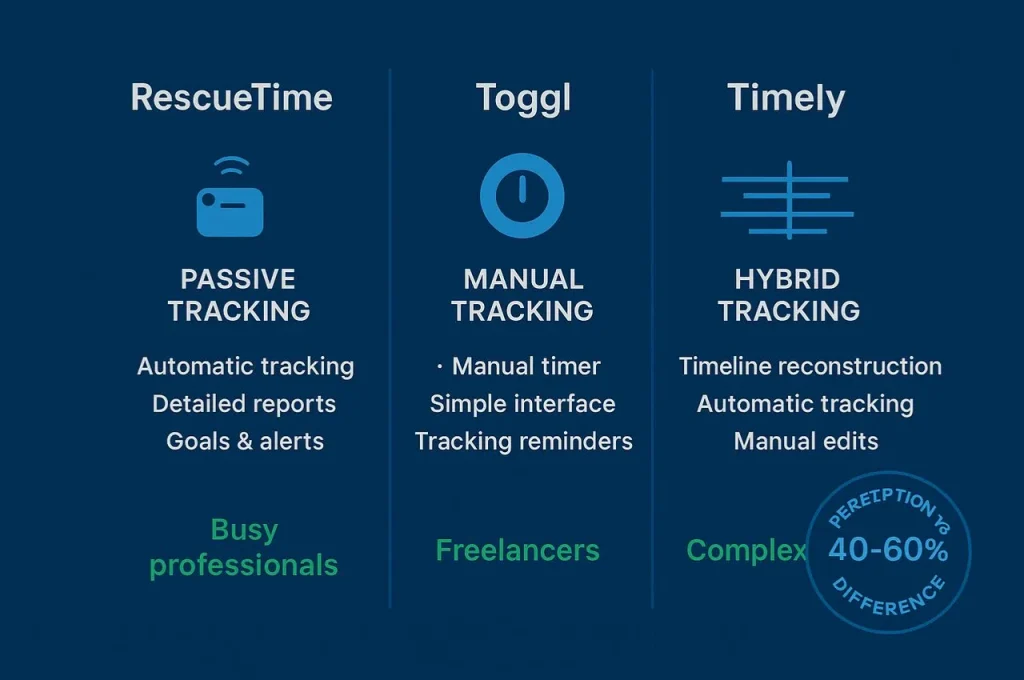
Your perception of time allocation differs significantly from reality according to multiple studies tracking entrepreneurs objectively. You probably believe you spend 3 hours daily on strategic work when actual measurement reveals 90 minutes fragmented across interruptions.
This gap between perception and reality explains why time optimization efforts often fail despite good intentions. You can’t improve what you don’t measure accurately.
RescueTime: The AI-powered passive attention guardian
Automatic activity classification
RescueTime operates silently in background, categorizing every application and website you visit according to productivity levels without conscious interaction required. The platform requires virtually no effort after initial setup.
The system automatically classifies activities as very productive, productive, neutral, distracting, or very distracting based on default categories and your custom rules. The real value emerges in revealing invisible leaks consuming hours weekly.
Gamification and focus features
Daily productivity scores create natural gamification without forced discipline. Focus time features complement awareness by blocking access to distracting sites during designated work sessions. Premium features unlock at $6 monthly.
Toggl Track: AI-enhanced precision for billing
Manual timer approach
Toggl takes the opposite philosophical approach by prioritizing accuracy over automation. You explicitly start and stop timers for each activity, creating precise record of every work session with full control over categorization.
This manual discipline demands more cognitive overhead but delivers superior granularity for client billing and project profitability analysis. Integration with 100+ applications allows starting timers directly from your project management tool.
Comprehensive reporting
Detailed reports dissect time allocation across every imaginable dimension—by client, by project, by task type, by team member. Pricing starts at $10 per user monthly.
Timely: AI-powered hybrid intelligence approach
Combining automatic and manual
Timely bridges the philosophical gap between fully automatic and fully manual tracking through innovative hybrid approach. The platform captures all digital activities automatically, then presents visual timelines you can assign to projects with quick clicks.
Memory AI learning
Automatic capture ensures nothing gets forgotten while manual assignment maintains accuracy. Memory AI technology learns from your assignment patterns to suggest categorizations automatically. Pricing ranges from $8 to $20 per user monthly.
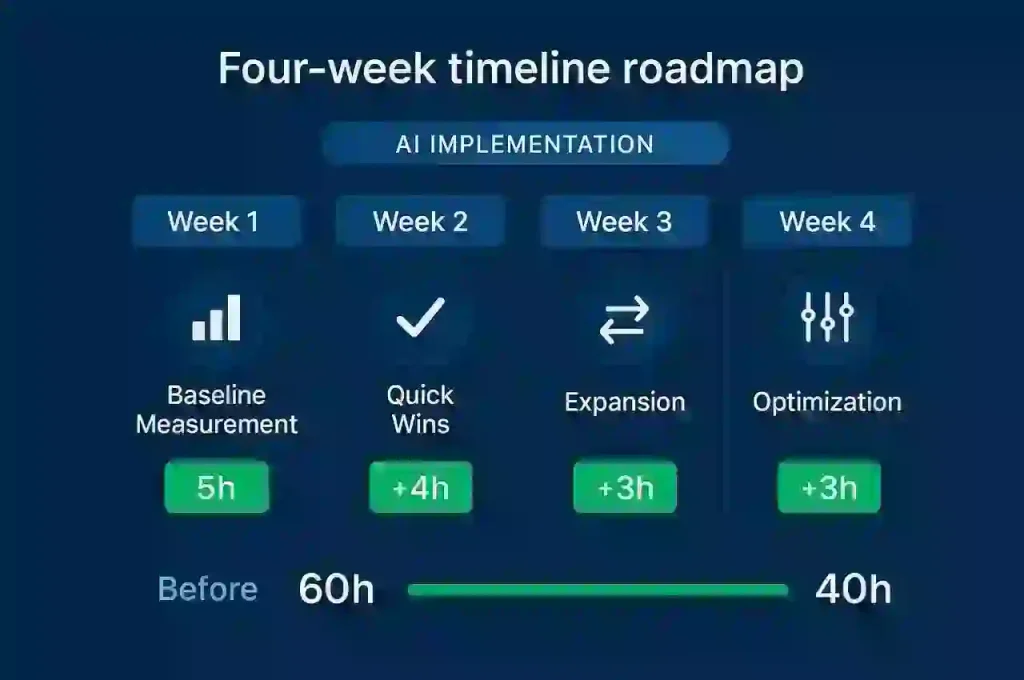
4-Week action plan: From 60 to 40 hours with same Output
Substantial time savings equal hundreds of hours annually reclaimed through systematic AI implementation. The transformation from 60-hour weeks to 40-hour weeks with equivalent output doesn’t require magic or extraordinary discipline.
This progressive four-week framework prevents overwhelming deployment while generating measurable victories that fuel continued adoption. Each week focuses on specific domains with clear metrics documenting gains.
Week 1: Establishing your baseline with AI
Honest measurement phase
The first week dedicates itself entirely to honest measurement of current reality. Install RescueTime or Toggl Track on Monday morning and let it capture a complete work week without changing any behaviors.
By Friday evening, export your tracking data and identify the 10 to 15 processes consuming most time. Quantify average time spent per category with brutal honesty. Create a simple spreadsheet documenting baseline metrics: total work hours, distribution across major categories, time in meetings versus focused work.
Selecting initial targets
Select your two initial targets based on combination of time consumed and emotional pain. Pick irritants you’ll feel motivated to fix, creating emotional fuel for behavior change.
Week 2: Implementing AI quick wins
Email automation setup
The second week launches tactical implementation on your two chosen domains. Start with email automation since this affects multiple daily touchpoints and generates noticeable relief quickly.
Configure smart filters creating three priority buckets. Urgent requires action within 24 hours. Important needs thoughtful response but not immediately. Informational can be batch-processed once daily.
Enable suggested responses for common message types. Measure time saved rigorously by tracking email processing duration this week versus last week’s baseline. Most entrepreneurs discover meaningful reduction immediately.
Meeting automation implementation
For meeting automation, implement transcription and summarization using Otter or Fireflies. Join one tool to your video conferences and let it capture everything automatically. Calculate time recovered—the typical 45-minute writing session shrinks to 10-minute verification and light editing.
Week 3: Expanding AI automation scope
Research automation
The third week broadens implementation to three additional high-impact areas. Information research represents low-hanging fruit—implement research assistants that find, synthesize, and cite sources automatically.
Presentation creation
Test presentation creation tools that generate complete first drafts in 10 minutes from brief outlines. Configure automatic weekly progress summaries that compile from task completion data rather than requiring manual report writing.
Team training
If managing a team, dedicate one 2-hour session to training on the new systems. Share your week two results to demonstrate concrete gains and overcome resistance.
Week 4: AI Optimization and comprehensive measurement
Complete impact assessment
The fourth week focuses on refinement and comprehensive impact assessment. Compile your complete metrics showing time allocation before and after across all categories. Calculate total hours saved weekly and annualize to reveal the full magnitude.
Most disciplined implementers reach meaningful weekly time savings by this point, representing substantial capacity expansion. Identify friction points that still slow workflows despite automation and dedicate time to optimizing these rough edges.
Financial ROI calculation
Calculate financial ROI using your actual or target hourly rate. An entrepreneur worth $100 per hour who saves substantial hours weekly generates significant recovered capacity monthly. Document your optimized processes in simple wiki or shared document.
Real entrepreneur case studies with AI.
Sarah’s E-Commerce success
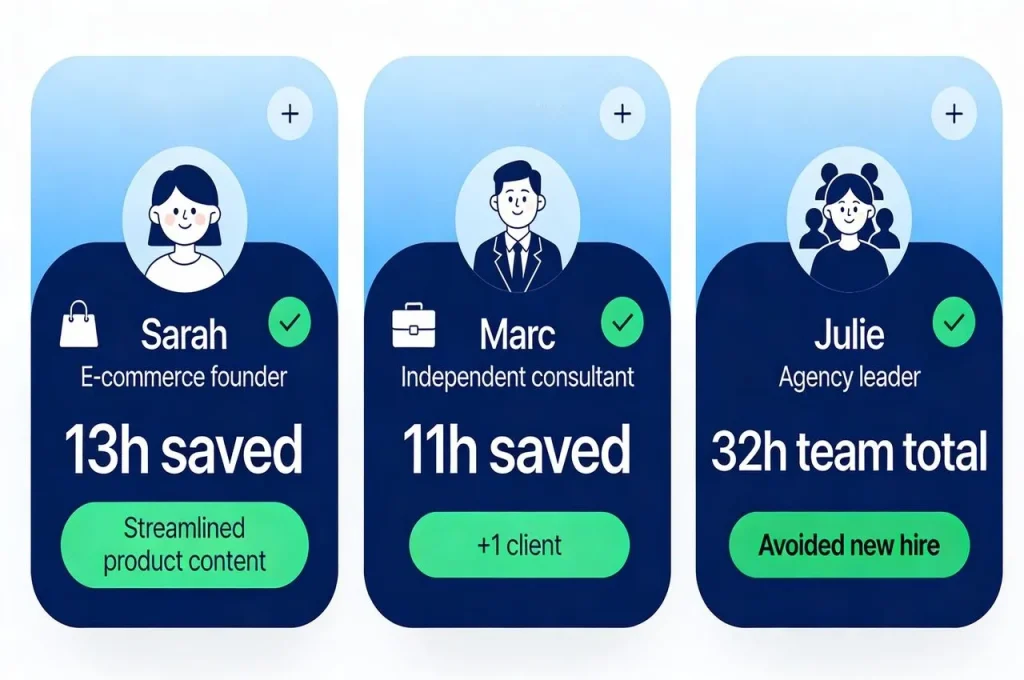
Sarah runs an e-commerce business that was consuming 65 hours weekly. Week one baseline revealed 15 hours weekly in email and 12 hours in meetings. By week four she’d reduced email to 6 hours and meetings to 8 hours, reclaiming 13 hours for growth initiatives.
Marc’s consulting expansion
Marc consults independently and struggled with maintaining five client accounts simultaneously. His baseline showed 20 hours weekly on client communication and coordination. After implementing automation, his coordination time dropped to 9 hours weekly. The recovered 11 hours weekly enabled accepting a sixth client without weekend work.
Julie’s agency efficiency
Julie leads a small marketing agency where she and three team members were drowning in operational overhead. Collectively they recovered 32 hours weekly across four people through coordinated automation adoption, eliminating the need to hire a fifth person for six months.
Mastering AI-powered time management for entrepreneurs is no longer optional but essential for survival in competitive markets. The transformation operates across three reinforcing levels that compound exponentially when implemented together.
The tools exist today—mature and proven across thousands of implementations. No single platform dominates universally because entrepreneur needs vary dramatically. Your stack should match your actual workflow, not aspirational ideal divorced from operational reality.
Real entrepreneurs document significant time recovered weekly after 90 days of systematic implementation. That represents hundreds of hours annually reclaimed from coordination overhead and operational busywork.
The barriers to adoption remain primarily psychological rather than technical or financial. Tools cost under $50 monthly while delivering substantial recovered capacity. Setup requires hours not weeks. What prevents transformation is not capability but decision to begin combined with persistence through initial adjustment period.
Start this week by installing time tracking and measuring one complete work week honestly. Identify your two biggest time sinks from that data. Research tools specifically addressing those pain points. Configure basic automation for one domain and measure results rigorously for two weeks.
Your time remains your most valuable and truly non-renewable resource. Every hour wasted on automatable tasks represents an hour stolen from strategic thinking, business development, or personal relationships. The tools, technologies, and methodologies exist today to reclaim significant capacity.
What remains is your decision to act.