
You probably have dozens of content ideas saved somewhere- notes app, voice memos, a Google Doc titled “Ideas.”
That’s not the problem.
The problem is that 90% of them never become actual content.
Most editorial workflows collapse because they treat “having an idea” and “publishing a post” like the same step. They’re not. One happens in bursts. The other needs structure.
A working AI editorial workflow separates capture from execution. That’s what makes this AI editorial workflow different from the typical approach. You save ideas when they show up, then process them on a fixed schedule- whether you feel inspired or not.
That’s the shift. When the system doesn’t depend on your mood, output becomes predictable.
Table of Contents

Most content creators in the US struggle with the same bottleneck: ideas pile up, but nothing gets published.
The fix is a three-part ai content workflow that treats capture, processing, and publishing as completely separate activities. You capture ideas whenever they show up. You process them into drafts on a fixed schedule using AI. You publish on a separate day after quality checks.
When you stop trying to do all three at once, the chaos stops. Ideas become posts. The rest of this guide shows you exactly how to build that workflow.
Why the typical AI editorial workflow approach breaks
The typical AI editorial workflow approach looks like this: idea hits, you open your AI tool, you try to turn it into a finished post right then and there.
Sometimes it works. Most times it doesn’t.
Here’s what actually happens. You get an idea Tuesday morning. You’re excited. You open ChatGPT and try to draft it immediately. But you’re between meetings, your brain is half-focused on the client call in 20 minutes, and the AI output feels flat. You tweak the prompt three times. Still not right. You save it as a draft and tell yourself you’ll finish it later.
You never do.
Or worse- you force it. You publish something half-baked because you’ve already spent 30 minutes on it and don’t want to waste the effort. It performs poorly. Now you’re frustrated with both the idea and the tool.
The approach breaks because it’s trying to do three different jobs simultaneously: capture the idea, develop it into something coherent, and polish it for publication. Your brain can’t do all three well at the same time, and neither can the AI.
My friend Lisa in Boston used to work this way. She’d get inspired, draft immediately, publish within an hour. Output was inconsistent. Some posts were great, most were mediocre. She couldn’t figure out why until she realized she was asking herself to be creative, strategic, and editorial all in the same sitting.
When she split those jobs into separate sessions using a structured ai content process, everything changed.

The 3-part AI content workflow structure that works
The AI editorial workflow that actually sticks has three distinct phases. Each phase happens at a different time. Each phase has one job.
| Phase | When | Job | Time | Output |
|---|---|---|---|---|
| Capture | Anytime idea hits | Get it out of your head | 30 sec – 2 min | Raw idea note |
| Process | Fixed schedule (1-2x/week) | Turn ideas into drafts with AI | 30-60 min session | 3-5 rough drafts |
| Publish | Separate day, 24h+ later | Review, edit, schedule | 15-30 min per piece | Published content |
Phase 1: Capture – get ideas out of your head instantly
When it happens: Anytime an idea shows up
The job: Get it out of your head and into a trusted system
Time required: 30 seconds to 2 minutes
This is not drafting. This is not developing. This is raw capture.
You’re walking the dog and think “that would make a good post about delegation.” You pull out your phone, open your notes app, and type: “Delegation post- why founders hold onto tasks they should hand off.”
That’s it. You don’t elaborate. You don’t open ChatGPT. You don’t try to structure it. You capture the seed and move on.
The key rule: capture happens in the moment, but it never turns into production work. The moment you try to “just quickly draft it,” you’ve broken the workflow.
Phase 2: Process – turn ideas into drafts with AI
When it happens: Fixed schedule, 1-2 times per week
The job: Turn captured ideas into draft content using AI
Time required: 30-60 minutes per session
This is where your content workflow with AI does the heavy lifting – turning raw ideas into usable drafts without draining your energy.
You sit down during your scheduled processing session- let’s say Monday and Thursday mornings. You open your capture list. You pick 3-5 ideas that feel ready. You feed them to your AI tool one at a time, using a consistent prompt structure.
For each idea, you get a rough draft. Not polished. Not publication-ready. Just a solid first version you can work with.
You don’t try to make it perfect. You don’t edit line by line. You just run the idea through the AI, copy the output into your content workspace, and move to the next one.
At the end of the session, you have 3-5 drafts that didn’t exist an hour ago. None of them are finished, but all of them are 70% of the way there.
A guy I know in Seattle blocks 45 minutes every Monday morning for this. He processes his weekly idea backlog, generates 4-5 drafts, then closes the AI tool. By 10am, his content pipeline is full for the week.
Phase 3: Publish – review, edit and schedule
When it happens: Separate day from processing, ideally 24+ hours later
The job: Review, edit, quality-check, then schedule or post
Time required: 15-30 minutes per piece
You’re not creating anything new here. You’re reviewing what AI generated during processing, making it sound like you, catching any errors, and deciding if it’s ready to publish.
This is where your editorial judgment shows up. Does this make sense? Is the tone right? Are the facts accurate? Does it need a stronger hook or a clearer ending?
You edit for voice and accuracy, not for generation. The hard work of turning nothing into something already happened during processing. Now you’re just making sure it’s good enough to put your name on.
Once it passes your review, you schedule it or publish it. Then you move to the next draft.
My friend in Denver does this every Thursday afternoon. She reviews the drafts from Monday’s processing session, edits them for 20 minutes each, and schedules them for the following week. By Friday, her entire next week of content is queued up and ready.
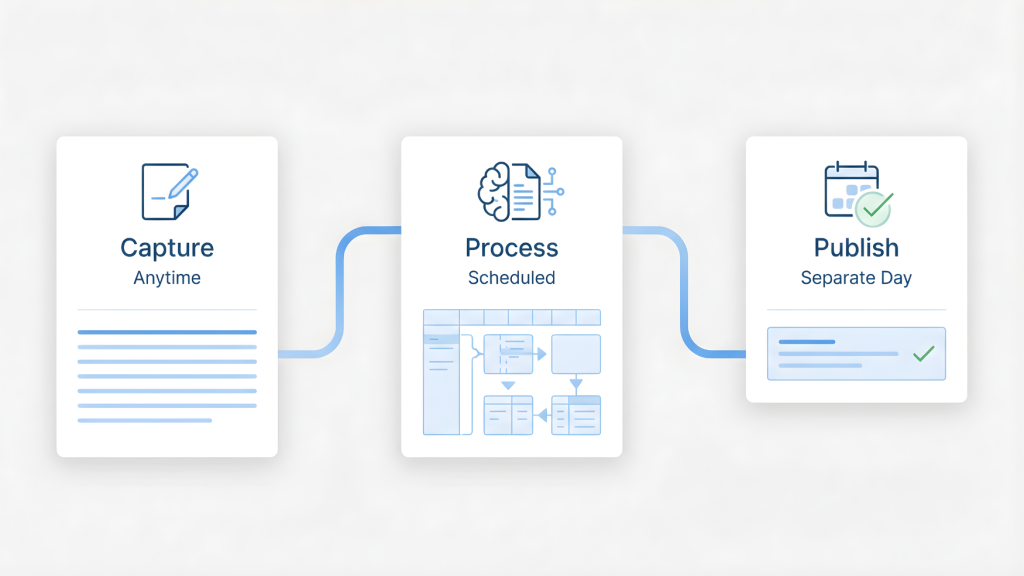
What each step of the AI editorial workflow looks like in practice
Let’s walk through a real example so you can see how the three phases work together.
| Day | Phase | Activity | Time | Result |
|---|---|---|---|---|
| Tuesday | Capture | Note idea about retention vs acquisition | 30 sec | 1 captured idea |
| Thursday | Process | Generate 5 drafts using AI prompts | 50 min | 5 rough drafts ready |
| Friday | Publish | Review, edit, schedule retention post | 15 min | 1 post scheduled for Monday |
Capture example
Tuesday afternoon, you’re reading an article about customer retention. A thought hits: “Most businesses focus on acquisition but ignore the customers they already have.”
You open your notes app and type:
“Post idea: Why retention > acquisition for most small businesses. Include stat about cost difference. Maybe use coffee shop example.”
Done. Two sentences. Thirty seconds. You close the app and get back to work.
Process example
Thursday morning, processing session. You open your idea list and see the retention post idea from Tuesday.
You feed it to ChatGPT with this prompt:
“Write a 600-word LinkedIn post about why customer retention is more valuable than acquisition for small businesses. Include a relatable example, one stat, and end with a question. Conversational tone, no corporate jargon.”
Three minutes later, you have a draft. It’s not perfect, but it’s 80% there. You copy it into your content doc and move to the next idea.
You process four more ideas the same way. Entire session takes 50 minutes. You now have five drafts ready for review.
Publish example
Friday morning, review session. You open Thursday’s drafts and read the retention post.
The AI-generated version is solid but needs your voice. You tighten the intro, swap out a generic coffee shop example for a story about a bookstore owner you know in Portland, and fact-check the retention cost stat.
Takes 15 minutes. You schedule it for Monday at 9am. Done.
You review and schedule the other four drafts the same way. By 11am, you have a week of content queued up and ready to go.
Common AI editorial workflow failure points and quick fixes
Every AI editorial workflow has predictable breaking points. Here’s how to identify and fix them fast.
| Failure Point | Symptom | Root Cause | Quick Fix |
|---|---|---|---|
| Ideas sit forever | 20+ uncaptured ideas | No processing schedule | Block 2x 30-min sessions/week |
| Edit while processing | Only 1 draft per session | Perfectionism during wrong phase | 5-minute timer per idea |
| Same-day publish | Errors slip through | No fresh-eye review | Force 24h gap between phases |
| Overwhelming backlog | 80+ ideas, paralysis | No filtering system | Archive ideas older than 30 days |
| Inconsistent results | Every draft feels different | No prompt templates | Create 2-3 reusable prompts |
Failure point 1: Ideas sit in capture forever
What’s happening: You’re capturing but never processing.
Why it happens: No fixed processing schedule, so it never feels urgent.
The fix: Block two 30-minute processing sessions per week on your calendar. Treat them like client meetings- non-negotiable. If you skip one, the idea backlog grows and the whole system clogs up.
Failure point 2: You edit while processing
What’s happening: You generate a draft, then spend 40 minutes trying to make it perfect before moving to the next idea.
Why it happens: The draft is right in front of you, and editing feels productive.
The fix: Set a timer for 5 minutes per idea during processing. When the timer goes off, you’re done with that idea whether the draft is perfect or not. Copy it to your content workspace and move on. You’ll edit it during the publish phase.
Jake in San Diego fell into this trap constantly. He’d process one idea, spend an hour perfecting it, then run out of time before processing the rest. His backlog kept growing. When he added the 5-minute timer rule, he started processing 5-6 ideas per session instead of one.
Failure point 3: Processing and publishing happen the same day
What’s happening: You generate a draft and immediately try to polish and publish it.
Why it happens: You want to ship fast, so collapsing the timeline feels efficient.
The fix: Force a 24-hour gap between processing and publishing. Fresh eyes catch mistakes, tone issues, and weak spots you miss when you’re too close to the content. Schedule your processing sessions and publish sessions on different days.
Failure point 4: Capture becomes overwhelming
What’s happening: You have 80 captured ideas and no idea where to start.
Why it happens: You’re capturing everything without filtering.
The fix: During processing sessions, archive ideas older than 30 days. If an idea sat for a month and you never felt compelled to develop it, it’s not a priority. Keep your active capture list under 15 ideas. Anything older moves to an archive you can revisit quarterly if needed.
A creator I know in Chicago keeps her active list at 10 ideas max. Once she hits 10, she either processes some or archives the oldest ones. Keeps the list manageable and decision-making fast.
If you’re struggling to manage your idea backlog, you can just learn how to design a weekly content system that prevents overwhelm.
Failure point 5: No consistent prompt structure
What’s happening: Every processing session, you’re reinventing the prompt from scratch.
Why it happens: You don’t have a template, so you wing it every time.
The fix: Create 2-3 prompt templates for your most common content types. Save them somewhere you can copy-paste. During processing, you’re just filling in the specific idea, not writing a new prompt each time.
Example template:
“Write a [length] [platform] post about [topic]. Include [specific element]. Tone: [description]. End with [CTA type].”
Fill in the brackets, hit enter, get your draft. Saves 5 minutes per idea and produces more consistent results.
Inconsistent prompts are also a main reason content systems fail – here’s how to fix them before it breaks your entire workflow.
How to start your content creation workflow this week
You don’t need a complicated setup. The capture process publish system only needs three things and 20 minutes to get started.
| Step | Action | Tool Needed | Time | Status |
|---|---|---|---|---|
| 1 | Choose capture tool | Notes app, Notion, or Google Doc | 5 min | ☐ |
| 2 | Schedule processing session | Calendar | 5 min | ☐ |
| 3 | Schedule publish session | Calendar | 5 min | ☐ |
| 4 | Capture first 3 ideas | Your chosen tool | 5 min | ☐ |
Step 1: Choose your capture tool (5 minutes)
Pick one place where you’ll save ideas. Not three places. One.
Options:
- Notes app on your phone (Apple Notes, Google Keep)
- Notion page titled “Content Ideas”
- Voice memos (if you prefer talking over typing)
- Simple Google Doc
The best tool is the one you’ll actually use in the moment. If you’re always on your phone, use your phone’s native notes app. If you live in Notion, use Notion.
Set it up now. Create a new note or page titled “Content Ideas.” Leave it empty. You’re done with step one.
Step 2: Schedule your first processing session (5 minutes)
Open your calendar. Find a 30-45 minute block this week when you’re typically alert and won’t be interrupted.
Block it. Title it “Content Processing.”
Add a note in the calendar event: “Review idea list. Generate 3-5 drafts using AI. No editing.”
That’s your first processing session. You’ll capture ideas between now and then.
Step 3: Schedule your first publish session (5 minutes)
Pick a different day, ideally 24-48 hours after your processing session.
Block 30-45 minutes. Title it “Content Review & Publishing.”
Add a note: “Edit drafts from processing session. Schedule for next week.”
Now you have the structure. Capture happens whenever. Processing happens [day you chose]. Publishing happens [day you chose].
Step 4: Capture your first 3 ideas (5 minutes)
Think about the last week. What ideas, observations, or frustrations came up that could become content?
Write them down in your capture tool right now. Just the raw thought, not a full draft.
Examples:
- “Post about why most business advice doesn’t apply to solopreneurs”
- “Thread on three things I stopped doing that freed up 10 hours per week”
- “Quick video on the biggest pricing mistake I see new consultants make”
Three ideas. Two sentences each. Done.
You now have a working editorial workflow. The structure is live. Next time an idea hits, you know exactly where it goes. When your processing session arrives, you know exactly what to do.

The real shift
An AI editorial workflow that actually sticks doesn’t require discipline. It requires separation. That’s what makes this content creation workflow different from everything you’ve tried before.
In an AI editorial workflow, you separate capture from processing. You separate processing from publishing. Separate the creative moment from the execution moment from the editorial moment.
When you stop trying to do everything at once, the workflow stops breaking. Ideas don’t die in your notes app. Drafts don’t sit unfinished for weeks. Publishing doesn’t depend on inspiration showing up at the exact right time.
You capture ideas when they’re fresh. You process them when you’re focused. You publish them when you’re clear-headed enough to make sure they’re good.
The system runs whether you feel inspired or not. That’s the whole point.
Build the structure once. Follow it for a month. You’ll stop wondering why your ideas never become content.
Ready to build a predictable content system?
Now that your AI editorial workflow is in place, here are your next steps :
- Take your system further with the complete calm AI content system guide.
- Learn how to design a weekly AI content system without burning out.
- Discover why content systems fail and how to fix yours before it breaks