
You’re running a Shopify store with steady monthly revenue. Orders come in, emails pile up, inventory updates pile up. Everything feels manual.
Most SMB owners skip ecommerce workflow mapping entirely. They buy automation tools first, then try to fit their operations around them. The result: broken processes, duplicated tasks, and $300/month spent on tools that create more problems than they solve.
This guide walks you through a practical workflow mapping method before you touch any AI tool. You’ll identify exactly what to automate, what to keep manual, and where your real bottlenecks are.
Table of contents
Why workflow mapping comes before any automation decision

Automation doesn’t fix bad processes. It speeds them up.
If your order fulfillment has three unnecessary steps, automating means you’ll execute those unnecessary steps faster. You’ve just automated waste.
Real Example: An Atlanta Shopify owner spent a significant monthly budget on Zapier workflows that duplicated customer emails. The problem wasn’t Zapier. Nobody mapped the existing email triggers before automating them. Result: customers received multiple identical emails per order, flooding the support inbox with confusion.
Ecommerce workflow mapping reveals:
- Which steps add value (and which are legacy bloat)
- Which steps waste time (redundant approvals, manual copy-paste)
- Where decisions happen (human judgment vs rule-based logic)
- Where exceptions break the process (returns, address errors, stockouts)
Without this clarity, automation creates new problems instead of solving old ones.
What workflow mapping actually means for ecommerce
Workflow mapping is simple. You write down every step that happens between a trigger and an outcome.
For ecommerce, a workflow has three parts:
Trigger: What starts the process (customer places order, inventory hits threshold, support ticket arrives).
Steps: What happens next (send confirmation email, update inventory, assign ticket to team member).
Outcome: What the process achieves (customer informed, stock replenished, issue resolved).
Most ecommerce owners skip this. They know what happens in their head, but they’ve never written it down.
The consequences:
- Your team doesn’t follow the same process. Every order gets handled slightly differently.
- You can’t identify what to automate. If the process isn’t clear, you’ll automate the wrong things.
- AI tools make decisions based on incomplete data, creating unpredictable results.
Workflow mapping forces clarity. You see the process as it actually works, not as you think it works.
Key insight: Mapping prevents automating broken processes that waste money.
Ecommerce workflow mapping: Where to start before you automate
To map ecommerce processes effectively, start with the workflow that directly impacts customer trust. Before diving into mapping, understand where AI actually adds value versus where simple automation works better.
AI excels at:
- Address verification and correction (detecting typos, suggesting fixes before shipping errors)
- Fraud detection (analyzing order patterns to flag suspicious transactions)
- Smart routing (sending complex support tickets to humans, simple ones to chatbots)
- Predictive inventory alerts (forecasting stockouts based on sales velocity, not just thresholds)
Simple automation handles:
- Order confirmations (trigger-based, no intelligence needed)
- Tracking emails (status changes trigger emails)
- Basic inventory alerts (stock drops below X units)
Peer Insight: A Phoenix WooCommerce seller tried using AI for basic order confirmations. Waste of money. AI shines when you need context-aware decisions, not simple if/then logic. They switched to Zapier for confirmations at a low monthly cost and redirected their AI budget toward fraud detection where it actually matters.
Map your workflows to identify which tasks need intelligence (AI) and which just need reliability (simple automation). Once you’ve identified where AI fits, learn exactly when to deploy AI agents in your workflows
Key insight: Use AI where decisions require context, use simple automation where rules suffice.
Ecommerce workflow mapping: The 3 operations to prioritize first
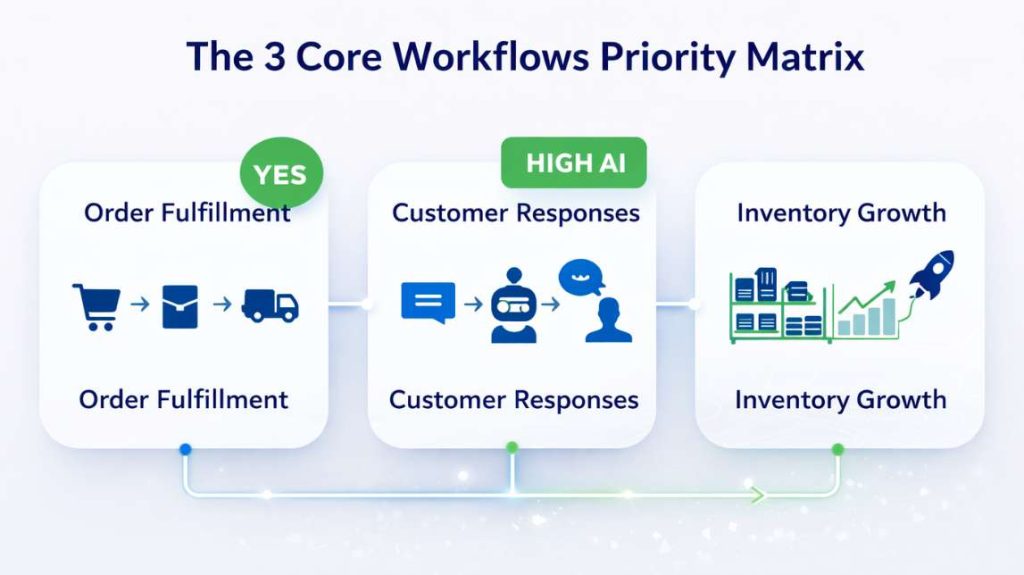
Workflow mapping priority matrix
| Workflow | Business Impact | Automation ROI | AI Opportunity | Map First? |
|---|---|---|---|---|
| Order fulfillment | High (customer trust) | High (saves substantial weekly hours) | Medium (address validation, fraud) | ✅ YES |
| Customer communication | High (satisfaction) | Medium (saves moderate weekly hours) | High (intent detection, routing) | ✅ YES |
| Inventory management | Medium (operational) | Medium (saves moderate weekly hours) | High (predictive alerts) | ✅ YES |
Order fulfillment workflow (from cart to delivery)
This is your most critical workflow. It starts when a customer completes checkout and ends when they receive your product.
A typical order fulfillment workflow includes:
- Customer completes payment
- Order confirmation email sent
- Order appears in fulfillment system (Shopify, WooCommerce, or 3PL)
- Inventory updated
- Shipping label generated
- Package shipped
- Tracking number sent to customer
- Delivery confirmed
Each step has potential bottlenecks:
- Email delays (customer doesn’t receive confirmation within minutes)
- Inventory sync failures (product shows available but isn’t, causing overselling)
- Manual label generation (someone clicks “print” for every order instead of auto-printing)
- Missing tracking updates (customer emails asking “where’s my order?” because no proactive update)
Map this workflow by following one real order through your system. Write down every action, every system it touches, every person involved.
You’ll see immediately where automation makes sense and where human judgment is necessary.
Where AI helps: Address validation before label printing (catches typos), fraud scoring before fulfillment (prevents shipping to fraudulent orders).
Key insight: Map one complete order from payment to delivery, noting every touchpoint.
Customer communication workflow (emails, support, returns)
Customer communication includes every email, chat, and support ticket between purchase and resolution.
A basic communication workflow looks like this:
- Customer sends inquiry (email, chat, or ticket)
- Inquiry categorized (order status, product question, return request)
- Response sent (manual or automated)
- Follow-up if needed
- Issue resolved or escalated
The problem most ecommerce owners face: they automate responses without mapping the decision tree first.
Common Mistake: A customer asks “Where’s my order?” You automate a tracking link response. But if the order hasn’t shipped yet, the automated response makes you look disorganized. Better approach: Map the decision logic first (if shipped → send tracking, if not shipped → send status update with ETA).
Map your communication workflow by listing every common customer question and the decision points that determine the right response.
This reveals which communications can be fully automated (order status for shipped orders) and which need human oversight (custom product requests, complaints, refunds).
Where AI helps: Intent detection (understanding what the customer actually needs), sentiment analysis (escalating angry customers to humans immediately), response generation (drafting replies for human review).
Key insight: Decision trees determine what can be automated versus what needs humans.
Inventory and product management workflow
Inventory management starts when you receive stock and ends when you sell the last unit.
A typical inventory workflow includes:
- Stock arrives from supplier
- Inventory count updated in system
- Product listed (or relisted if previously out of stock)
- Sales reduce inventory count
- Low stock threshold triggers reorder alert
- Reorder placed with supplier
- Cycle repeats
Most inventory problems come from poor workflow mapping. Every ecommerce workflow mapping exercise starts with one thing: a clear understanding of your inventory cycle.
- Inventory counts don’t match reality (someone forgot to update the system after damaged goods)
- Products go out of stock without warning (no alert system or wrong thresholds)
- Reorders happen too late (supplier lead time wasn’t factored into alerts)
- Overstock ties up cash (no data on actual sell-through rate, just gut feeling)
Map your inventory workflow by tracking one product from arrival to sale. Document every system update, every decision point, every exception (damaged goods, supplier delays, seasonal demand shifts).
You’ll see exactly where automation saves time and where manual oversight prevents costly mistakes.
Where AI helps: Predictive reorder alerts (forecasting based on sales velocity trends, not just static thresholds), demand forecasting (seasonality, promotions), supplier reliability scoring.
Key insight: Track one product’s complete journey through your inventory system, including exceptions.
AI ecommerce automation: Where it fits and where it doesn’t

Complete workflow mapping process
| Step | Action | Time Required | Output | Tools Needed |
|---|---|---|---|---|
| 1 | List every task | 30-60 min | Complete task list | Spreadsheet, doc |
| 2 | Identify bottlenecks | 20-30 min | Automation candidates | Highlighter, notes |
| 3 | Document decisions & exceptions | 30-45 min | Clear boundaries | Flowchart (optional) |
Step 1: List every task in your current process
Start with one workflow. Choose order fulfillment if you’re not sure where to begin. This first step in ecommerce workflow mapping is simple: write down every task without filtering or optimizing. Open a document or spreadsheet and list what actually happens.
For order fulfillment, your list might look like this:

- Customer completes checkout
- Payment processor confirms payment
- Shopify creates order record
- Email confirmation sent to customer
- Order appears in Shipstation
- Team member prints packing slip
- Team member picks items from shelf
- Team member packs box
- Team member generates shipping label
- Team member applies label to box
- Box placed in pickup area
- Carrier picks up box
- Tracking number syncs to Shopify
- Tracking email sent to customer
This list reveals the reality of your process. Not the ideal version. The version that happens every day.
Suggested Visual: Create a simple flowchart showing each step as a box connected by arrows. Mark manual steps in one color, automated steps in another. This makes bottlenecks obvious at a glance.
Step 2: Identify bottlenecks and manual repetitions
Review your list. At this stage of ecommerce workflow mapping, your goal is to identify friction, not fix it yet. Mark every task that requires manual action, causes delays, creates errors, or happens repeatedly:
- Requires manual action (someone has to click, type, or move something)
- Causes delays (waiting for someone to be available)
- Creates errors (data entry mistakes, missed steps)
- Happens repeatedly (same action for every order)
For the order fulfillment example:
Manual actions: Print packing slip, pick items, pack box, generate label, apply label
Delays: Waiting for team member to process orders (if orders come in overnight)
Errors: Wrong items picked, shipping address typos
Repetitions: Every order requires printing, picking, packing, labeling
These are your automation opportunities. But not all of them should be automated.
Picking items from a shelf requires human judgment (is this the right product? is it damaged?). Generating shipping labels is pure repetition with no judgment needed.
Mark Mark which tasks are automation candidates at a manageable monthly cost and which require human oversight.
Step 3: This is where ai ecommerce automation adds real value, handling decisions that follow clear rules, without human intervention. Document decision points and exceptions
Every workflow has decision points. These are moments where the next step depends on conditions.
For order fulfillment:
- If the product is in stock → continue to packing
- If the product is out of stock → send backorder notification
- If the shipping address is invalid → contact customer (or use AI address validation)
- If the order total exceeds your defined high-value threshold → require signature confirmation
- If fraud score is high → hold order for manual review
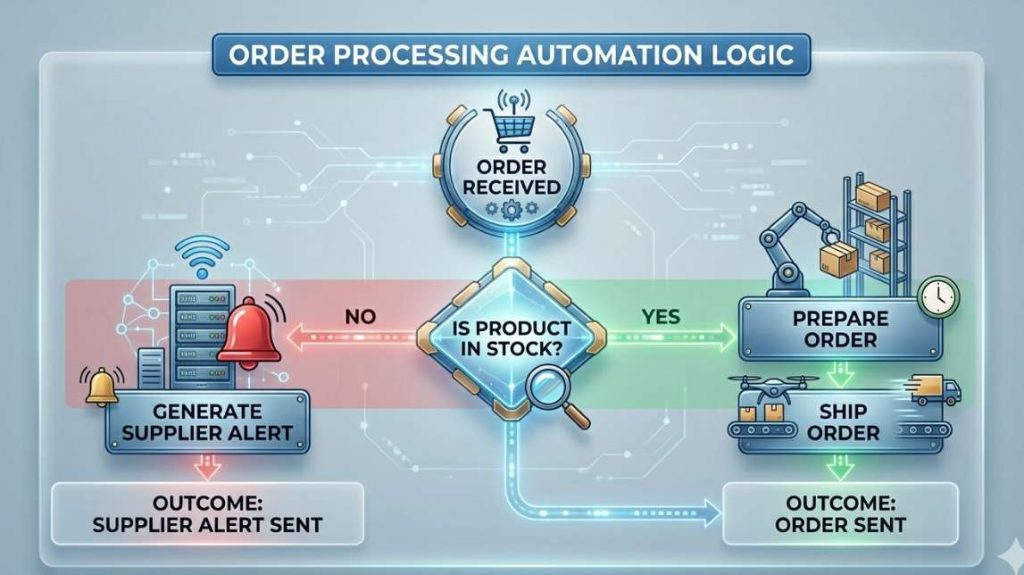
Decision points determine whether automation works or breaks.
Simple decisions can be automated. Complex decisions need human judgment.
Also document exceptions. These are scenarios that break the normal workflow:
- Customer requests gift wrapping
- Product damaged during packing
- Carrier misses pickup
- Customer cancels order after shipping
- International customs hold
Exceptions reveal where your workflow needs flexibility. If your automation can’t handle exceptions, you’ll spend more time fixing broken automations than you save.
Map decision points and exceptions by asking: “What could go wrong?” and “What variations happen regularly?”
This step prevents automation failures before they happen.
Key insight: Decision points and exceptions define automation boundaries and AI opportunities.
Ecommerce workflow mistakes that cost US SMBs money
Over-complicating the map
These are the most common ecommerce workflow mapping mistakes. They explain why most automation projects fail in US SMBs. The biggest mistake is trying to map everything at once with perfect detail.
You don’t need a 50-step flowchart with color-coded decision trees. You need a clear list of what actually happens.
Start simple. One workflow. One document. Bullet points are fine.
Cautionary Tale: A Phoenix SMB owner spent two weeks building a complex workflow diagram in Lucidchart at a low monthly subscription cost. It looked impressive. But when it was time to automate, the diagram was too detailed to be useful. They had to start over with a simple list. Lesson: Complexity creates confusion. Simplicity creates action.
Map your workflows in plain language. You can always add detail later if needed.
Skipping exception scenarios
Most workflow maps assume everything goes perfectly. Customer orders. Product ships. Customer receives. Done.
Real ecommerce doesn’t work that way.
Customers change their minds. Suppliers delay shipments. Carriers lose packages. Payment processors flag transactions.
If your workflow map doesn’t include exceptions, your automation will break when exceptions occur.
Real Cost: A Dallas WooCommerce seller automated their return process. Worked great for standard returns. But when a customer wanted to exchange a product instead of returning it, the automation sent the wrong email, processed the wrong refund, and confused the customer. The fix required manually reversing the automation and handling the exchange by hand. The automation saved time in normal cases but created more work in exception cases.
Always map exceptions. Even if you don’t automate them, you need to know where they happen and how to handle them.
Not involving your team
If you run your ecommerce operation alone, you can skip this section.
But if you have a team, workflow mapping must involve the people who actually execute the workflows.
You might think orders are processed one way. Your team might do it differently.
Team Reality Check: A Houston Shopify store owner mapped their order fulfillment workflow based on how they trained their team. When they observed the actual process, they discovered the team had created shortcuts that bypassed two steps. Those shortcuts worked. But the owner didn’t know about them. When they automated based on the training process instead of the real process, the automation broke.
Talk to your team. Watch them work. Ask them where the process slows down. If your team lacks technical skills, see what you can automate without developers. They know the bottlenecks better than anyone.
Involve your team in workflow mapping. It prevents automation failures and builds buy-in for the changes you’ll make.
What you should take away from this
Ecommerce workflow mapping isn’t optional. It’s the decision that determines whether your automation saves time or creates chaos.
Without a clear map, you’ll automate the wrong tasks, waste budget on tools that don’t fit, and spend more time fixing broken automations than running your business.
Map first. Then choose your tools.
Now that you know what to automate, the next step is designing a system that scales. Learn how to build your complete automation architecture, the framework that connects every workflow you just mapped.
Now that you know what to automate, the next step is designing a system that scales. → Design your AI ecommerce automation architecture
Want to go further? → AI Agents in E-commerce: When to Use Them → No-Code Ecommerce Automation: What You Can Really Build