
Running a Shopify or WooCommerce store with a lean team means every hour counts. No code automation ecommerce tools are now the smartest way to automate order confirmations, inventory alerts, and customer emails without hiring a developer. In fact, businesses using no code automation ecommerce tools report saving several hours of manual work every week.
But with so many options available, knowing what actually works versus pure marketing hype is not always easy. This guide gives you a clear, honest answer. You will discover exactly which workflows US stores can build today, which tools deliver real results, and where the limits are.
No technical background required. No JavaScript. No Python. Just a proven roadmap to automate your store the right way, starting in the next 20 minutes.es.
Table of contents
No code automation ecommerce: What is the real difference with low code?
No code automation ecommerce gives US store owners the ability to connect apps and trigger actions without writing a single line of code. These platforms use simple visual interfaces where you drag, drop, and connect your favorite apps in minutes. The most popular examples include Zapier, Make (formerly Integromat), and Shopify Flow.
Low code platforms, on the other hand, require some custom scripting for advanced scenarios. Think Airtable automations with custom scripts or custom Shopify apps built by a developer.
For most US ecommerce stores, no code automation ecommerce handles standard operational workflows effectively and affordably. The key difference is simple: no code means no developer required, not zero effort.
Why no code works for most SMB operations

Small and mid-sized ecommerce businesses repeat the same core tasks every single day. Without a solid no code automation ecommerce strategy, these repetitive tasks become a serious bottleneck for your growth:
- Send order confirmations instantly after purchase
- Update inventory levels across all platforms
- Notify customers automatically about their shipments
- Follow up with abandoned carts before losing the sale
- Sync product data between platforms without manual input
None of these tasks require custom development. They simply require connecting apps that already exist. This is exactly where no code automation ecommerce platforms excel, giving your team back valuable hours every week.
Key insight: No code does not mean zero effort. It means no developer required, and that changes everything for lean ecommerce teams.
No code automation ecommerce: 4 Powerful workflows without a developer
Here is exactly what is possible with no code automation ecommerce for your US store today. These are the 4 most impactful workflows lean ecommerce teams can build without any technical help.
Order Confirmations and Tracking Updates
With no code automation ecommerce tools, you can fully automate your order communication:
- Send a custom branded email instantly when an order is placed
- Deliver tracking numbers automatically as soon as orders ship
- Notify customers proactively when their order is delivered
Tools that handle this: Shopify Flow, Zapier, Klaviyo, Make
Reality check: This works smoothly if your shipping carrier integrates with your platform. If you use a regional carrier without API access, some manual workarounds may still be needed.

Inventory alerts and restock triggers
Never run out of stock unexpectedly again. Automate your entire inventory monitoring process:
- Get instant notifications when a product runs low in stock
- Automatically mark products as out of stock directly on your site
- Trigger restock emails to past buyers the moment inventory is replenished
Tools that handle this: Shopify Flow, Zapier + Google Sheets, Make + Airtable
Reality check: This works perfectly for simple inventory systems. If you manage product variants across multiple warehouses, you will hit limits quickly.
Customer email sequences and follow-ups
What you can automate:
- Welcome emails for new customers
- Post-purchase follow-ups asking for reviews
- Win-back emails for customers who haven’t bought in a set timeframe
Tools that handle this: Klaviyo, Mailchimp, ActiveCampaign, Zapier.
Reality check: Email automation is one of the easiest no code wins. Most platforms offer built-in templates.
Product data sync across platforms
What you can automate:
- Sync Shopify products to Google Sheets
- Update WooCommerce inventory from Airtable
- Push new products to Facebook catalog
Tools that handle this: Zapier, Make, Shopify Flow, API connectors.
Reality check: This works until you need complex conditional logic. Then you’ll need custom fields or scripts.
Key insight: No code automation works best for linear, repeatable workflows with limited conditional branches. Don’t know which workflows to automate first? Start by mapping your current processes
3 Proven limits of no code automation every ecommerce store owner must know
Understanding the real limits of no code automation ecommerce before you build saves you hours of frustration and costly mistakes. Here are the 3 boundaries every US store owner must know before getting started.
Custom Checkout Experiences
What you might want:
- Personalized checkout fields based on customer type
- Dynamic upsells triggered during checkout
- Fully custom payment flows
Why no code fails here: Checkout customization requires direct access to your platform core code. Shopify, WooCommerce, and BigCommerce all restrict this for security and compliance reasons.
What you need instead: A developer or a Shopify Plus account which unlocks checkout extensibility features.
Complex Conditional Logic With Many Variables
What you might want:
- If customer bought X, lives in Y state, and has not purchased in 30 days, send email A, unless tagged as B, then send email C
Why no code struggles here: Most no code automation ecommerce platforms support only limited conditional branches. Beyond that threshold, workflows become completely unmanageable and prone to errors.
What you need instead: A dedicated marketing automation platform with advanced segmentation or custom development.
Real-Time Dynamic Pricing
What you might want:
- Prices that update automatically based on demand, inventory levels, or customer behavior
- Competitor price matching updated in real time
Why no code fails here: Real-time pricing requires constant data pulls, fast calculations, and instant storefront updates. No code automation ecommerce tools are simply not built for this level of speed and scale.
What you need instead: A dedicated pricing tool or custom development solution.
Key insight: No code automation ecommerce handles most standard operations efficiently. But for complex, real-time, or highly customized scenarios, specialized tools or developers remain the smarter choice.
Zapier, Make and Shopify Flow: Best no code automation ecommerce tools

Here are the 3 no code automation ecommerce tools that real US stores actually use every day, not just theoretical setups that look good on paper.
Zapier: Best for Simple Multi-App Workflows
What it does well:
- Connects thousands of apps in just a few clicks
- Easiest visual interface for complete beginners
- Hundreds of pre-built templates called Zaps ready to deploy
Real use case: When a Shopify order is placed, automatically create a row in Google Sheets and send a Slack notification to your team.
Pricing (as of January 2026, according to Zapier’s official pricing page):
- Free plan: 100 tasks per month
- Professional plan: $19.99 per month billed annually or $29.99 per month billed monthly (750 tasks)
Limitations:
- Task count adds up fast at high order volumes
- Limited conditional logic for complex workflows
- Can become expensive as your store scales
Best for: US stores with straightforward no code automation ecommerce workflows and moderate order volumes.
Make: Best for Visual Workflow Logic
What it does well:
- Powerful visual workflow builder that shows your entire data flow clearly
- More advanced conditional logic than Zapier
- Ideal for complex multi-step automations
Real use case: When a customer abandons their cart, wait 1 hour, check if they completed the purchase, and if not, automatically send a personalized email with a discount code.
Pricing (as of January 2026, according to Make’s official pricing page):
- Free plan: 1,000 credits per month
- Core plan: $10.59 per month (10,000 credits)
- Pro plan: $18.82 per month (10,000 credits + priority execution)
Limitations:
- Steeper learning curve compared to Zapier
- Fewer app integrations than Zapier but covers all major ecommerce platforms
Best for: Stores with more complex no code automation ecommerce needs and moderate technical comfort.
Shopify Flow: Best for Shopify-Only Automation
What it does well:
- Natively built into Shopify with zero setup required
- Deep integration with all your Shopify store data
- Completely free for all Shopify users
Real use case: When product inventory drops below a set threshold, automatically tag the product as low stock and send an alert email directly to your supplier.
Pricing (as of January 2026, according to Shopify’s official pricing page):
- Free for all Shopify plans
- Full advanced features available on Shopify Plus starting at $2,000 per month
Limitations:
- Only works within the Shopify ecosystem
- Cannot connect to external apps without Zapier or Make
- Advanced features require a Shopify Plus subscription
Best for: Shopify stores focused on no code automation ecommerce without needing cross-platform connectivity.
Key insight: Start with Zapier if you are new to no code automation ecommerce. Upgrade to Make when you outgrow Zapier logic. Use Shopify Flow if you run a Shopify only store.
Step by step: Build your first no code automation ecommerce workflow in 20 minutes
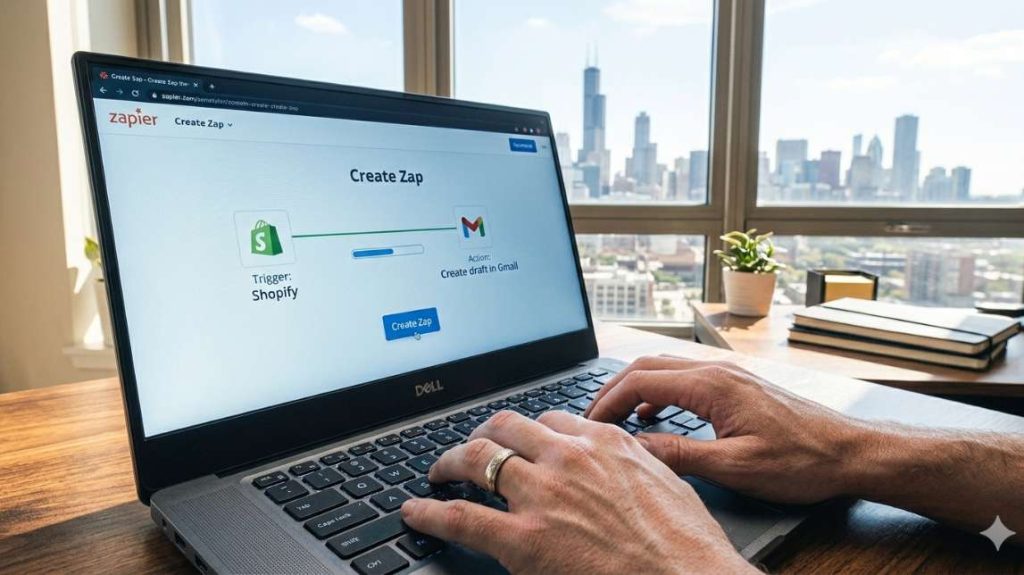
This is where no code automation ecommerce becomes real. Follow these 10 steps to build your first working automation today. This example works for both Shopify and WooCommerce stores using a free Zapier account.
What You Need Before Starting
- A Shopify or WooCommerce store
- A free Zapier account
- Gmail or any other email service
Your Goal
When an order ships, automatically send a personalized email with tracking information to your customer. Zero manual work required.
The 10 Steps
Step 1: Log into Zapier and click Create Zap.
Step 2: Choose your trigger app: Shopify or WooCommerce.
Step 3: Choose your trigger event: Order Fulfilled for Shopify or Order Completed for WooCommerce.
Step 4: Connect your Shopify or WooCommerce account. Zapier will ask for your API key or login credentials.
Step 5: Test the trigger. Zapier will pull a recent order to confirm the connection works correctly.
Step 6: Choose your action app: Gmail or your preferred email service.
Step 7: Choose your action event: Send Email.
Step 8: Set up your email:
- To: Customer email address (Zapier auto-fills this from your trigger data)
- Subject: Your order is on the way!
- Body: Hi [Customer Name], your order [Order Number] has shipped. Track it here: [Tracking Link].
Step 9: Test the action. Zapier will send a test email to confirm everything works.
Step 10: Turn on your Zap. Your no code automation ecommerce workflow is now live.
Common Mistakes and How to Avoid Them
Mistake 1: Forgetting to test with real data. Always test your Zap with a real order before turning it on. Verify that customer names, order numbers, and tracking links all populate correctly.
Mistake 2: Using the wrong trigger event. Order Created fires when someone places an order. Order Fulfilled fires when you mark it as shipped. Always choose the right event for your specific workflow.
Mistake 3: Exceeding free plan task limits. On Zapier’s free plan, you get 100 tasks per month according to Zapier’s official pricing page. If you process more orders than that, upgrade to a paid plan or switch to Shopify Flow which is free for all Shopify users.
Key insight: Start small with your no code automation ecommerce strategy. Build one workflow, test it thoroughly with real data, measure the time saved, then build the next one. Always build in layers, not all at once.
4 Essential signs your ecommerce store has outgrown no code automation
No code automation ecommerce is not a permanent solution for every store. At some point, your business will outgrow it. Here is exactly how to know when that moment has arrived.
Sign 1: Your Workflows Have Too Many Conditional Branches
When your no code automation ecommerce workflows start looking like this: if customer is in segment A, bought product B, has not purchased in 30 days, and is not tagged as C, then send email D, your no code tool will struggle to keep up. Beyond a certain level of complexity, workflows become completely unmanageable and error prone.
Sign 2: Your Monthly Costs Keep Rising With No End in Sight
If you are paying significant monthly fees for no code automation ecommerce tools and still hitting task limits every month, hiring a developer to build custom automations may be more cost effective in the long run.
Sign 3: You Need Real-Time Data Processing
No code automation ecommerce tools poll APIs periodically, not instantly. If your store needs dynamic pricing that updates every few minutes based on competitor prices or live inventory levels, custom code becomes a necessity, not an option.
Sign 4: You Are Manually Fixing Broken Automations Too Often
If your automations fail regularly because of edge cases and you spend more time fixing them than benefiting from them, it is a clear sign that a more robust and scalable solution is needed.
Key insight: Outgrowing no code automation ecommerce is not a failure. It is a sign that your store is scaling successfully. When that moment comes, upgrade confidently to a more powerful solution.

What you should take away from this
No code automation ecommerce is not a magic solution. It is the smartest practical starting point for any lean US ecommerce store looking to save time and reduce manual work.
No code automation ecommerce handles the vast majority of standard store operations including order confirmations, inventory alerts, email sequences, and product data sync. It does not handle complex conditional logic, real-time pricing, or custom checkout experiences. Knowing that boundary upfront saves you time, money, and frustration.
Start with Zapier on the free plan. Build your first no code automation ecommerce workflow. Test it thoroughly with real data. Measure the time saved. Then build the next one. Always work in layers, not all at once.
When your no code automation ecommerce workflows exceed what these tools can handle cleanly, upgrade confidently, either to a more powerful platform or to custom development. That is not a setback. That is a sign your store is growing exactly as it should.
Key insight: The stores that win are not the ones with the most complex automations. They are the ones that start simple, stay consistent, and scale their no code automation ecommerce strategy one workflow at a time.
Your next step: no code automation works best when it sits inside a complete automation architecture. Discover how to design that system in our guide on ecommerce automation architecture. Related: Ecommerce automation architecture: how US SMBs should design systems before choosing tools: /ecommerce-automation-architecture-ai