

AI automation ROI is the missing piece in most automation projects. Teams implement tools, processes improve subjectively, but leadership sees only subscription costs without clear return demonstration.
Without proven AI automation ROI, budgets get cut during downturns. Projects lose momentum. Teams revert to manual processes
his guide provides a complete financial framework for measuring AI automation ROI accurately. You’ll learn which metrics matter, how to capture them reliably, and how to present results justifying continued investment. Understanding AI-powered business automation helps position your ROI analysis within broader operational transformation efforts.
Table of Contents
The three-component AI automation ROI formula
Calculating AI automation ROI requires three distinct components working together. Miss any one and your calculations will either understate or overstate real value.
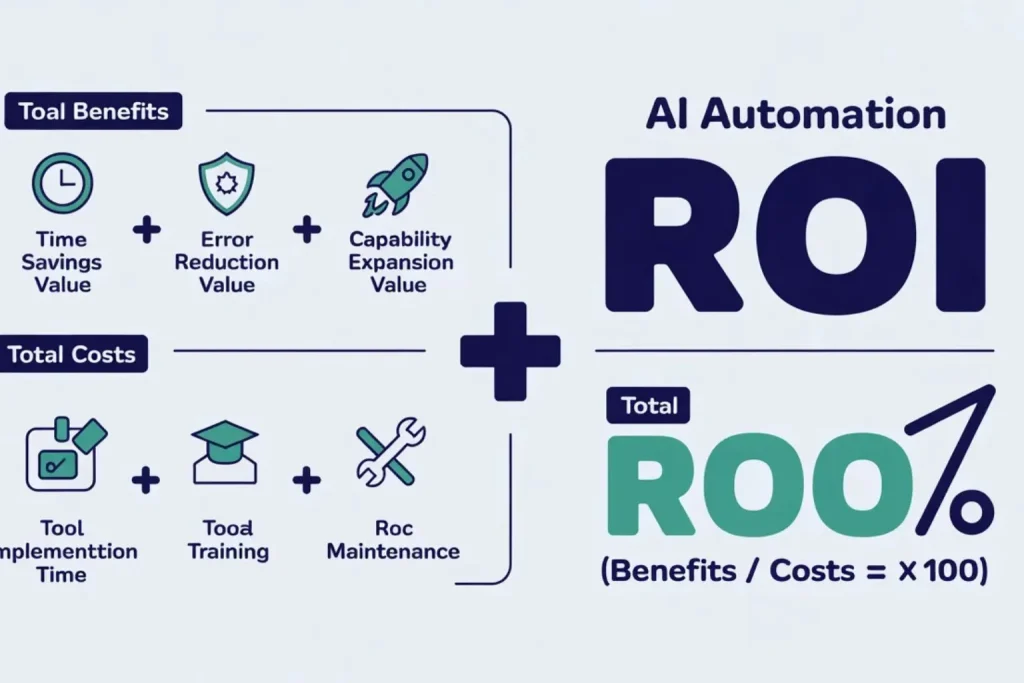
AI automation ROI = (Total Benefits – Total Costs) / Total Costs × 100
Total Benefits = Time Savings Value + Error Reduction Value + Capability Expansion Value
Total Costs = Tool Subscription + Implementation Time + Training + Ongoing Maintenance
For a complete overview of automation tools that deliver measurable ROI, see our AI automation tools guide for small businesses.
Component 1: Measure time savings to calculate AI automation ROI
Time savings are the most visible AI automation ROI component but require precise measurement. Vague estimates like “saves several hours weekly” don’t justify budget requests.
Track baseline performance for two weeks minimum before automating. Measure average time per execution, not best-case scenarios.
Include setup time, execution time, and post-execution verification. Document who performs the work and their loaded hourly cost.
Salary alone understates true cost. Include taxes, benefits, overhead allocation. Most companies use 1.4-1.6x multiplier on base salary for loaded cost calculations.
Example calculation: Customer onboarding took 45 minutes per customer manually. After automation, it takes 8 minutes. That’s 37 minutes saved per onboarding.
Company onboards 60 customers monthly. 37 minutes × 60 = 2,220 minutes = 37 hours monthly savings.
Onboarding specialist earns $55K annually = $26/hour base = $37/hour loaded cost. 37 hours × $37 = $1,369 monthly time savings = $16,428 annual value.
Component 2: Quantify error reduction in your AI automation ROI
Error reduction is the second critical component of AI automation ROI. Manual processes generate errors costing money through rework, customer service time, replacement shipments, relationship damage, and lost opportunities.
Measure your error rate before automation. Track errors per 100 process executions.
Common error types include: data entry mistakes, missed steps, incorrect routing, timing failures, duplicate processing. Estimate cost per error category.
Data entry errors might cost 15 minutes correction time. Incorrect routing might delay outcomes by days, costing customer satisfaction. Duplicate processing wastes direct costs plus correction time.
Gartner’s process automation report confirms that AI automation reduces error rates by 80-90% compared to manual processes — delivering significant hidden ROI most businesses never quantify.
Example calculation:
Invoice processing had 8% error rate manually-8 errors per 100 invoices processed. Each error required 25 minutes correction time plus potential late payment fees averaging $35.
Correction time cost: 25 minutes × $37 loaded cost = $15.42 per error. Total per-error cost: $15.42 + $35 late fee = $50.42.
300 monthly invoices × 8% error rate = 24 errors monthly. 24 × $50.42 = $1,210 monthly error cost = $14,520 annually.
Post-automation error rate: 2% (6 errors monthly). 6 × $50.42 = $302 monthly cost.
Error reduction saves $908 monthly = $10,896 annually.
Component 3: Capture capability expansion for complete AI automation ROI
Capability expansion is the most powerful and most overlooked component of AI automation ROI. Automation enables work that was previously impossible at scale.
You couldn’t test 50 email subject variations. You couldn’t monitor every customer account for churn signals. These new capabilities drive revenue growth that wouldn’t exist without automation.
Measuring this component requires comparing outcomes before and after automation implementation. Track business metrics directly impacted by new capabilities: conversion rates, retention rates, average deal size, sales cycle length, customer lifetime value.
Example calculation:
Before automation, marketing team could only run basic email campaigns with minimal personalization. Conversion rate: 2.1%.
After implementing AI-powered personalization and behavior-based sequencing, conversion rate increased to 3.4%-a 1.3 percentage point improvement.
Monthly qualified leads: 500. Previous conversions: 500 × 2.1% = 10.5 customers.
New conversions: 500 × 3.4% = 17 customers. Additional 6.5 customers monthly from same lead volume.
Average customer value: $4,200 annually. 6.5 × $4,200 = $27,300 additional monthly revenue = $327,600 annually.
For deeper insights into how capability expansion drives AI automation ROI, explore our AI business process optimization guide.
Complete AI automation ROI calculation framework
The master formula
ROI = (Total Benefits – Total Costs) / Total Costs × 100
Total Benefits = Time Savings Value + Error Reduction Value + Capability Expansion Value
Total Costs = Tool Subscription + Implementation Time + Training + Ongoing Maintenance
Accounting for all costs accurately
Tool subscription costs are obvious. Don’t forget implementation costs consuming team time and possibly requiring consultant support for complex integrations.
Implementation time includes: requirements gathering, tool evaluation, initial configuration, integration setup, testing, training creation, rollout management.
For simple automations, this might be 10-15 hours. Complex implementations can reach 100+ hours. Value implementation time at loaded cost rates.
If your operations manager earning $75K spends 20 hours implementing automation, that’s approximately $720 in implementation cost ($36/hour loaded × 20 hours).
Training costs cover time spent teaching team members to use new systems. Include both trainer time and trainee time.
Five people spending two hours in training represents 10 hours of productive time redirected to learning. Calculate this at their loaded hourly rates.
Ongoing maintenance includes monitoring automation health, updating workflows as processes change, troubleshooting errors, optimizing performance.
Budget 2-4 hours monthly for simple automations, more for complex ones. This ongoing cost continues indefinitely and must be accounted for in your AI automation ROI calculations.
Real-world AI automation ROI example: Finance flow case Study.
Finance Flow, a 25-person financial services firm, automated their client onboarding process using AI-powered form processing and workflow automation. Their AI automation ROI results illustrate all three components working together.
Benefits calculation:
Time savings:
- Previous process: 90 minutes per client
- Automated process: 12 minutes per client
- Time saved: 78 minutes per client
- Monthly volume: 35 new clients
- Monthly time savings: 35 × 78 minutes = 2,730 minutes = 45.5 hours
- Loaded cost: $42/hour
- Monthly time savings value: 45.5 × $42 = $1,911
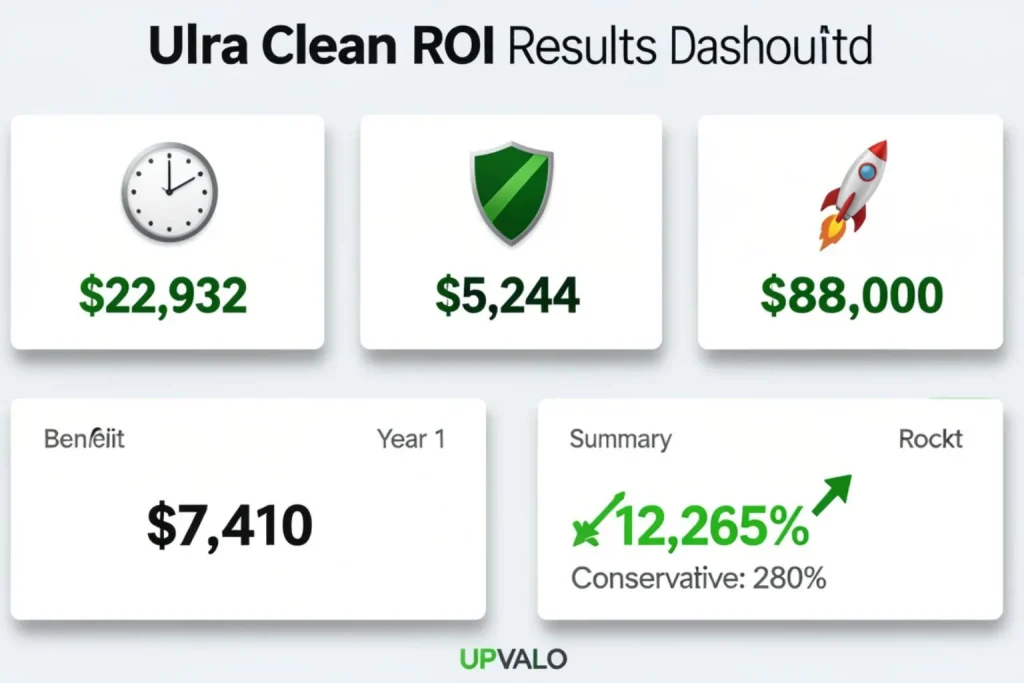
- Annual time savings value: $22,932
Error reduction:
- Previous error rate: 11% (data entry mistakes, missed fields, incorrect account types)
- Post-automation error rate: 1%
- Error reduction: 10 percentage points
- Previous monthly errors: 35 × 11% = 3.85 errors
- Current monthly errors: 35 × 1% = 0.35 errors
- Errors eliminated: 3.5 monthly
- Average error correction cost: $125 (staff time + client frustration + compliance risk)
- Monthly error reduction value: 3.5 × $125 = $437
- Annual error reduction value: $5,244
Capability expansion:
- Faster onboarding enabled same-day account activation (previously took 3-5 days)
- Client satisfaction scores increased from 7.2 to 8.9 (out of 10)
- Referral rate increased from 12% to 19%
- Additional clients from increased referrals: ~4 monthly
- Average client lifetime value: $18,500
- Annual new revenue from capability expansion: 48 × $18,500 = $888,000
Total annual benefits: $22,932 + $5,244 + $888,000 = $916,176
Costs calculation:
Tool subscription:
- Form processing AI: $89/month
- Workflow automation platform: $149/month
- Total monthly subscription: $238
- Annual subscription: $2,856
Implementation (One-Time):
- Operations manager time: 25 hours @ $42/hour = $1,050
- IT consultant setup: $1,200
- Testing and refinement: 8 hours @ $42/hour = $336
- Total implementation: $2,586
Training (One-Time):
- Three staff trained: 4 hours each = 12 hours @ $38/hour
- Total training: $456
Ongoing maintenance:
- Monthly monitoring and updates: 3 hours @ $42/hour = $126 monthly
- Annual maintenance: $1,512
Year 1 Total Costs: $2,856 + $2,586 + $456 + $1,512 = $7,410
Year 1 AI Automation ROI: ($916,176 – $7,410) / $7,410 × 100 = 12,265% ROI
Conservative calculation (excluding capability expansion optimistic projection):($28,176 – $7,410) / $7,410 × 100 = 280% ROI
Even the conservative AI automation ROI calculation shows strong financial justification for automation investment.
For the complete CRM automation ROI breakdown, see our AI-powered CRM automation guide..
Building your AI automation ROI measurement framework
Set Up tracking before implementation
Create baseline metrics before automating anything. You can’t prove AI automation ROI improvement without knowing starting performance.
Track for 2-4 weeks minimum to account for normal variation. Use simple spreadsheets initially. Fancy dashboards come later.
You need: process execution count, time per execution, errors per 100 executions, and business outcome metrics this process affects.
Assign tracking responsibility to one person. Distributed responsibility means nobody tracks consistently. One owner ensures data collection happens reliably.
Monitor continuously post-implementation
Track the same metrics weekly for first month, then monthly ongoing. Automation performance can drift as business conditions change or edge cases emerge.
Set up automated alerts for concerning trends. If error rates suddenly spike or processing times increase significantly, you want immediate notification rather than discovering problems in quarterly reviews.
Document everything affecting performance. Process volume changes, data source modifications, integration updates-any change that might impact automation effectiveness gets noted.
This context explains metric fluctuations later when you’re analyzing trends.
Report results in business language
Finance and leadership teams care about dollars, not technical metrics. Translate “reduced processing time by 78 minutes per transaction” into “saved $22,932 annually in labor costs.”
Frame capability expansion in revenue terms. “Increased email engagement rates” matters less than “additional $327,600 annual revenue from improved conversion rates enabled by AI personalization.”
Create executive summary dashboards showing: Total Investment, Current Annualized Return, Payback Period Achieved, and Projected 3-Year Value.
These four metrics answer the questions leadership actually asks about AI automation ROI.
Common AI automation ROI calculation mistakes to avoid
Mistake 1: Ignoring implementation costs
Teams remember tool subscriptions but forget dozens of hours spent configuring, testing, and training. This makes AI automation ROI calculations artificially optimistic and damages credibility.
Implementation is real cost even when done by existing staff. Their time has value. Account for it accurately.
Mistake 2: Using Best-Case scenarios
Measuring fastest execution time rather than average time inflates benefit calculations. One perfect automation run doesn’t represent typical performance.
Use median performance metrics, not best-case outliers. This produces reliable AI automation ROI projections matching actual results.
Mistake 3: Claiming credit for unrelated improvements
Revenue increased 15% after implementing automation? That might be automation impact, market trends, new sales hire performance, or seasonal patterns.
Don’t claim full credit without isolating automation’s specific contribution. Use control groups when possible. Compare automated processes to similar non-automated processes.
The difference is automation impact. Attribution matters for credibility.
Mistake 4: Stopping measurement after initial Success
AI automation ROI at month 3 might differ dramatically from month 12. AI automation compounds—it gets better as it learns from more data.
Early results often understate long-term value. Continue tracking indefinitely. Automation that delivered 200% ROI initially might reach 800% ROI by year two as capabilities expand and usage scales.
Your AI automation ROI measurement action plan
Pre-Implementation (Week 1-2):
- Document current process performance
- Calculate loaded hourly costs
- Establish baseline business metrics
- Create tracking spreadsheet
Implementation (Week 3-6):
- Track all implementation time
- Document consultant costs and subscriptions
- Calculate total investment
- Set up automated tracking
Post-Implementation (Week 7+):
- Monitor performance weekly first month
- Compare actual results to baseline
- Calculate time savings, error reduction, capability expansion
- Compute AI automation ROI using complete formula
- Create executive summary
- Report monthly to stakeholders
Prove your AI automation ROI and secure continued investment
AI automation ROI is rarely questioned once properly measured. The numbers speak clearly.
Most SMB automation projects deliver 200-500% first-year AI automation ROI even excluding capability expansion benefits. The key is rigorous measurement from day one.
Baseline, track, calculate, report. Make the financial impact undeniable. Start measuring your highest-potential automation opportunity this week.
Two weeks of baseline data positions you to prove AI automation ROI value definitively once implementation completes.
Download your free ROI calculation template: Pre-built Excel spreadsheet with formulas, examples, and executive summary generator. Just enter your metrics. Get your template →
Join our ROI masterclass: Free 60-minute workshop showing how three companies proved 300-800% automation ROI to secure executive support. Register for masterclass →
Get personalized ROI projections: Share your automation idea and current process metrics. We’ll calculate projected ROI and implementation roadmap. 20-minute consultation. Schedule your consultation →
What automation project are you trying to justify right now? Share your situation in comments and we’ll help you build the ROI case within 24 hours. Real projects, real calculations, real business cases.